I used to have a CON for version, and always had to duplicate the date into { } tags beside the CON block for it to show up.
Now it works more efficiently! Cool !!
BTW: I've just found that your debug windows work with P1 (Spin2, when compiled with external tool, flexprop).
I think you just added some graphical type debug windows, will be interesting to see if that works too!
@Rayman said:
@macca This is a little strange... It seems SpinTools IDE will let you include the file extension in a object.
But, if you do so, it seems to create broken archives... At least, I think that's what I'm seeing...
Yes, it is the bug reported few posts early, it is fixed in GitHub but not yet released.
For now avoid the extension in the object file name (or archive manually if that prevents to compile for P1).
BTW: I've just found that your debug windows work with P1 (Spin2, when compiled with external tool, flexprop).
I think you just added some graphical type debug windows, will be interesting to see if that works too!
Should work, the external tool output is captured even after the upload is done and processed as if it was receive through the serial port, if flexprop output follows the P2 debug tags it should work.
@Rayman said:
Just noticed the "Case Sensitive Symbols" option...
Guess that would mean it would treat all variables and things like C does, right?
Right.
I really like the idea of that option. Think it would break all existing code though...
Not all existing code, when I tested the libraries and examples I found some files with mixed case identifiers, like variable, Variable and VARIAble, but most code works.
The fixes are also easy because the code suggestion prompts you with the declared identifier (CTRL-SPACE at end of the variable name).
This is probably an idea that only I care about... but I'll toss it into the ether, anyway. In the File menu I would love to have New (From P1/Object template) with a similar item for the P2. I have templates for applications, and templates for objects. Of course, the Preferences dialog would need updating to add paths to the object template files.
Can I actually program in C from Spin Tools? Not that I will, but I'd like to experiment. I clicked on New (From P1/C template) and tried to run (without saving). I got stuck on the downloading dialog (it would not close manually), so I had to force a shutdown with Task Manager. It did work when I tried again and saved the file, so maybe adding an error dialog to prevent unsaved files from sticking things.
I tried this, but no joy -- it doesn't like the use of time.pause().
@JonnyMac said:
This is probably an idea that only I care about... but I'll toss it into the ether, anyway. In the File menu I would love to have New (From P1/Object template) with a similar item for the P2. I have templates for applications, and templates for objects. Of course, the Preferences dialog would need updating to add paths to the object template files.
Could be added, maybe with a bit redesigned menu, it is getting crowded.
Can I actually program in C from Spin Tools? Not that I will, but I'd like to experiment. I clicked on New (From P1/C template) and tried to run (without saving). I got stuck on the downloading dialog (it would not close manually), so I had to force a shutdown with Task Manager. It did work when I tried again and saved the file, so maybe adding an error dialog to prevent unsaved files from sticking things.
I tried this, but no joy -- it doesn't like the use of time.pause().
The C compiler is still very incomplete, I can't find the time to work on it, but works to some extents.
In your case, you haven't defined the jm_time_80 object instance, unlike other implementations (AFAIK) the include works as in C, it just includes the definitions, then you need to declare the object:
Is it possible to use spinc.exe as a loader for a pre-compiled .binary file? I was hoping it would be as simple as this:
spinc -f program.binary
In another thread a user is looking for a "Clear EEPROM" tool for a compiler. I was hoping to add this as a custom tool, but maybe it's just easier to open the EEPROM clearing program and press F11 (which is what I do now).
@JonnyMac said:
Is it possible to use spinc.exe as a loader for a pre-compiled .binary file? I was hoping it would be as simple as this:
spinc -f program.binary
In another thread a user is looking for a "Clear EEPROM" tool for a compiler. I was hoping to add this as a custom tool, but maybe it's just easier to open the EEPROM clearing program and press F11 (which is what I do now).
No, it is not possible to upload a binary file.
I have to review the command line compiler code, I'll add that option.
This release changes the QUIT/NEXT level count to match the latest PNut v52a.
Added a dialog with the keyboard shortcuts to the help menu and the option to create a new non top-level object from a template (configurable in the Preferences for Spin1 and Spin2).
Reviewed the tab and backtab behaviour when there is a selection, it should work better now.
The debug windows are optimized a bit with some fixes (the FFT calculation was not fully correct), and while I was at it, I noticed that the input from the windows was not sent to the external tools so I have also fixed that. Using an external loader with the debug windows should work correctly for mouse and keyboard inputs.
The menu was rearranged a bit to be more compact:
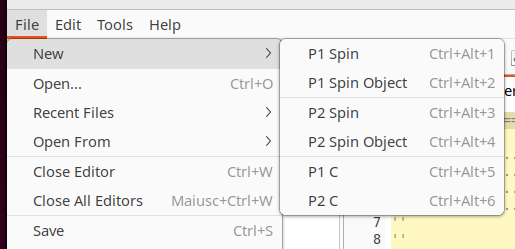
The New file menu was moved to a sub-menu with the items better grouped. There isn't anymore the New item alone which created an empty source (which caused an error for P1 since it doesn't have any Spin method), I think it is better to always start from a template.
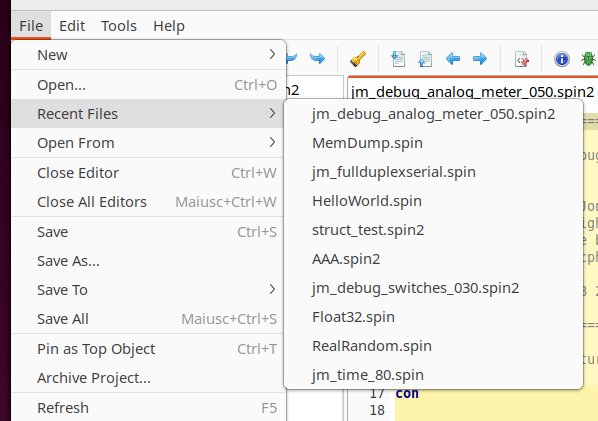
The recent files list was moved to a sub-menu below the Open item.
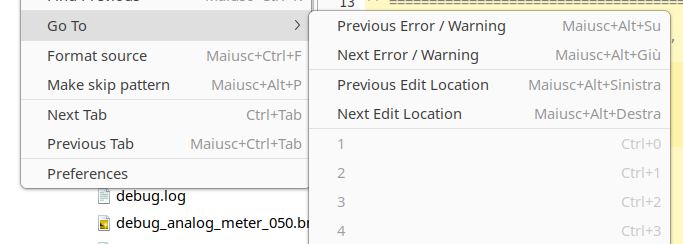
Tthe Bookmarks menu was renamed to Go To and added the missing navigation items.
Other changes:
Reviewed tab/backtab behaviour to handle line selection
Added keyboard shortcuts window to Help menu
Menu rearrange
Recent files list moved to cascade menu
New file list moved to cascade menu
Bookmarks menu renamed to Go To and added missing navigation items
Added Spin object template
Changed QUIT/NEXT level count to match PNut v52a
Fixed input from debug windows for external tools
Some debug windows optimizations and fixes
Fixed broken archive creation in some circumstances
Found a hiccup in the adventures using Spin2 on P1...
Seems that for the P2 style graphical debug to work on P1, seems like you first need to run with debug in P2 mode.
Guess that flips some switch to get it ready for graphical debug commands...
Found a hiccup in the adventures using Spin2 on P1...
Seems that for the P2 style graphical debug to work on P1, seems like you first need to run with debug in P2 mode.
Guess that flips some switch to get it ready for graphical debug commands...
I tried with the old release 0.52.1 and indeed I get an error when running the P1 program with debug, that error is fixed in the latest 0.53.0 release and running the P1 debug looks good, so try with the latest release.
Small thing (hopefully)... Could there be an option on the Tools editing dialog that stops the console window from opening? Once I have things setup, I don't need to see that again and just find myself having to close it to regain screen real estate.
Another ask... the next time you're dealing with colors, could you enhance the contrast for the yellow warning color -- especially for light mode (dark mode is fine). The error (red) is great, but the yellow is very hard to see on the vertical strip on the left side of the edit window. I've resorted to arbitrarily clicking the Next Error/Warning button since I cannot see them very easily on the screen.
I notice a difference in behaviour in display of the SCOPE window with my code at the bottom of this thread. Version 0.52.1 displays all windows correctly. Version 0.53 displays a flat line for four of the SCOPE windows.
Many other programs of mine display no difference - I wonder if I've made a slight mistake in the debug statements of this particular program or if it's a genuine bug?
@bob_g4bby said:
I notice a difference in behaviour in display of the SCOPE window with my code at the bottom of this thread. Version 0.52.1 displays all windows correctly. Version 0.53 displays a flat line for four of the SCOPE windows.
Many other programs of mine display no difference - I wonder if I've made a slight mistake in the debug statements of this particular program or if it's a genuine bug?
Looks like I did an over optimization there. The problem is the scope samples are set to 1025 and the draw optimization assumed they are a power of 2. Probabily it was my mistake in interpreting the PNut code since I don't see any limitation on the documentation. If you change the sample number to 1024 it will work, in the mean time I'll fix the code so there are no more problems.
Hello @macca, Amazing Creator of SpinIDE,
and the Parallax Community,
I am currently running a Windows 11 machine and have successfully used SpinIDE in the past. However, recently I have not been able to get it to open.
Here are the steps I’ve taken:
Downloaded the latest files
Unzipped the folder
Double-clicked the .EXE file
When the blue Windows security window appeared, I selected “More Info” and then “Run Anyway”
I also tried right-clicking and selecting “Run as Administrator”
Despite these steps, the application will not open.
I’m not sure if I have missed something in the process or if there is a compatibility issue with Windows 11. I would greatly appreciate any guidance on what I may have done incorrectly or how to get back up and running with this great tool for use with Parallax Inc. products.
@JoshW said:
I am currently running a Windows 11 machine and have successfully used SpinIDE in the past. However, recently I have not been able to get it to open.
Here are the steps I’ve taken:
Downloaded the latest files
Unzipped the folder
Double-clicked the .EXE file
When the blue Windows security window appeared, I selected “More Info” and then “Run Anyway”
I also tried right-clicking and selecting “Run as Administrator”
Despite these steps, the application will not open.
I’m not sure if I have missed something in the process or if there is a compatibility issue with Windows 11. I would greatly appreciate any guidance on what I may have done incorrectly or how to get back up and running with this great tool for use with Parallax Inc. products.
I'm not aware of any issue with Windows 11, I'm using it on a laptop.
It doesn't need to run as administrator, the security window is correct because the executable is not signed.
You can try to run the command line compiler spinc.exe: open the command prompt window, change to the spin-tools directory and start spinc.exe, it shoud list the available command line parameters.
If there is something wrong it should write an error message. It is not exactly as running the IDE but should at least exclude some things.
@JoshW Try rebooting, of course... Was it working before on this same machine?
If not, there is a "core isolation" setting, new in Win11, that sometimes needs to be turned off to get FTDI driver to work...
Not sure if that could stop Spin Tools from starting or not though...
I'm using Spin Tools on several Win11 machines and have not seen this problem...
Thanks for the insights and information.
Yes, I was able to use it previously on this machine.
I will continue to look and try it has to be a setting or something I changed.
I double checked my Java files, picture here
@JoshW One thing that I do is store all the files in C:\SpinTools (or something like that) and then delete all the files there when doing an upgrade and then copy in the new files.
If you have two sets of these files on the PC, maybe it's getting confused between them?
I had exactly the same problem on Win11 pro.
It work before, now I try lots of way's to run spin tools again, but not.
I try to install old spin tool, but same issue, start but never show the windows of spin tool.
I first think it was my computer, but now I see Joshw have the same trouble.
Strange,
On OSX emulate with UTM Win 11 pro, spintools works.
First of all, I said that I was not aware of issues with Windows 11 but there is an issue open on GitHub that I forgot about, sorry.
@JoshW said:
I am currently running a Windows 11 machine and have successfully used SpinIDE in the past. However, recently I have not been able to get it to open.
@Ltech said:
I had exactly the same problem on Win11 pro.
It work before, now I try lots of way's to run spin tools again, but not.
I try to install old spin tool, but same issue, start but never show the windows of spin tool.
I did some researches and all seems point to the unsigned executable, I'm not sure why it worked before and now it doesn't work anymore, maybe it was some Windows update that silently enforced the security for unsigned applications. @Ltech uses Windows 11 Pro, maybe is related to the Pro version only (I'm using the Home version), that would explain why old versions do not work anymore. If you want to check, older releases can still be downloaded from GitHub.
You can try a couple of things.
Right-click on the executable, select Properties, it should have a warning on the bottom:
Check "Unblock" button.
Do not extract the package with Windows Explorer, open a command prompt and type unzip spin-tools-0.53.0-windows-x86_64.zip the executable then doesn't have the block propery above. This is similar to the MacOS trick, when you unpack files with a system file manager it flags the executables as blocked, if the package is extracted from the command line the exes are not flagged.
There are also suggestions to disable the smart screen security, but I don't want to suggest things that could be potentially dangerous, so if you want to try beware of the consequences.


Comments
Outline view is a handy improvement!
I used to have a CON for version, and always had to duplicate the date into { } tags beside the CON block for it to show up.
Now it works more efficiently! Cool !!
And I guess, thanks JM for the idea!
@macca This is a little strange... It seems SpinTools IDE will let you include the file extension in a object.
But, if you do so, it seems to create broken archives... At least, I think that's what I'm seeing...
The "Scanner" top file attached demonstrates this I think...
BTW: I've just found that your debug windows work with P1 (Spin2, when compiled with external tool, flexprop).
I think you just added some graphical type debug windows, will be interesting to see if that works too!
Yes, it is the bug reported few posts early, it is fixed in GitHub but not yet released.
For now avoid the extension in the object file name (or archive manually if that prevents to compile for P1).
Should work, the external tool output is captured even after the upload is done and processed as if it was receive through the serial port, if flexprop output follows the P2 debug tags it should work.
Just noticed the "Case Sensitive Symbols" option...
Guess that would mean it would treat all variables and things like C does, right?
I really like the idea of that option. Think it would break all existing code though...
Right.
Not all existing code, when I tested the libraries and examples I found some files with mixed case identifiers, like variable, Variable and VARIAble, but most code works.
The fixes are also easy because the code suggestion prompts you with the declared identifier (CTRL-SPACE at end of the variable name).
@macca Do you have a cheat sheet of hot-key combinations likes like CTRL-Space? Did I miss it? Could it be added to the Help menu?
No, I'll try to put something to the help menu.
Thank you, Marco.
This is probably an idea that only I care about... but I'll toss it into the ether, anyway. In the File menu I would love to have New (From P1/Object template) with a similar item for the P2. I have templates for applications, and templates for objects. Of course, the Preferences dialog would need updating to add paths to the object template files.
Can I actually program in C from Spin Tools? Not that I will, but I'd like to experiment. I clicked on New (From P1/C template) and tried to run (without saving). I got stuck on the downloading dialog (it would not close manually), so I had to force a shutdown with Task Manager. It did work when I tried again and saved the file, so maybe adding an error dialog to prevent unsaved files from sticking things.
I tried this, but no joy -- it doesn't like the use of time.pause().
#pragma target P1

#define _XINFREQ 5_000_000
#define _CLKMODE XTAL1 + PLL16X

#include "jm_time_80"

void main()
{
    // initialization

    dira[26] = 1;

    for(;;) {
        outa[26] = 1;
        time.pause(500);
        outa[26] = 0;
        time.pause(500);
    }
}
Again, I'm not going to be coding any of my work projects in C, but I'd like to get better at it.
Could be added, maybe with a bit redesigned menu, it is getting crowded.
The C compiler is still very incomplete, I can't find the time to work on it, but works to some extents.
In your case, you haven't defined the jm_time_80 object instance, unlike other implementations (AFAIK) the include works as in C, it just includes the definitions, then you need to declare the object:
#pragma target P1 #define _XINFREQ 5_000_000 #define _CLKMODE XTAL1 + PLL16X #include "jm_time_80" jm_time_80 time; // object instance void main() { // initialization dira[26] = 1; for(;;) { outa[26] = 1; time.pause(500); outa[26] = 0; time.pause(500); } }That did it, thanks. See, I need to practice C.
Is it possible to use spinc.exe as a loader for a pre-compiled .binary file? I was hoping it would be as simple as this:
In another thread a user is looking for a "Clear EEPROM" tool for a compiler. I was hoping to add this as a custom tool, but maybe it's just easier to open the EEPROM clearing program and press F11 (which is what I do now).
No, it is not possible to upload a binary file.
I have to review the command line compiler code, I'll add that option.
Released version 0.53.0
This release changes the QUIT/NEXT level count to match the latest PNut v52a.
Added a dialog with the keyboard shortcuts to the help menu and the option to create a new non top-level object from a template (configurable in the Preferences for Spin1 and Spin2).
Reviewed the tab and backtab behaviour when there is a selection, it should work better now.
The debug windows are optimized a bit with some fixes (the FFT calculation was not fully correct), and while I was at it, I noticed that the input from the windows was not sent to the external tools so I have also fixed that. Using an external loader with the debug windows should work correctly for mouse and keyboard inputs.
The menu was rearranged a bit to be more compact:
The New file menu was moved to a sub-menu with the items better grouped. There isn't anymore the New item alone which created an empty source (which caused an error for P1 since it doesn't have any Spin method), I think it is better to always start from a template.
The recent files list was moved to a sub-menu below the Open item.
Tthe Bookmarks menu was renamed to Go To and added the missing navigation items.
Other changes:
Menu rearrange
Added Spin object template
Thank you, Marco! I like the cleaner File menu, the addition of object templates, and I can confirm that the Tab fix works. Again, thank you!
Just a comment...
Found a hiccup in the adventures using Spin2 on P1...
Seems that for the P2 style graphical debug to work on P1, seems like you first need to run with debug in P2 mode.
Guess that flips some switch to get it ready for graphical debug commands...
I tried with the old release 0.52.1 and indeed I get an error when running the P1 program with debug, that error is fixed in the latest 0.53.0 release and running the P1 debug looks good, so try with the latest release.
@macc Awesome thanks!
Small thing (hopefully)... Could there be an option on the Tools editing dialog that stops the console window from opening? Once I have things setup, I don't need to see that again and just find myself having to close it to regain screen real estate.
Another ask... the next time you're dealing with colors, could you enhance the contrast for the yellow warning color -- especially for light mode (dark mode is fine). The error (red) is great, but the yellow is very hard to see on the vertical strip on the left side of the edit window. I've resorted to arbitrarily clicking the Next Error/Warning button since I cannot see them very easily on the screen.
I notice a difference in behaviour in display of the SCOPE window with my code at the bottom of this thread. Version 0.52.1 displays all windows correctly. Version 0.53 displays a flat line for four of the SCOPE windows.
Many other programs of mine display no difference - I wonder if I've made a slight mistake in the debug statements of this particular program or if it's a genuine bug?
Looks like I did an over optimization there. The problem is the scope samples are set to 1025 and the draw optimization assumed they are a power of 2. Probabily it was my mistake in interpreting the PNut code since I don't see any limitation on the documentation. If you change the sample number to 1024 it will work, in the mean time I'll fix the code so there are no more problems.
Thank you - I'm really enjoying the speed with which scope windows are drawn - makes dsp debug so much easier
Hello @macca, Amazing Creator of SpinIDE,
and the Parallax Community,
I am currently running a Windows 11 machine and have successfully used SpinIDE in the past. However, recently I have not been able to get it to open.
Here are the steps I’ve taken:
Downloaded the latest files
Unzipped the folder
Double-clicked the .EXE file
When the blue Windows security window appeared, I selected “More Info” and then “Run Anyway”
I also tried right-clicking and selecting “Run as Administrator”
Despite these steps, the application will not open.
I’m not sure if I have missed something in the process or if there is a compatibility issue with Windows 11. I would greatly appreciate any guidance on what I may have done incorrectly or how to get back up and running with this great tool for use with Parallax Inc. products.
Thank you for your time and support.
Joshua W
I'm not aware of any issue with Windows 11, I'm using it on a laptop.
It doesn't need to run as administrator, the security window is correct because the executable is not signed.
You can try to run the command line compiler spinc.exe: open the command prompt window, change to the spin-tools directory and start spinc.exe, it shoud list the available command line parameters.
If there is something wrong it should write an error message. It is not exactly as running the IDE but should at least exclude some things.
@JoshW Try rebooting, of course... Was it working before on this same machine?
If not, there is a "core isolation" setting, new in Win11, that sometimes needs to be turned off to get FTDI driver to work...
Not sure if that could stop Spin Tools from starting or not though...
I'm using Spin Tools on several Win11 machines and have not seen this problem...
Thanks for the insights and information.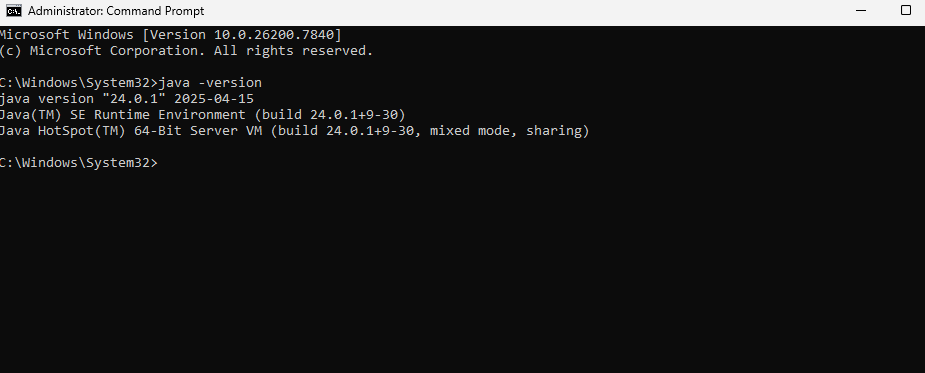
Yes, I was able to use it previously on this machine.
I will continue to look and try it has to be a setting or something I changed.
I double checked my Java files, picture here
Thanks
Joshua
@JoshW One thing that I do is store all the files in C:\SpinTools (or something like that) and then delete all the files there when doing an upgrade and then copy in the new files.
If you have two sets of these files on the PC, maybe it's getting confused between them?
I had exactly the same problem on Win11 pro.
It work before, now I try lots of way's to run spin tools again, but not.
I try to install old spin tool, but same issue, start but never show the windows of spin tool.
I first think it was my computer, but now I see Joshw have the same trouble.
Strange,
On OSX emulate with UTM Win 11 pro, spintools works.
First of all, I said that I was not aware of issues with Windows 11 but there is an issue open on GitHub that I forgot about, sorry.
I did some researches and all seems point to the unsigned executable, I'm not sure why it worked before and now it doesn't work anymore, maybe it was some Windows update that silently enforced the security for unsigned applications. @Ltech uses Windows 11 Pro, maybe is related to the Pro version only (I'm using the Home version), that would explain why old versions do not work anymore. If you want to check, older releases can still be downloaded from GitHub.
You can try a couple of things.
Right-click on the executable, select Properties, it should have a warning on the bottom:
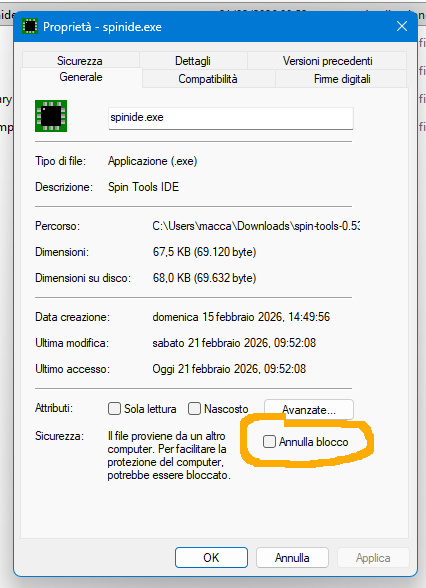
Check "Unblock" button.
Do not extract the package with Windows Explorer, open a command prompt and type
unzip spin-tools-0.53.0-windows-x86_64.zipthe executable then doesn't have the block propery above. This is similar to the MacOS trick, when you unpack files with a system file manager it flags the executables as blocked, if the package is extracted from the command line the exes are not flagged.There are also suggestions to disable the smart screen security, but I don't want to suggest things that could be potentially dangerous, so if you want to try beware of the consequences.