On MacOS, I don't know if it works (sorry, my testing on MacOS is very limited), it certainly needs some more implementations but I think most needs an actual executable instead of a shell script, with all the signature issues this involves.
Also implemented drag and drop files to the editor, if you have Spin Tools IDE open, drag a source file from a File Exporer (or the corresponding applet on your OS) and drop to the editor area to open it.
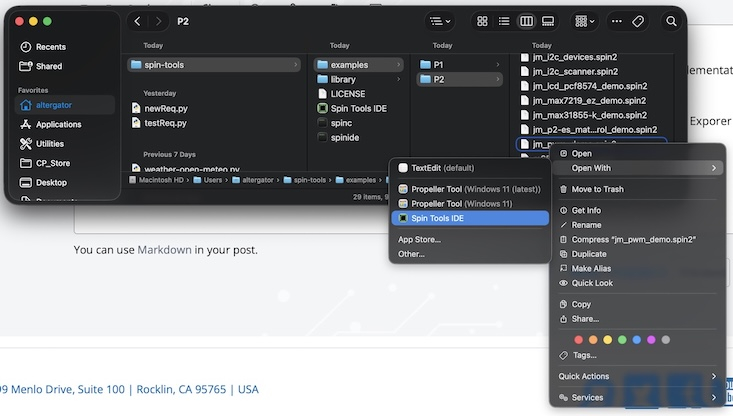
on MacOS, the "Open With" option (Control click on a .spin2 or .spin file) now shows Spin Tools IDE as an available app for opening the file... Yay!
And, yes dragging & dropping a spin file into the editor panel works! Dropping a spin code file on the Spin Tools IDE icon in the MacOS Dock, works as well!
Found what may be a small "gotcha." If one clicks on a filename in the tree view, the editor tab changes, but the outline pane doesn't switch to it. I have to manually re-sync by selecting another tab and then going back.
Toggle Outline View does not refresh the contents of the outline.
@dgately said:
on MacOS, the "Open With" option (Control click on a .spin2 or .spin file) now shows Spin Tools IDE as an available app for opening the file... Yay!
And, yes dragging & dropping a spin file into the editor panel works! Dropping a spin code file on the Spin Tools IDE icon in the MacOS Dock, works as well!
That's great!
Are the files opened in the same Spin Tools IDE instance or do they open a new instance each time ?
I ask because on Linux and Windows I had to implement a dedicated handler to open the files in the same IDE instance.
@JonnyMac said:
Found what may be a small "gotcha." If one clicks on a filename in the tree view, the editor tab changes, but the outline pane doesn't switch to it. I have to manually re-sync by selecting another tab and then going back.
Toggle Outline View does not refresh the contents of the outline.
@macca said:
Are the files opened in the same Spin Tools IDE instance or do they open a new instance each time ?
I ask because on Linux and Windows I had to implement a dedicated handler to open the files in the same IDE instance.
Oof... I spent all day chasing my tail, rewriting code, and doing a lot of swearing. It finally occurred to me that the terminal was set to Line Input mode. Aargh!!! I was trying to use it the way I've always used PST: just press a key. This is on me, but maybe myself and others can be helped down the line.
Request: Would it be possible to add " (Line Input)" to the title bar of the terminal window when it is in that mode as a reminder to us mortals that the terminal may not be configured they way we think it is?
Would it be possible to reassign the F12 key so that it invokes PST instead of the internal terminal?
@JonnyMac said:
Oof... I spent all day chasing my tail, rewriting code, and doing a lot of swearing. It finally occurred to me that the terminal was set to Line Input mode. Aargh!!! I was trying to use it the way I've always used PST: just press a key. This is on me, but maybe myself and others can be helped down the line.
Request: Would it be possible to add " (Line Input)" to the title bar of the terminal window when it is in that mode as a reminder to us mortals that the terminal may not be configured they way we think it is?
Sorry, I think I understand what happens:
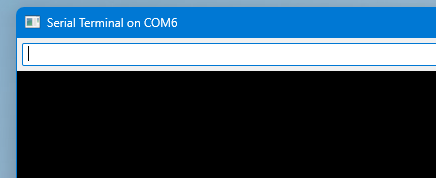
When the line input mode is enabled there is a text box at the top of the terminal window:
However I just realized that it doesn't work like PST, with PST each key is sent immediately while in Spin Tools the whole line is sent when Return/Enter is pressed. For some reasons I was sure that PST wasn't sending the keys immediately.
With the line input disabled there isn't a text box, there is a blinking cursor and the keys are sent immediately. In your screenshot there isn't the text box so I think the line input is disabled, all keys should be sent immediately, if that's not what happens there is something else.
Since the line input mode was meant to "emulate" PST I think that I can fix the key typing and rename the option as PST Mode, there won't be any line input mode unless this is actually useful for someone. I need to verify what the history does in PST (becase seems it does nothing...).
Would it be possible to reassign the F12 key so that it invokes PST instead of the internal terminal?
Not now, maybe with a key shortcut customization option but is not easy. For now you can use the external tools.
@JonnyMac said:
Why is it not possible to copy text from the terminal window? I ended up switching back to PST because I need to copy messages from laser tag devices.
It is, right-mouse button and drag to select the text, when you release the mouse button the text is copied automatically (no need to press CTRL-C or else).
Doesn't that work ?
@macca said:
Are the files opened in the same Spin Tools IDE instance or do they open a new instance each time ?
I ask because on Linux and Windows I had to implement a dedicated handler to open the files in the same IDE instance.
It does! I didn't know that it worked this way. I checked, and found both left and right mouse drag-select work.
Forgive me for missing it, but do you have a list somewhere of Spin Tools features and how they work? That came up during the Parallax Zoom call today. Things were a little quiet so I volunteered to share with the participants some of the recent updates to Spin Tools IDE. Thanks again for all the work you've put into it.
Okay, time for bed. I'm only up this late so I could step outside to watch the SpaceX Dragon capsule reenter the atmosphere and fly-by on its way to San Diego. It was really neat -- like a giant shooting star with a very long, very bright tail.
A small update to fix some bugs in the previous release.
Restored debug SCOPE optimized line draw
Fixed outline view update on editor switch
Fixed debug PLOT sprite alpha draw
There are still some performance issues with the scope debug (and the debug windows in general) that requires more deep changes, but now should be back to a usable state.
Many thanks Marco. My spin code was displaying blank scope windows and now they display properly and quickly. I'm also using the file drop onto the open editor. Very useful.
Darn. I was really hoping the color for sections and highlights could be found in the .spin-tools configuration file. I have a very big P1 project with 3000+ lines and would love if the make the line maker in the outline view more obvious. Had I found the colors in the configuration file I was hoping to go from this:
to something like this
As it's awards season here in Hollywood, the phrase "For your consideration..." is used quite a lot. I'm hoping that if user-definable colors come to Spin Tools that the outline highlight can be customized, too.
@macca: Would it be possible to force Spin Tools to only ever run one instance? Today I got up early and wasn't paying attention. I started Spin Tools from my desktop icon -- though another instance was running with unsaved edits. Yes, this is my fault. I'm hoping, though, that you'll save me from myself when I decide to write code before I've had coffee or tea and try to open another instance of Spin Tools when it's already running.
Also, could you add "Clear Bookmarks" to the Edit menu?
@JonnyMac said:
@macca: Would it be possible to force Spin Tools to only ever run one instance?
Yes, it already checks if there is a running instance to open a source from the OS file explorer, I guess I can always check if there is already a running instance.
Also, could you add "Clear Bookmarks" to the Edit menu?
@"R Baggett" said:
@macca:
One instance option please? I often open sub objects, etc. in another instance on another screen.
I actually thought that was already an option -- but didn't find it. While I won't want multiple instances running, I think giving users that option is the best way to go. Perhaps a check-box in the Preferences/General section that says "[ ] Limit to single instance"
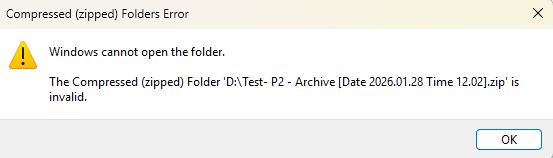
An archive created when the .spin2 suffix is included at the OBJ definition appears broken.
Windows throws an error and cannot open the zip. As does 7-zip.
Chrome can preview inside the zip, and it shows a double suffix on the packed file: jm_fullduplexserial.spin2.spin2
I assume that double suffix is the clue.
Removing the .spin2 from the OBJ declaration resolves it.
-- might be user error; I thought adding the suffix to filenames was OK in the past, but maybe that changed, or I dreamt it?
I noticed in the outline view that when you open a VAR section it will tell you the type, but when you open a CON section the values aren't provided. Since the view of the outline and the view of the code editor can be in different places, it might be useful for CON blocks in the outline to display the symbol values when opened.
@VonSzarvas said:
Possible gremlin in 0.52.1 (and also 0.51)...
OBJ
uart : "jm_fullduplexserial.spin2"
An archive created when the .spin2 suffix is included at the OBJ definition appears broken.
Windows throws an error and cannot open the zip. As does 7-zip.
Chrome can preview inside the zip, and it shows a double suffix on the packed file: jm_fullduplexserial.spin2.spin2
I assume that double suffix is the clue.
Removing the .spin2 from the OBJ declaration resolves it.
-- might be user error; I thought adding the suffix to filenames was OK in the past, but maybe that changed, or I dreamt it?
The suffix to file names is allowed, the compiler doesn't generate errors, but the archiver crashes because of that attempt to add a file with a double suffix.
it was introduced with the check for external changes (I think it worked before).
I have fixed it but for now is better to not add extensions to the object file names.
@JonnyMac said:
I noticed in the outline view that when you open a VAR section it will tell you the type, but when you open a CON section the values aren't provided. Since the view of the outline and the view of the code editor can be in different places, it might be useful for CON blocks in the outline to display the symbol values when opened.
Experimenting with this, here are the results:
The outline view:
Also added in the hover popup with more details (hex and binary):
I'm not sure about the outline view, it is clear when the value is a "simple number", it becames less clear when it is the result of a bitfield combination.
Anyway, if you like it, I'll check-in these changes.
A niggly thing that still catches me out is doing a selection (e.g., several spaces) in front of a Tab stop, pressing Tab, and (seemingly) nothing happening. In other editors those spaces are replaced with the Tab. In Spin Tools, any key except Tab replaces the selection. When Tab is pressed the cursor simply moves to the end of the selection, but the selection is not affected.
@JonnyMac said:
A niggly thing that still catches me out is doing a selection (e.g., several spaces) in front of a Tab stop, pressing Tab, and (seemingly) nothing happening. In other editors those spaces are replaced with the Tab. In Spin Tools, any key except Tab replaces the selection. When Tab is pressed the cursor simply moves to the end of the selection, but the selection is not affected.
Yes, it is an unwanted effect of tabbing a block selection, it works when selecting multiple lines but not when the selection is on the same line.
Will fix it.


Comments
on MacOS, the "Open With" option (Control click on a .spin2 or .spin file) now shows Spin Tools IDE as an available app for opening the file... Yay!
And, yes dragging & dropping a spin file into the editor panel works! Dropping a spin code file on the Spin Tools IDE icon in the MacOS Dock, works as well!
Thanks for all the hard work!
dgately
Found what may be a small "gotcha." If one clicks on a filename in the tree view, the editor tab changes, but the outline pane doesn't switch to it. I have to manually re-sync by selecting another tab and then going back.
Toggle Outline View does not refresh the contents of the outline.
That's great!
Are the files opened in the same Spin Tools IDE instance or do they open a new instance each time ?
I ask because on Linux and Windows I had to implement a dedicated handler to open the files in the same IDE instance.
I see, I'll fix it soon.
They open in the same instance!
dgately
Thank you so much @macca ! Being able to open spin2 files in Spin-Tools directly from the file Explorer is a godsend. Again, thank you so much!
If you decide to make a build for Windows on ARM64, let me know. I will happily test for you! I have a Snapdragon Windows machine.
I don't know if it would be a hassle to add, but I would love know the number of lines selected down in this section:
Oof... I spent all day chasing my tail, rewriting code, and doing a lot of swearing. It finally occurred to me that the terminal was set to Line Input mode. Aargh!!! I was trying to use it the way I've always used PST: just press a key. This is on me, but maybe myself and others can be helped down the line.
Request: Would it be possible to add " (Line Input)" to the title bar of the terminal window when it is in that mode as a reminder to us mortals that the terminal may not be configured they way we think it is?
Would it be possible to reassign the F12 key so that it invokes PST instead of the internal terminal?
Sorry, I think I understand what happens:
When the line input mode is enabled there is a text box at the top of the terminal window:
However I just realized that it doesn't work like PST, with PST each key is sent immediately while in Spin Tools the whole line is sent when Return/Enter is pressed. For some reasons I was sure that PST wasn't sending the keys immediately.
With the line input disabled there isn't a text box, there is a blinking cursor and the keys are sent immediately. In your screenshot there isn't the text box so I think the line input is disabled, all keys should be sent immediately, if that's not what happens there is something else.
Since the line input mode was meant to "emulate" PST I think that I can fix the key typing and rename the option as PST Mode, there won't be any line input mode unless this is actually useful for someone. I need to verify what the history does in PST (becase seems it does nothing...).
Not now, maybe with a key shortcut customization option but is not easy. For now you can use the external tools.
Okay. PST always has that input box so I didn't notice that it's not present in the Spin Tools terminal when the line input is disabled.
Why is it not possible to copy text from the terminal window? I ended up switching back to PST because I need to copy messages from laser tag devices.
It is, right-mouse button and drag to select the text, when you release the mouse button the text is copied automatically (no need to press CTRL-C or else).
Doesn't that work ?
Great, easier than expected.
Thanks for testing.
It does! I didn't know that it worked this way. I checked, and found both left and right mouse drag-select work.
Forgive me for missing it, but do you have a list somewhere of Spin Tools features and how they work? That came up during the Parallax Zoom call today. Things were a little quiet so I volunteered to share with the participants some of the recent updates to Spin Tools IDE. Thanks again for all the work you've put into it.
Okay, time for bed. I'm only up this late so I could step outside to watch the SpaceX Dragon capsule reenter the atmosphere and fly-by on its way to San Diego. It was really neat -- like a giant shooting star with a very long, very bright tail.
Released version 0.52.1
A small update to fix some bugs in the previous release.
There are still some performance issues with the scope debug (and the debug windows in general) that requires more deep changes, but now should be back to a usable state.
Thank you, Marco. Outline view updates are working as expected.
Many thanks Marco. My spin code was displaying blank scope windows and now they display properly and quickly. I'm also using the file drop onto the open editor. Very useful.
Darn. I was really hoping the color for sections and highlights could be found in the .spin-tools configuration file. I have a very big P1 project with 3000+ lines and would love if the make the line maker in the outline view more obvious. Had I found the colors in the configuration file I was hoping to go from this:
to something like this
As it's awards season here in Hollywood, the phrase "For your consideration..." is used quite a lot. I'm hoping that if user-definable colors come to Spin Tools that the outline highlight can be customized, too.
@macca: Would it be possible to force Spin Tools to only ever run one instance? Today I got up early and wasn't paying attention. I started Spin Tools from my desktop icon -- though another instance was running with unsaved edits. Yes, this is my fault. I'm hoping, though, that you'll save me from myself when I decide to write code before I've had coffee or tea and try to open another instance of Spin Tools when it's already running.
Also, could you add "Clear Bookmarks" to the Edit menu?
Yes, it already checks if there is a running instance to open a source from the OS file explorer, I guess I can always check if there is already a running instance.
Yes.
@macca:
One instance option please? I often open sub objects, etc. in another instance on another screen.
I actually thought that was already an option -- but didn't find it. While I won't want multiple instances running, I think giving users that option is the best way to go. Perhaps a check-box in the Preferences/General section that says "[ ] Limit to single instance"
I'll try to make it as much flexible as possible.
Possible gremlin in 0.52.1 (and also 0.51)...
OBJ
uart : "jm_fullduplexserial.spin2"
An archive created when the .spin2 suffix is included at the OBJ definition appears broken.
Windows throws an error and cannot open the zip. As does 7-zip.
Chrome can preview inside the zip, and it shows a double suffix on the packed file: jm_fullduplexserial.spin2.spin2
I assume that double suffix is the clue.
Removing the .spin2 from the OBJ declaration resolves it.
-- might be user error; I thought adding the suffix to filenames was OK in the past, but maybe that changed, or I dreamt it?
I noticed in the outline view that when you open a VAR section it will tell you the type, but when you open a CON section the values aren't provided. Since the view of the outline and the view of the code editor can be in different places, it might be useful for CON blocks in the outline to display the symbol values when opened.
The suffix to file names is allowed, the compiler doesn't generate errors, but the archiver crashes because of that attempt to add a file with a double suffix.
it was introduced with the check for external changes (I think it worked before).
I have fixed it but for now is better to not add extensions to the object file names.
Experimenting with this, here are the results:
The outline view:
Also added in the hover popup with more details (hex and binary):
I'm not sure about the outline view, it is clear when the value is a "simple number", it becames less clear when it is the result of a bitfield combination.
Anyway, if you like it, I'll check-in these changes.
Thank you, Marco. I think it's fine to keep simple numbers in the outline view.
A niggly thing that still catches me out is doing a selection (e.g., several spaces) in front of a Tab stop, pressing Tab, and (seemingly) nothing happening. In other editors those spaces are replaced with the Tab. In Spin Tools, any key except Tab replaces the selection. When Tab is pressed the cursor simply moves to the end of the selection, but the selection is not affected.
Yes, it is an unwanted effect of tabbing a block selection, it works when selecting multiple lines but not when the selection is on the same line.
Will fix it.
Thank you.