I am now in Italy just like you, in Cortina for the Olympic curling HF camera's.
I try you explanations, but do not work.
I find strange, I get it working on an emulation win 11 pro on my mac with latest updates on win11.
But it didn't work on my i7 HP win 11 pro laptop....
It's been a long time since I've seen Windows really block something...
But, back then think the trick was to copy onto removeable media, maybe from a different computer, first.
Windows does seem to track things that are downloaded from the web. But, once coming in from removeable media, like USB drive, think it loses track...
@Ltech Good find! Was thinking that all settings were in registry, but seems they are in this file instead...
Wonder if that's the issue for @JoshW as well...
Maybe this happens when trying to go from a very old version to a new version?
Imagining that the very first thing Spin Tools IDE does is try to open and process this file...
In User map I have ".spin-tools" hidden file.
When removed, the last version is running
I'm glad you found the cause of the problem, although it's surprising because the file contains the IDE settings and loading errors shouldn't prevent the application from opening. The settings should anyway have a default. I tried to set the file as hidden but it works, seems it can't be updated but the IDE works.
I'll do some tests to see if I can reproduce somehow. Any chance you have a backup to examine ?
I was trying to help Josh yesterday (he's my colleague). He said he didn't see .spin-tools in his user folder, but I wonder if his Win11 OS shows hidden files or not. I will ask him next time we speak.
I changed the warning and error colors a bit, should be better, at least on the right-side bar.
I think I'll start working on the color theme configuration.
I found a place where I missed to add an error dialog, that would explain why the application closes silently when there is an error reading the preferences. Should also help with other issues.
Changes:
Fixed terminal window redraw
Fixed scope and logic debug windows with arbitrary number of samples
Added missing internal error dialog
Slightly revised warning and error highlighting colors
Just a note about the java runtime: Spin Tools uses its own private runtime, it doesn't use the system-wide runtime (it doesn't need to have one installed at all).
warning color at edge of edit window easy to see now
terminal bottom line printing as expected
The next time you're looking at the Find/Replace dialog, could you add the start point option as on the Find/Replace option in Propeller Tool? It should default to cursor, of course, but I find it convenient to switch to top when I want to locate a global variable definition. Thanks.
There is a bit of a misalignment in the hotkeys versus the bookmark, i.e., bookmark #1 uses [Ctrl]+[0].
Request: Would it be possible to add a Go To fly-out menu to the right-click context menu of the edit window?
For my own use I've found these settings best for the Code Navigation and Hover Doc modifiers
If nothing is selected they seem to operate automatically. Is this the intent?
Request: Would it be possible to show the value of a constant another object using the Hover Doc feature? The Code Navigation feature will take me to a child object, so I'm hoping showing constant values for child objects as well.
@JonnyMac said:
There is a bit of a misalignment in the hotkeys versus the bookmark, i.e., bookmark #1 uses [Ctrl]+[0].
Ah... yes, I must have mixed up the indexes...
Request: Would it be possible to add a Go To fly-out menu to the right-click context menu of the edit window?
Yes, I think there are no problems adding it.
For my own use I've found these settings best for the Code Navigation and Hover Doc modifiers
If nothing is selected they seem to operate automatically. Is this the intent?
Yes, if nothing is selected the mouse click on a navigable keyword goes to the definition and the doc popup opens, it can be a bit annoying.
Request: Would it be possible to show the value of a constant another object using the Hover Doc feature? The Code Navigation feature will take me to a child object, so I'm hoping showing constant values for child objects as well.
That should work, unless I'm missing something:
You can hover on both the object or the constant name and should display the value.
You showed P2 code. At the moment I'm in the middle of a largish (~3800 lines in main app) P1 project. Navigation to the constant definition in the child object does work on the P1. Maybe this is an issue of # versus . in the object#constant expression.
Just to confirm, Hover Doc works for constants defined within the P1 file that is the active edit window.
Don't know... I like the doc hover without modifiers.
You showed P2 code. At the moment I'm in the middle of a largish (~3800 lines in main app) P1 project. Navigation to the constant definition in the child object does work on the P1. Maybe this is an issue of # versus . in the object#constant expression.
Ahhh... yes, I forgot the separator for P1 constants. Will fix it.
Another one of those "For your consideration..." quality-of-life things. I make use of bookmarks and was thrilled when you added them to Spin Tools. That said, the markers in the line numbers sidebar are tiny, as as they use anti aliased colors, they're difficult to read on a high-res monitor that's not gigantic. The Propeller Tool bookmarks are bigger, but a little clunky. Feeling a bit arty, I made an alternative set that use the I think are easier to read, and a little nicer looking than the Propeller Tool version.
This is all three, side-by-side: Propeller Tool, Spin Tools (current), JM Spin Tools suggestion
Edited Saturday at 7:35PM Pacific Time -- corrected 7 glyph.
@Rayman said:
I'm wondering if the toolbar buttons should be bigger...
Just a thought... They are tiny on my Windows machine right now...
Windows does have this new DPI thing going that can mess up some programs that don't handle high DPI.
Maybe that is what is going on here?
Almost certainly.
Honestly I don't know how this High DPI thing works (either on Windows or any other OS) since I don't have any high resolution monitors (that is higher than the standard 1920x1080).
At minimum, it needs a set of icons resized to match the "zoom" factor applied to the application, if I'm not wrong. All icons are bitmaps so the resize will be blurry at best.
I see that there is an override setting in the Properties -> Compatibility tab of the desktop shortcut, some "AI Overview" tells that the Override DPI settings should do something, does that have any effect ?
@Rayman said:
Ok, this does make them a little big bigger. Maybe good enough...
Windows does the scaling on its own, good.
Yes, the icons looks good, a bit blurry maybe, but I don't think I can do better by scaling the 16x16 bitmaps with Gimp.
...but I don't think I can do better by scaling the 16x16 bitmaps with Gimp.
Does the icon set you're using only come with 16x16 bitmaps? Some sets have multiple resolutions--though dealing with that could add a bunch of work.
Some icons are also available as 24x24 and 32x32 bitmaps, but not all.
Maybe I could add a mix of "native" and resized icons (assuming I understand how SWT handles the dpi scaling).
Hi,
just some feedback:
Because I wanted to be able to use graphical debugging, I now have tried Spin Tools IDE. (Windows 11, I am not comfortable with SPIN2.)
Areas of improvement seem to be:
With my 4K screen, the icons are way too small and I could not find a way to enlarge them. This has been discussed before, I see. You really cannot use them with the mouse. Perhaps just use text instead?
The error messages are not helpful: "Program has errors"
What I really like, are the quick and easy installing process and the outline window on the right side!!! Thank you very much for sharing!
Cheers Christof
"The error messages are not helpful: "Program has errors"" - that's true, but notice that the editor cursor goes to the first error and you can hover over the underlined text and get more information about the error.
And what I really like is all the Pnut debug windows are working and they display really fast
Cheers, Bob
"The error messages are not helpful: "Program has errors"" - that's true, but notice that the editor cursor goes to the first error and you can hover over the underlined text and get more information about the error.
And what I really like is all the Pnut debug windows are working and they display really fast
Cheers, Bob
@"Christof Eb." said:
Areas of improvement seem to be:
With my 4K screen, the icons are way too small and I could not find a way to enlarge them. This has been discussed before, I see. You really cannot use them with the mouse. Perhaps just use text instead?
Will work on it, not sure how much it would take because I'm really bad at graphics but I'm looking at alternate icons sets as svg (vector graphics) that should scale perfectly.
The error messages are not helpful: "Program has errors"
That error should appear when you attempt to upload or get info (memory map and listing) with a source that has errors and, as already answered by bob_g4bby, after closing the dialog it should move the editor to the first error line. It is intentionally generic because there are other indicators that the program has errors, like the editor tab title should be red. I could add more details but in the end you still need to check where the errors are.


Comments
Hey Macca,
I am now in Italy just like you, in Cortina for the Olympic curling HF camera's.
I try you explanations, but do not work.
I find strange, I get it working on an emulation win 11 pro on my mac with latest updates on win11.
But it didn't work on my i7 HP win 11 pro laptop....
Guess I have to talk to myt IT staf.
It's been a long time since I've seen Windows really block something...
But, back then think the trick was to copy onto removeable media, maybe from a different computer, first.
Windows does seem to track things that are downloaded from the web. But, once coming in from removeable media, like USB drive, think it loses track...
Find it !
In User map I have ".spin-tools" hidden file.
When removed, the last version is running
@Ltech Good find! Was thinking that all settings were in registry, but seems they are in this file instead...
Wonder if that's the issue for @JoshW as well...
Maybe this happens when trying to go from a very old version to a new version?
Imagining that the very first thing Spin Tools IDE does is try to open and process this file...
I'm glad you found the cause of the problem, although it's surprising because the file contains the IDE settings and loading errors shouldn't prevent the application from opening. The settings should anyway have a default. I tried to set the file as hidden but it works, seems it can't be updated but the IDE works.
I'll do some tests to see if I can reproduce somehow. Any chance you have a backup to examine ?
The most recently used file list can break Prop Tool. Wonder if that is what is going on here…
I was trying to help Josh yesterday (he's my colleague). He said he didn't see .spin-tools in his user folder, but I wonder if his Win11 OS shows hidden files or not. I will ask him next time we speak.
It might be a hidden file…
Show hidden files is just an option in the explorer menu…
Released version 0.53.1
This is a bugfix release:
I changed the warning and error colors a bit, should be better, at least on the right-side bar.
I think I'll start working on the color theme configuration.
I found a place where I missed to add an error dialog, that would explain why the application closes silently when there is an error reading the preferences. Should also help with other issues.
Changes:
Just a note about the java runtime: Spin Tools uses its own private runtime, it doesn't use the system-wide runtime (it doesn't need to have one installed at all).
Thank you, Marco!
The next time you're looking at the Find/Replace dialog, could you add the start point option as on the Find/Replace option in Propeller Tool? It should default to cursor, of course, but I find it convenient to switch to top when I want to locate a global variable definition. Thanks.
Hello, @macca
Thank you so much for your hard work — I’m happy to report that I am back to being able to use your great tool.
I installed the most recent release and followed the instructions for unzipping the files using the CMD window, and that resolved the issue.
I truly appreciate the time and effort you put into supporting the community.
Thanks again,
Joshua W
There is a bit of a misalignment in the hotkeys versus the bookmark, i.e., bookmark #1 uses [Ctrl]+[0].
Request: Would it be possible to add a Go To fly-out menu to the right-click context menu of the edit window?
For my own use I've found these settings best for the Code Navigation and Hover Doc modifiers
If nothing is selected they seem to operate automatically. Is this the intent?
Request: Would it be possible to show the value of a constant another object using the Hover Doc feature? The Code Navigation feature will take me to a child object, so I'm hoping showing constant values for child objects as well.
Ah... yes, I must have mixed up the indexes...
Yes, I think there are no problems adding it.
Yes, if nothing is selected the mouse click on a navigable keyword goes to the definition and the doc popup opens, it can be a bit annoying.
That should work, unless I'm missing something:
You can hover on both the object or the constant name and should display the value.
Thank you Marco.
😄 Agreed. Maybe force a checkmark to enable?
You showed P2 code. At the moment I'm in the middle of a largish (~3800 lines in main app) P1 project. Navigation to the constant definition in the child object does work on the P1. Maybe this is an issue of # versus . in the object#constant expression.
Just to confirm, Hover Doc works for constants defined within the P1 file that is the active edit window.
Don't know... I like the doc hover without modifiers.
Ahhh... yes, I forgot the separator for P1 constants. Will fix it.
Another one of those "For your consideration..." quality-of-life things. I make use of bookmarks and was thrilled when you added them to Spin Tools. That said, the markers in the line numbers sidebar are tiny, as as they use anti aliased colors, they're difficult to read on a high-res monitor that's not gigantic. The Propeller Tool bookmarks are bigger, but a little clunky. Feeling a bit arty, I made an alternative set that use the I think are easier to read, and a little nicer looking than the Propeller Tool version.
This is all three, side-by-side: Propeller Tool, Spin Tools (current), JM Spin Tools suggestion
Edited Saturday at 7:35PM Pacific Time -- corrected 7 glyph.
Deleted by JM
Released version 0.53.2
Some fixes and a couple of small additions:
That's working well for me, thank you
Thank you very much, Marco! Everything is working nicely.
I'm wondering if the toolbar buttons should be bigger...
Just a thought... They are tiny on my Windows machine right now...
Windows does have this new DPI thing going that can mess up some programs that don't handle high DPI.
Maybe that is what is going on here?
Almost certainly.
Honestly I don't know how this High DPI thing works (either on Windows or any other OS) since I don't have any high resolution monitors (that is higher than the standard 1920x1080).
At minimum, it needs a set of icons resized to match the "zoom" factor applied to the application, if I'm not wrong. All icons are bitmaps so the resize will be blurry at best.
I see that there is an override setting in the Properties -> Compatibility tab of the desktop shortcut, some "AI Overview" tells that the Override DPI settings should do something, does that have any effect ?
Ok, this does make them a little big bigger. Maybe good enough...
Windows does the scaling on its own, good.
Yes, the icons looks good, a bit blurry maybe, but I don't think I can do better by scaling the 16x16 bitmaps with Gimp.
Does the icon set you're using only come with 16x16 bitmaps? Some sets have multiple resolutions--though dealing with that could add a bunch of work.
Some icons are also available as 24x24 and 32x32 bitmaps, but not all.
Maybe I could add a mix of "native" and resized icons (assuming I understand how SWT handles the dpi scaling).
Hi,
just some feedback:
Because I wanted to be able to use graphical debugging, I now have tried Spin Tools IDE. (Windows 11, I am not comfortable with SPIN2.)
Areas of improvement seem to be:
With my 4K screen, the icons are way too small and I could not find a way to enlarge them. This has been discussed before, I see. You really cannot use them with the mouse. Perhaps just use text instead?
The error messages are not helpful: "Program has errors"
What I really like, are the quick and easy installing process and the outline window on the right side!!! Thank you very much for sharing!
Cheers Christof
Hi @"Christof Eb."
"The error messages are not helpful: "Program has errors"" - that's true, but notice that the editor cursor goes to the first error and you can hover over the underlined text and get more information about the error.
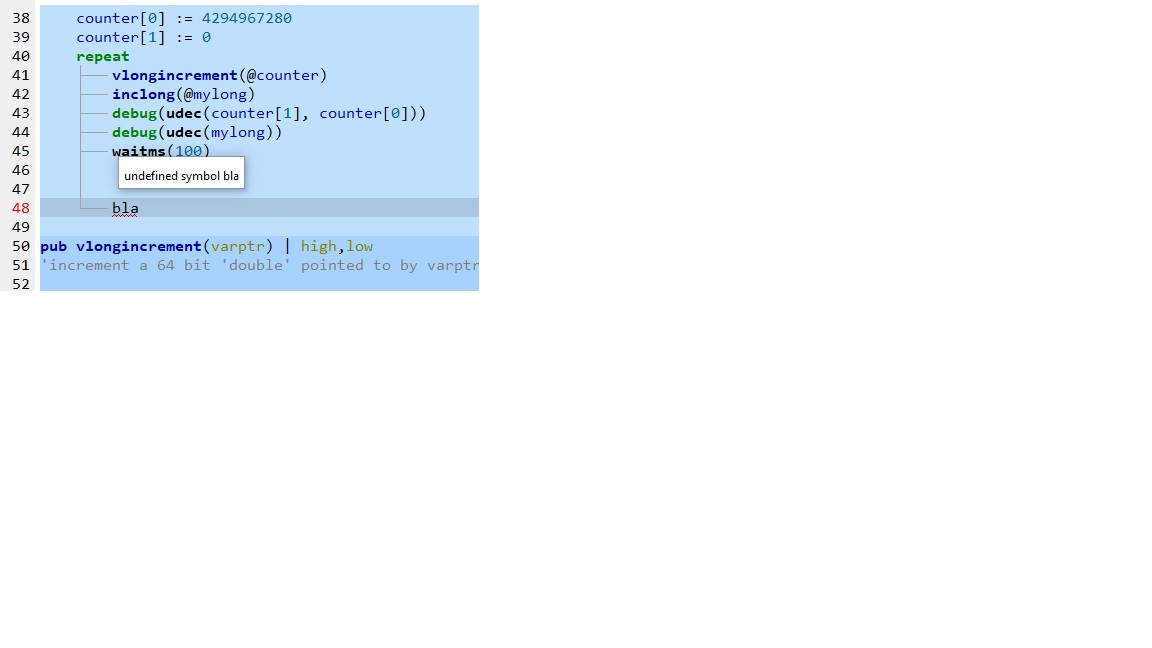
And what I really like is all the Pnut debug windows are working and they display really fast
Cheers, Bob
Ok, that was somehow hidden to me.
Will work on it, not sure how much it would take because I'm really bad at graphics but I'm looking at alternate icons sets as svg (vector graphics) that should scale perfectly.
That error should appear when you attempt to upload or get info (memory map and listing) with a source that has errors and, as already answered by bob_g4bby, after closing the dialog it should move the editor to the first error line. It is intentionally generic because there are other indicators that the program has errors, like the editor tab title should be red. I could add more details but in the end you still need to check where the errors are.