@macca tried fixing a tearing issue with debug bitmap display by creating a new window in the loop, at the start, and then "close" -ing it at the end.
But this seems to have been a horrible idea... Several windows appeared at same time, none of them showing any data and then appears to have actually broken the system.
Looks like I need to reboot...
@Rayman said:
Also tried "clear" and "update" mode, clear caused second window to open with both blank. Update mode doesn't seem to work.
Not sure if works in Prop Tool or not...
Maybe will try that later because not exactly sure of syntax...
CLEAR simply clear the window (all black), should not open any other window.
UPDATE performs a window update, it should be used when the auto-update is disabled with the UPDATE keyword on the setup line (the first line that opens a window).
Maybe there is a clash when windows with the same name are closed and reopened too fast, hard to tell.
I don't know what you want to accomplish but I suggest to try with the standard ways, keep the window open and use the RATE, UPDATE or DLY commands.
Are you trying to debug a problem with the bitmap window or with your program ?
I've just tried SpinTools for the first time because I thought it could probably reduce the binary size of old P1 code due to dead code removal. However, I got some errors and it didn't compile.
It says "not a constant" although enc_freq is a constant.
maskErr RES
It also doesn't like RES without a number. For the P1 this was perfectly legal and defaulted to RES 1.
dec long 0 ' decelleration
Is "dec" a reserved keyword, now? Propeller Tool 2.9.3 didn't complain.
And my apologies for bothering you... If it can't be fixed for some reason or you simply don't want to I will surely find workarounds. I just wanted to report that it seems not to be fully compatible.
@ManAtWork said:
I've just tried SpinTools for the first time because I thought it could probably reduce the binary size of old P1 code due to dead code removal. However, I got some errors and it didn't compile.
It says "not a constant" although enc_freq is a constant.
maskErr RES
It also doesn't like RES without a number. For the P1 this was perfectly legal and defaulted to RES 1.
I tried your attached source and it compiles without errors, what version are you using ? I think res without arguments was fixed at some point, make sure to always use the latest release.
However, I see there is a problem with the encod operator, seems that the result is one less than the expected value (in your expression it should return 5 but returns 4).
I need to check with the P2 if the operator returns the same result, from the description seems that this changed from P1 to P2:
P1 - The Bitwise Encode operator encodes a 32-bit long value into the value (0 - 32)
P2 - Encode MSB, 0..31
With P1 returns 0 if no bit is set, with P2 apparently it returns the bit position, meaning that, if I'm not wrong, values 0 and 1 returns both 0. Need to check.
dec long 0 ' decelleration
Is "dec" a reserved keyword, now? Propeller Tool 2.9.3 didn't complain.
No, that was my mistake, for some reasons dec was included as a pasm instruction that doesn't exists... (sometimes hallucinations happens to humans too, not just AIs...).
And my apologies for bothering you... If it can't be fixed for some reason or you simply don't want to I will surely find workarounds. I just wanted to report that it seems not to be fully compatible.
No need to apology, thank you for reporting, I try to test the code but bugs are always there waiting to show, feel free to post issues or ask questions, I'll do my best to fix everything.
For that specific issues, I'll fix them for sure, but I'm in the middle of some deep refactorings and I'm not sure when a new release is ready (hopefully in a couple of weeks).
The most problematic workaround is for the encod issue, if you don't need to change enc_freq you may hard-code the result.
@macca said:
I tried your attached source and it compiles without errors, what version are you using ? I think res without arguments was fixed at some point, make sure to always use the latest release.
Sorry, my fault. I thought I've just downloaded the latest version but I remember I got some errors during the installation I ignorantly just clicked away. But now, I found out I actually did install an old version in 2022 and there are some outdated files left from the old installation. I'll fix that.
The most problematic workaround is for the encod issue, if you don't need to change enc_freq you may hard-code the result.
LOL, I have to find out what that expression actually does. I've just copied that from Harrison Pham's original code.
@macca said:
I tried your attached source and it compiles without errors, what version are you using ? I think res without arguments was fixed at some point, make sure to always use the latest release.
Sorry, my fault. I thought I've just downloaded the latest version but I remember I got some errors during the installation I ignorantly just clicked away. But now, I found out I actually did install an old version in 2022 and there are some outdated files left from the old installation. I'll fix that.
Good.
The most problematic workaround is for the encod issue, if you don't need to change enc_freq you may hard-code the result.
LOL, I have to find out what that expression actually does. I've just copied that from Harrison Pham's original code.
Actually, a more suitable workaround is to just remove the constant() wrap and disable the automatic constant folding in the Spin1 preferences:
That will use the bytecode encod operator that works correctly.
Ok, I re-installed the latest version and now it compiles without error.
I've done a quick check and the constant() actually computes different results. Propeller Tool shows
 PLLDIV=0A800000
 FRQ=14000000
SpinTools IDE produces:
 PLLDIV=0A000000
 FRQ=28000000
I'll hardcode the correct values above. Changing the frequency makes no sense at all. The ENC28J60 chip always wants 25MHz.
BTW, The binary file SpinTools produces is ~70longs shorter than the filr from Propeller Tool. That's only 1% but just enough so I can add debug output.
I was looking at your GitHub page for Spin Tools and I was trying to figure out how you update your compiler to support changes I make to new versions, like v54.
Are you using the same interpreter and generating the same bytecodes that I do? I am pretty sure you are, but I couldn't find any definite indication of that.
I am almost done with a new v55 which makes some interpreter/bytecode changes to make bitfield reading and writing take one less bytecode and run a little faster. I am just wondering how you accommodate the changes I make. I suppose you get my new release and first do a file-diff to see what has changed, and then you go from there. Is that right?
With this release I did some big code refactorings, some were long overdue and some needed to add requested feature, it is not yet finished and there are still some glitches that will be fixed in the next releases. All my tests that includes a number of real world code samples are passing, I hope to not have broken anything relevant.
This release implements the structure bitfield member and is aligned with PNut v54.
The preprocessor handling is now much better, the P2 uSD card driver now works without changes.
The syntax highlight was refactored and optimized to better handle large source files, less stuttering while editing. There are still some glitches that will be fixed in the next releases.
The code suggestion was better reorganized to present suggestions in a consistent way: content that starts with the filter text are listed first, followed by content that contains the filter text. Also added a small feature that doesn't list the first object method if named null since this is the traditional way to indicate a library object.
I have unified the serial terminal PST and ANSI protocols, the codes are mostly unique and should not clash in normal circumstances.
I have added preferences to set the behaviour of the non-standard PST codes, like CR (13) that expects an implicit LF and BS (8) that erases the previous character.
As you can see, the preferences added settings for the terminal size in characters (the window is no more resizable with the mouse,, the actual size depends on the font) and default cursor appearance.
The object browser in both the editor and program info dialog shows the files imported with the FILE pasm directive.
In the program info dialog, the object tree is clickable and highlight the related portion of the memory map and updates the listing to show only the selected object:
Also code and data values are updated to show the selected object.
The command line compiler spinc code was refactored and can now upload binary files directly.
Other changes:
Fixed OFFSETOF allowed syntax
Some fixes in the backtab unindent on blank space before content
Added check if window opens within the desktop bounds, revert to default position otherwise
Block identifiers (con, var, obj, ecc.) enforced to start at column 0.
Fixed Spin1 encode operator result
Removed non-existing dec instruction
Added missing built-in constants highlight (P_TRUE_OUT and P_INVERT_OUT)
@cgracey said:
I was looking at your GitHub page for Spin Tools and I was trying to figure out how you update your compiler to support changes I make to new versions, like v54.
Are you using the same interpreter and generating the same bytecodes that I do? I am pretty sure you are, but I couldn't find any definite indication of that.
The code is a bit messed but yes, I'm using the same bytecodes. The Spin2Bytecode class defines the "mnemonics" and is taken from Spin2_Interpreter.spin2 using the same names, I'll update that in case of changes in the interpreter, this should ensure that the compiler generates the right code even in case of renumbers to make space for other codes.
I am almost done with a new v55 which makes some interpreter/bytecode changes to make bitfield reading and writing take one less bytecode and run a little faster. I am just wondering how you accommodate the changes I make. I suppose you get my new release and first do a file-diff to see what has changed, and then you go from there. Is that right?
Yes, I do that for the bytecodes update, the actual code generator may requires some other changes, bitfields are using the BitField class to generate the bytecodes, if the new bitfield encoding is specific to structure it may require to change the StructOp class that is used to generate the structure setup code.
@macca: Did you mean to disallow resizing the terminal window? I'm not bothered that the maximize button is disabled, but there are times when I need that window wider or taller or both.
@Rayman said:
@macca could the ALT-x commands, if they exist, be added to main menu?
Maybe icons could be added to main menu bar as A1… etc
Would maybe make using them easier…
Or maybe just easier to optionally add them all to menu bar. Plenty of room for them on my windows boxes..
ALT-x shortcuts to run external tools are already in the menu Tools -> Run
Maybe I can add buttons to the toolbar and/or to the editor right-click pupup menu if this is useful.
@JonnyMac said:
@macca: Did you mean to disallow resizing the terminal window? I'm not bothered that the maximize button is disabled, but there are times when I need that window wider or taller or both.
Yes, the window can be resized from the terminal preferences with the width and height in characters rather than pixels.
I just tought that once set to a preferred size it will remain mostly unchanged and explicit size in characters would be easier to set.
I just tought that once set to a preferred size it will remain mostly unchanged and explicit size in characters would be easier to set.
That is not the case at all -- with me, anyway; I am always adjusting things visually.
Please consider allowing it to be resized as before. Thank you.
Also, my window size doesn't seem to stick between sessions. I haven't tried deleting the .spin-tools file yet to allow a rebuild, because I would lose all my custom settings.
And if you're going to make additions to the toolbar (I'd love buttons for the User Tools), would you also add a button that opens the Preferences dialog? Thank you.
I just tought that once set to a preferred size it will remain mostly unchanged and explicit size in characters would be easier to set.
That is not the case at all -- with me, anyway; I am always adjusting things visually.
Please consider allowing it to be resized as before. Thank you.
I agree! Often when debugging I dump data structures to the terminal/console that are difficult to decipher in shorter line lengths (like, json structures from weather website APIs). It's nice to be able to stretch-out the line length 'temporarily' to get a better view of that kind of data.
Having the terminal window size reset on re launch, to what's saved in Settings is good, though, so keep that feature.
I just tought that once set to a preferred size it will remain mostly unchanged and explicit size in characters would be easier to set.
That is not the case at all -- with me, anyway; I am always adjusting things visually.
Please consider allowing it to be resized as before. Thank you.
I agree! Often when debugging I dump data structures to the terminal/console that are difficult to decipher in shorter line lengths (like, json structures from weather website APIs). It's nice to be able to stretch-out the line length 'temporarily' to get a better view of that kind of data.
Ok, I'll restore the resizable border, I'll keep both the preferences settings and the resizable border.
Also, my window size doesn't seem to stick between sessions. I haven't tried deleting the .spin-tools file yet to allow a rebuild, because I would lose all my custom settings.
Thats should not be necessary, the settings are the same as before. Seems to work for me, I'll look more at it.
Maybe this is already done, but would it be possible to attach a specific tab or file to a specific serial port?
I have applications that use several P2s running very similar, but not exactly the same code. it would be nice if there was some persistence after I figure out which tab goes with which processor. It wouldn't make much sense for that to persist from session to session, as the port numbering may not be the same.
Ok, I'll restore the resizable border, I'll keep both the preferences settings and the resizable border.
Thank you.
My other issue -- which is just a small bother -- is where the main window is located when I start; it always seems to move around. Not a problem, really, just a minor annoyance.
@JonnyMac said:
My other issue -- which is just a small bother -- is where the main window is located when I start; it always seems to move around. Not a problem, really, just a minor annoyance.
That's weird, I have implemented a simple check to make sure the window doesn't open outside the desktop, this may be an issue with multi-monitors configurations and one of the monitors is disconnected, but should not have any effect of the window position. If detected outside it should open with the default position and size.
I'll review that.
I think I'll do a patch release, I want to implement the PNut 55 updates but seems more difficult than expected.
@JonnyMac said:
My other issue -- which is just a small bother -- is where the main window is located when I start; it always seems to move around. Not a problem, really, just a minor annoyance.
That's weird, I have implemented a simple check to make sure the window doesn't open outside the desktop, this may be an issue with multi-monitors configurations and one of the monitors is disconnected, but should not have any effect of the window position. If detected outside it should open with the default position and size.
I'll review that.
I think I'll do a patch release, I want to implement the PNut 55 updates but seems more difficult than expected.
For the v55 update, there are just three things that you need to do:
1) Renumber the variable-operator bytecode set to accomodate new bytecodes at the end of the list: 2 regular bytecodes and 6 compressed bytecodes. This has the effect of the first variable-operator bytecode starting at $15 (was $7x something).
2) In compile_var, if you are compiling an inc/dec modifier ([++/--] for word/long/structure pointer) and the value is 2 to 33, use one of the two new compressed bytecodes for setting incdec. This saves a byte of output.
3) In compile_var, if you are reading or writing a bitfield (but not doing a read-modify-write, like ++ or --), use one of the other new bytecodes to optimize the output: 1 for RFVAR-bitfield read, 1 for RFVAR-bitfield write, 1 for pop-bitfield read, 1 for pop-bitfield write,, 2 compressed bytecodes for single-bit read, and 2 compressed bytecodes for single-bit write. This will save a byte of output.
The other change you see for the 'range' routine was just to move the LOOKUP/LOOKDOWN portion to hub memory, in order to free up the new bytecode space in the cog LUT. There was no functional change. Same goes for optimizing PINL/PINH using a DRVNZ instruction, instead of separate DRVL/DRVH instructions.
The only thing that the compiler needs to worry about is adding and taking advantage of the new bytecodes to optimize compiler output. Everything else works the same as before, even though skip patterns have had to change here and there to accommodate things.
@cgracey said:
The only thing that the compiler needs to worry about is adding and taking advantage of the new bytecodes to optimize compiler output. Everything else works the same as before, even though skip patterns have had to change here and there to accommodate things.
Yes, that's the complicated part... the compiler is a bit messed and some things are not very easy to modify, the post effect had a common pattern and now there are exceptions for bitfields... I need to reorganize things and that may take a bit more time.
BTW, it just occurred to me that maybe one things was not clear, I'm using your Spin interpreter runtime not just the bytecodes, I don't have my own runtime. The compiler generates a binary (almost) identical to PNut binaries.
@cgracey said:
The only thing that the compiler needs to worry about is adding and taking advantage of the new bytecodes to optimize compiler output. Everything else works the same as before, even though skip patterns have had to change here and there to accommodate things.
Yes, that's the complicated part... the compiler is a bit messed and some things are not very easy to modify, the post effect had a common pattern and now there are exceptions for bitfields... I need to reorganize things and that may take a bit more time.
BTW, it just occurred to me that maybe one things was not clear, I'm using your Spin interpreter runtime not just the bytecodes, I don't have my own runtime. The compiler generates a binary (almost) identical to PNut binaries.
I am glad you are using the interpreter. So much thought and effort has gone into it. I think, initially, it was around 4KB. Now it's just a little over 6KB and does WAY more. I am always thinking about how it could be improved and how future silicon could make it faster.
Stephen Moraco had Claude Opus analyze it to make suggestions for how to make it more efficient. It discovered, by looking at the compiler, too, that NEXT/QUIT are always followed by a pop bytecode, so the NEXT/QUIT bytecodes could also do the pop, automatically. The thing is, those are seldom used and it's probably not worth blowing up the interpreter for, unless there is a very sympathetic way to do it.
We were using less than half of the variable-operation bytecodes, though, so they were begging for some kind of usage; hence, the bitfield stuff. It was all just a matter of adding some skip patterns and only one or two instructions to make it work.
Thanks for supporting it by including it in your compiler. I know it's a pain when things need reorganizing.
@cgracey said:
I am glad you are using the interpreter. So much thought and effort has gone into it. I think, initially, it was around 4KB. Now it's just a little over 6KB and does WAY more. I am always thinking about how it could be improved and how future silicon could make it faster.
Careful, you'll end up with something that looks a lot like an x86 processor
(in the sense that they optimize for being able to run a set of complex[citation needed] bytecodes really quickly)
I'd guess the biggest cycle contribution on P2 is just grabbing data from the stack in hub RAM at 9..16 cycles cost, which is sort of a general pain point for anything that can't easily be reformulated into using FIFO or block transfer. The actual 6 cycle cost of entering the bytecode handler is probably negligable.
Maybe the trick would be to keep the "live" expression stack as a separate entity in cogRAM. Would have to have the compiler work around it if an expression tree ever gets deeper than 16 or so values...
Stephen Moraco had Claude Opus analyze it to make suggestions for how to make it more efficient. It discovered, by looking at the compiler, too, that NEXT/QUIT are always followed by a pop bytecode, so the NEXT/QUIT bytecodes could also do the pop, automatically. The thing is, those are seldom used and it's probably not worth blowing up the interpreter for, unless there is a very sympathetic way to do it.
Since when would there be a dedicated NEXT/QUIT bytecode? Aren't NEXT/QUIT just jumps (with appropriate pops to clear loop state in front of them)? Don't let yourself get brainrotted by the AI slop, you're too good for that.


Comments
@macca tried fixing a tearing issue with debug bitmap display by creating a new window in the loop, at the start, and then "close" -ing it at the end.
But this seems to have been a horrible idea... Several windows appeared at same time, none of them showing any data and then appears to have actually broken the system.
Looks like I need to reboot...
Also tried "clear" and "update" mode, clear caused second window to open with both blank. Update mode doesn't seem to work.
Not sure if works in Prop Tool or not...
Maybe will try that later because not exactly sure of syntax...
CLEAR simply clear the window (all black), should not open any other window.
UPDATE performs a window update, it should be used when the auto-update is disabled with the UPDATE keyword on the setup line (the first line that opens a window).
Maybe there is a clash when windows with the same name are closed and reopened too fast, hard to tell.
I don't know what you want to accomplish but I suggest to try with the standard ways, keep the window open and use the RATE, UPDATE or DLY commands.
Are you trying to debug a problem with the bitmap window or with your program ?
I've just tried SpinTools for the first time because I thought it could probably reduce the binary size of old P1 code due to dead code removal. However, I got some errors and it didn't compile.
It says "not a constant" although enc_freq is a constant.
It also doesn't like RES without a number. For the P1 this was perfectly legal and defaulted to RES 1.
Is "dec" a reserved keyword, now? Propeller Tool 2.9.3 didn't complain.
And my apologies for bothering you... If it can't be fixed for some reason or you simply don't want to I will surely find workarounds. I just wanted to report that it seems not to be fully compatible.
I tried your attached source and it compiles without errors, what version are you using ? I think res without arguments was fixed at some point, make sure to always use the latest release.
However, I see there is a problem with the encod operator, seems that the result is one less than the expected value (in your expression it should return 5 but returns 4).
I need to check with the P2 if the operator returns the same result, from the description seems that this changed from P1 to P2:
P1 - The Bitwise Encode operator encodes a 32-bit long value into the value (0 - 32)
P2 - Encode MSB, 0..31
With P1 returns 0 if no bit is set, with P2 apparently it returns the bit position, meaning that, if I'm not wrong, values 0 and 1 returns both 0. Need to check.
No, that was my mistake, for some reasons dec was included as a pasm instruction that doesn't exists... (sometimes hallucinations happens to humans too, not just AIs...).
No need to apology, thank you for reporting, I try to test the code but bugs are always there waiting to show, feel free to post issues or ask questions, I'll do my best to fix everything.
For that specific issues, I'll fix them for sure, but I'm in the middle of some deep refactorings and I'm not sure when a new release is ready (hopefully in a couple of weeks).
The most problematic workaround is for the encod issue, if you don't need to change enc_freq you may hard-code the result.
@macca After rebooting PC again, tearing problem seems to have gone away, at least mostly....
Sorry, my fault. I thought I've just downloaded the latest version but I remember I got some errors during the installation I ignorantly just clicked away. But now, I found out I actually did install an old version in 2022 and there are some outdated files left from the old installation. I'll fix that.
LOL, I have to find out what that expression actually does. I've just copied that from Harrison Pham's original code.
Good.
Actually, a more suitable workaround is to just remove the constant() wrap and disable the automatic constant folding in the Spin1 preferences:
That will use the bytecode encod operator that works correctly.
Ok, I re-installed the latest version and now it compiles without error.
I've done a quick check and the constant() actually computes different results. Propeller Tool shows
SpinTools IDE produces:
I'll hardcode the correct values above. Changing the frequency makes no sense at all. The ENC28J60 chip always wants 25MHz.
BTW, The binary file SpinTools produces is ~70longs shorter than the filr from Propeller Tool. That's only 1% but just enough so I can add debug output.
@macca could the ALT-x commands, if they exist, be added to main menu?
Maybe icons could be added to main menu bar as A1… etc
Would maybe make using them easier…
Or maybe just easier to optionally add them all to menu bar. Plenty of room for them on my windows boxes..
@Macca,
I was looking at your GitHub page for Spin Tools and I was trying to figure out how you update your compiler to support changes I make to new versions, like v54.
Are you using the same interpreter and generating the same bytecodes that I do? I am pretty sure you are, but I couldn't find any definite indication of that.
I am almost done with a new v55 which makes some interpreter/bytecode changes to make bitfield reading and writing take one less bytecode and run a little faster. I am just wondering how you accommodate the changes I make. I suppose you get my new release and first do a file-diff to see what has changed, and then you go from there. Is that right?
I think your tool is very good, by the way.
Thanks. -Chip
Released version 0.55.0
With this release I did some big code refactorings, some were long overdue and some needed to add requested feature, it is not yet finished and there are still some glitches that will be fixed in the next releases. All my tests that includes a number of real world code samples are passing, I hope to not have broken anything relevant.
This release implements the structure bitfield member and is aligned with PNut v54.
The preprocessor handling is now much better, the P2 uSD card driver now works without changes.
The syntax highlight was refactored and optimized to better handle large source files, less stuttering while editing. There are still some glitches that will be fixed in the next releases.
The code suggestion was better reorganized to present suggestions in a consistent way: content that starts with the filter text are listed first, followed by content that contains the filter text. Also added a small feature that doesn't list the first object method if named null since this is the traditional way to indicate a library object.
I have unified the serial terminal PST and ANSI protocols, the codes are mostly unique and should not clash in normal circumstances.
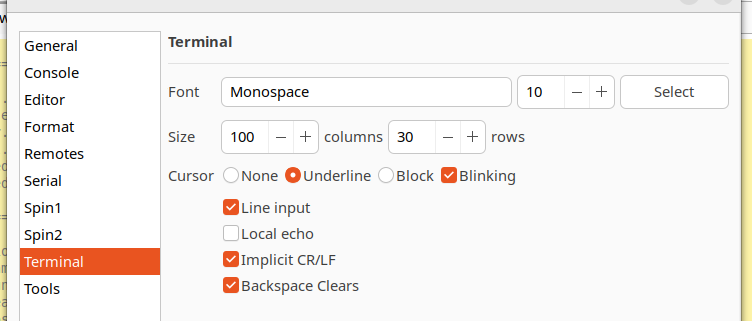
I have added preferences to set the behaviour of the non-standard PST codes, like CR (13) that expects an implicit LF and BS (8) that erases the previous character.
As you can see, the preferences added settings for the terminal size in characters (the window is no more resizable with the mouse,, the actual size depends on the font) and default cursor appearance.
The object browser in both the editor and program info dialog shows the files imported with the FILE pasm directive.
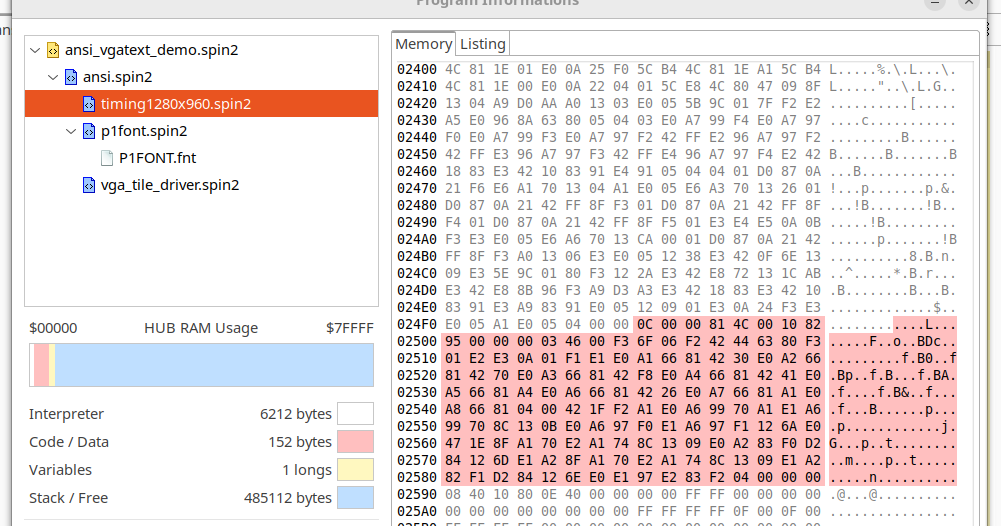
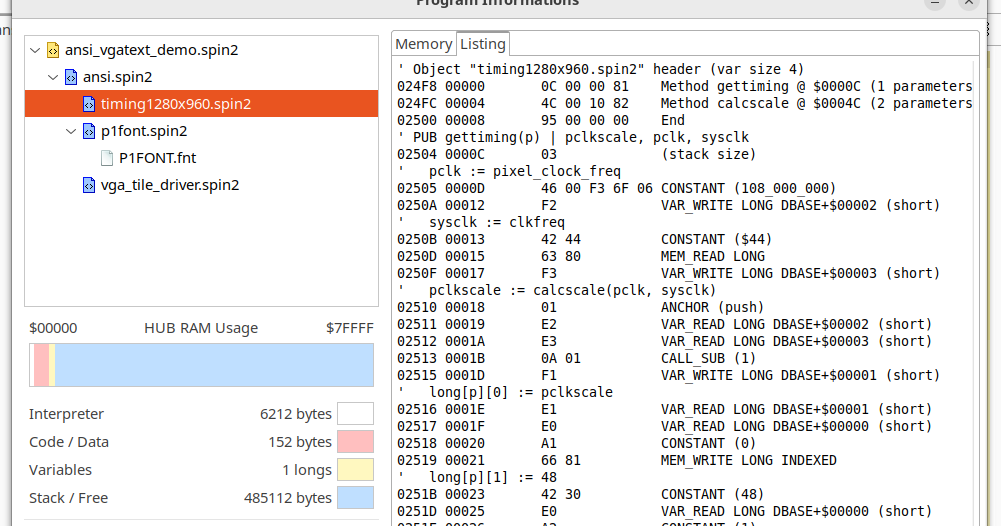
In the program info dialog, the object tree is clickable and highlight the related portion of the memory map and updates the listing to show only the selected object:
Also code and data values are updated to show the selected object.
The command line compiler spinc code was refactored and can now upload binary files directly.
Other changes:
The full changelog is here.
The code is a bit messed but yes, I'm using the same bytecodes. The Spin2Bytecode class defines the "mnemonics" and is taken from Spin2_Interpreter.spin2 using the same names, I'll update that in case of changes in the interpreter, this should ensure that the compiler generates the right code even in case of renumbers to make space for other codes.
Yes, I do that for the bytecodes update, the actual code generator may requires some other changes, bitfields are using the BitField class to generate the bytecodes, if the new bitfield encoding is specific to structure it may require to change the StructOp class that is used to generate the structure setup code.
Thank you.
@macca Does adding ALT buttons, mentioned above, to menu sound easy to do?
Thanks for the update, Marco. I just have to remember not to make a selection when I want to adjust the tab position of text on a single line.
Off topic: How badly does Ferrari want to poach Kimi Antonelli from Mercedes when Lewis decides to retire?
@macca Thank you for the update! Having a preprocessor that will work with @"Stephen Moraco" 's SD card software will be very helpful!!
@macca: Did you mean to disallow resizing the terminal window? I'm not bothered that the maximize button is disabled, but there are times when I need that window wider or taller or both.
ALT-x shortcuts to run external tools are already in the menu Tools -> Run
Maybe I can add buttons to the toolbar and/or to the editor right-click pupup menu if this is useful.
Yes, the window can be resized from the terminal preferences with the width and height in characters rather than pixels.
I just tought that once set to a preferred size it will remain mostly unchanged and explicit size in characters would be easier to set.
@macca buttons on toolbar would be great if not to much trouble..
Probably should be optional so as not to be confusing for those not using them, right?
Also if popup text on these new buttons could describe function somehow would be great too if that were easy to do…
Mostly just want to make easier to use Spin2 on P1…
That is not the case at all -- with me, anyway; I am always adjusting things visually.
Please consider allowing it to be resized as before. Thank you.
Also, my window size doesn't seem to stick between sessions. I haven't tried deleting the .spin-tools file yet to allow a rebuild, because I would lose all my custom settings.
And if you're going to make additions to the toolbar (I'd love buttons for the User Tools), would you also add a button that opens the Preferences dialog? Thank you.
I agree! Often when debugging I dump data structures to the terminal/console that are difficult to decipher in shorter line lengths (like, json structures from weather website APIs). It's nice to be able to stretch-out the line length 'temporarily' to get a better view of that kind of data.
Having the terminal window size reset on re launch, to what's saved in Settings is good, though, so keep that feature.
dgately
Ok, I'll restore the resizable border, I'll keep both the preferences settings and the resizable border.
Thats should not be necessary, the settings are the same as before. Seems to work for me, I'll look more at it.
Maybe this is already done, but would it be possible to attach a specific tab or file to a specific serial port?
I have applications that use several P2s running very similar, but not exactly the same code. it would be nice if there was some persistence after I figure out which tab goes with which processor. It wouldn't make much sense for that to persist from session to session, as the port numbering may not be the same.
Thank you.
My other issue -- which is just a small bother -- is where the main window is located when I start; it always seems to move around. Not a problem, really, just a minor annoyance.
That's weird, I have implemented a simple check to make sure the window doesn't open outside the desktop, this may be an issue with multi-monitors configurations and one of the monitors is disconnected, but should not have any effect of the window position. If detected outside it should open with the default position and size.
I'll review that.
I think I'll do a patch release, I want to implement the PNut 55 updates but seems more difficult than expected.
For the v55 update, there are just three things that you need to do:
1) Renumber the variable-operator bytecode set to accomodate new bytecodes at the end of the list: 2 regular bytecodes and 6 compressed bytecodes. This has the effect of the first variable-operator bytecode starting at $15 (was $7x something).
2) In compile_var, if you are compiling an inc/dec modifier ([++/--] for word/long/structure pointer) and the value is 2 to 33, use one of the two new compressed bytecodes for setting incdec. This saves a byte of output.
3) In compile_var, if you are reading or writing a bitfield (but not doing a read-modify-write, like ++ or --), use one of the other new bytecodes to optimize the output: 1 for RFVAR-bitfield read, 1 for RFVAR-bitfield write, 1 for pop-bitfield read, 1 for pop-bitfield write,, 2 compressed bytecodes for single-bit read, and 2 compressed bytecodes for single-bit write. This will save a byte of output.
The other change you see for the 'range' routine was just to move the LOOKUP/LOOKDOWN portion to hub memory, in order to free up the new bytecode space in the cog LUT. There was no functional change. Same goes for optimizing PINL/PINH using a DRVNZ instruction, instead of separate DRVL/DRVH instructions.
The only thing that the compiler needs to worry about is adding and taking advantage of the new bytecodes to optimize compiler output. Everything else works the same as before, even though skip patterns have had to change here and there to accommodate things.
Yes, that's the complicated part... the compiler is a bit messed and some things are not very easy to modify, the post effect had a common pattern and now there are exceptions for bitfields... I need to reorganize things and that may take a bit more time.
BTW, it just occurred to me that maybe one things was not clear, I'm using your Spin interpreter runtime not just the bytecodes, I don't have my own runtime. The compiler generates a binary (almost) identical to PNut binaries.
I am glad you are using the interpreter. So much thought and effort has gone into it. I think, initially, it was around 4KB. Now it's just a little over 6KB and does WAY more. I am always thinking about how it could be improved and how future silicon could make it faster.
Stephen Moraco had Claude Opus analyze it to make suggestions for how to make it more efficient. It discovered, by looking at the compiler, too, that NEXT/QUIT are always followed by a pop bytecode, so the NEXT/QUIT bytecodes could also do the pop, automatically. The thing is, those are seldom used and it's probably not worth blowing up the interpreter for, unless there is a very sympathetic way to do it.
We were using less than half of the variable-operation bytecodes, though, so they were begging for some kind of usage; hence, the bitfield stuff. It was all just a matter of adding some skip patterns and only one or two instructions to make it work.
Thanks for supporting it by including it in your compiler. I know it's a pain when things need reorganizing.
Careful, you'll end up with something that looks a lot like an x86 processor
(in the sense that they optimize for being able to run a set of complex[citation needed] bytecodes really quickly)
I'd guess the biggest cycle contribution on P2 is just grabbing data from the stack in hub RAM at 9..16 cycles cost, which is sort of a general pain point for anything that can't easily be reformulated into using FIFO or block transfer. The actual 6 cycle cost of entering the bytecode handler is probably negligable.
Maybe the trick would be to keep the "live" expression stack as a separate entity in cogRAM. Would have to have the compiler work around it if an expression tree ever gets deeper than 16 or so values...
Since when would there be a dedicated NEXT/QUIT bytecode? Aren't NEXT/QUIT just jumps (with appropriate pops to clear loop state in front of them)? Don't let yourself get brainrotted by the AI slop, you're too good for that.