spinc in the Spin Tools Compiler - Version 0.53.2 is not working for me in Fedora 42 Linux, but the spinide is working fine. Version 0.45.1 of spinc works.
Linux fedora 6.18.16-100.fc42.x86_64
theo@fedora:~$ spinc -r -p /dev/ttyUSB0 led_flasher_6led.spin2
Spin Tools Compiler - Version 0.53.2
Copyright (c) 2021-26 Marco Maccaferri and others. All rights reserved.
Compiling...
led_flasher_6led.spin2
Program size is 6416 bytes
Uploading...
Exception in thread "main" java.lang.NoClassDefFoundError: org/eclipse/swt/SWT
at com.maccasoft.propeller.devices.SerialComPort.setParams(SerialComPort.java:65)
at com.maccasoft.propeller.Propeller2Loader.upload(Propeller2Loader.java:73)
at com.maccasoft.propeller.PropellerLoader.upload(PropellerLoader.java:41)
at com.maccasoft.propeller.SpinCompiler.main(SpinCompiler.java:475)
Caused by: java.lang.ClassNotFoundException: org.eclipse.swt.SWT
at java.base/jdk.internal.loader.BuiltinClassLoader.loadClass(Unknown Source)
at java.base/jdk.internal.loader.ClassLoaders$AppClassLoader.loadClass(Unknown Source)
at java.base/java.lang.ClassLoader.loadClass(Unknown Source)
... 4 more
theo@fedora:~$ spin-tools-old/spinc -r -p /dev/ttyUSB0 led_flasher_6led.spin2
Spin Tools Compiler - Version 0.45.1
Copyright (c) 2021-25 Marco Maccaferri and others. All rights reserved.
Compiling...
led_flasher_6led.spin2
Program size is 6136 bytes
Uploading...
Propeller 2 on port /dev/ttyUSB0
Loading binary image to hub memory
6140 bytes sent
Verifying checksum ... OK
Done.
theo@fedora:~$
@TheoHaugen said:
Exception in thread "main" java.lang.NoClassDefFoundError: org/eclipse/swt/SWT
at com.maccasoft.propeller.devices.SerialComPort.setParams(SerialComPort.java:65)
Yes, there is a missing dependency in the spinc executable. It affects only the upload from spinc, all other functions should work without problems, as well as the IDE.
I'll do a new release in few days.
Sorry for the inconvenience.
With this release I have updated a number of runtime libraries, including the Java runtime to version 21 LTS.
The upgrade from an existing install should not have any problem, just unzip/untar the package and overwrite the existing files.
I tried to upgrade and downgrade on Linux and Windows without deleting the spin-tools folder and I haven't experienced any problem.
Also updated the SWT libraries to the latest release 4.39.
Implemented some enhancements to the external tools dialog, I have removed the label with the list of variable substitutions and replaced with a content assist popup, press $ or Ctrl-Space to open the popup and insert the variable:
Also added run in background and show console when run options.
Run in background runs the program without capturing the output to the console.
Show console simply doesn't open the console view, the output is still captured and can be seen by toggling the console view.
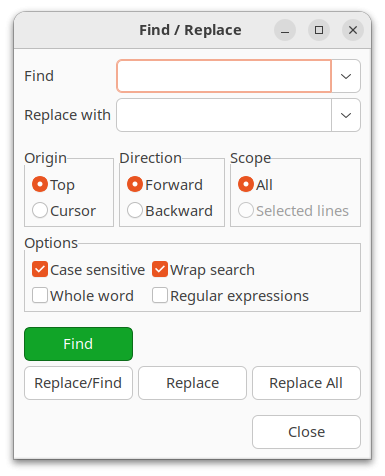
Added option to search from top or cursor to the search dialog:
Some more fixes for the PST terminal emulation on both the command-line and IDE terminal.
The Linux and Windows launchers now also configure the console to work more like a terminal, disabling the line input mode and some other things. Running the terminal from the command-line compiler should now work much better.
Implemented the OFFSETOF function from the latest PNut release.
On open, the IDE now switches to the last selected editor tab instead of the first.
The Linux and Windows launchers now also configure the console to work more like a terminal,
Does this mean we can do command line activities through the console?
I'm not sure to understant, let me explain better what was changed.
That change is related to the spinc command line compiler, when entering the terminal mode after upload (with the -T or -t parameter), the original Linux or Windows console mode was retained like the line input mode (you need to press the ENTER key to actually send something to the Propeller). Now the launcher executable configure the Linux or Windows console to disable the line input mode (and some other flags) so typed characters are sent immediately.
This only affects the command line compiler, the IDE still works as before.
@macca Can prop-tool.exe be called from the command line to program the P2? The log facility when debug is called is ideal for a project I am working on.
The Linux and Windows launchers now also configure the console to work more like a terminal,
Does this mean we can do command line activities through the console?
I'm not sure to understant, let me explain better what was changed.
That change is related to the spinc command line compiler, when entering the terminal mode after upload (with the -T or -t parameter), the original Linux or Windows console mode was retained like the line input mode (you need to press the ENTER key to actually send something to the Propeller). Now the launcher executable configure the Linux or Windows console to disable the line input mode (and some other flags) so typed characters are sent immediately.
This only affects the command line compiler, the IDE still works as before.
Thanks. I misunderstood.
I don't know if I ever asked for this, but I will now in case I haven't. I've seen in a couple editors (e.g., Thonny) the ability to select a bunch of lines and then comment them out, or remove the comment so they're back. This seems to work by looking at the first character of each line; if it's not a comment character it makes it a comment character (apostrophe in our case). If the first character is a comment character, it changes it to a space. Could we have something like that in Spin Tools?
@macca I almost have want I want with spinc.exe Is it possible to have spinc.exe (or an external program) log to a file the same way that the GUI does for debug?
Nevermind. I had Claud build a debugger for the P2 so it can directly receive debug data. I am having Claude Code program the P2 with spinc.exe with debug enabled. I will share with others in the "AI Tools and Techniques" very soon. Currently only works with Powershell, because it is a built in tool on Windows. I am sure a python version will be available if anyone else find this useful.
@ke4pjw said: @macca I almost have want I want with spinc.exe Is it possible to have spinc.exe (or an external program) log to a file the same way that the GUI does for debug?
Nevermind. I had Claud build a debugger for the P2 so it can directly receive debug data. I am having Claude Code program the P2 with spinc.exe with debug enabled. I will share with others in the "AI Tools and Techniques" very soon. Currently only works with Powershell, because it is a built in tool on Windows. I am sure a python version will be available if anyone else find this useful.
I see you found a solution, however I would like to give some suggestions for a more portable solution.
You end the debug log with debug("TEST_DONE"), sometime ago PNut introduced the DEBUG_END_SESSION flag to signal receivers that the debug has ended, if you use debug(DEBUG_END_SESSION), the spinc terminal mode will exit after receiving the code (it is translated to ESC CR LF).
Spin Tools Compiler - Version 0.54.0
Copyright (c) 2021-26 Marco Maccaferri and others. All rights reserved.
Compiling...
MyTest.spin2
Program size is 9225 bytes
Uploading...
Propeller 2 on port /dev/ttyUSB0
Loading binary image to hub memory
9232 bytes sent
Verifying checksum ... OK
Entering terminal mode. CTRL-C to exit.
Cog0  INIT $0000_0000 $0000_0000 load
Cog0  INIT $0000_0F64 $0000_1868 jump
Cog0  Hello from P2
Cog0  Result: value = 42
Cog0                      <--- this is the DEBUG_END_SESSION signal
spinc doesn't have a way to log to a file, however you can always redirect the output.
With the above change, you can compile, upload, switch to terminal mode, redirect to a file and exit when done automatically.
Would like to know more about the included C compiler for P2…. Is it complete? Work in progress? Compatible with some standard like C89? Maybe there is some documentation on this but didn’t find it yet…
@Rayman said:
Would like to know more about the included C compiler for P2…. Is it complete? Work in progress? Compatible with some standard like C89? Maybe there is some documentation on this but didn’t find it yet…
It is a work in progress, though I haven't had much time to work on it lately, and it is far from complete.
There is only one example in the examples/P2 folder, i2c_scanner.c that gives an idea of how to use it with spin objects.
It is basically a spin compiler with C syntax, it produces standard spin bytecodes for both P1 and P2.
@macca Ok thanks. I thought maybe bytecode was an option because seeing two versions of stuff in Github, but think you are saying it is all bytecode. Thanks for the info.
@macca said:
I see you found a solution, however I would like to give some suggestions for a more portable solution.
You end the debug log with debug("TEST_DONE"), sometime ago PNut introduced the DEBUG_END_SESSION flag to signal receivers that the debug has ended, if you use debug(DEBUG_END_SESSION), the spinc terminal mode will exit after receiving the code (it is translated to ESC CR LF).
I thought the -T would launch a terminal so I didn't try it. I haven't tested but it looks like it does exactly what I needed, redirect debug to STDOUT.
Well, at least I learned how to vibe code a debugger! I will give this a try. What you have here is really the ideal solution. Thank you!
Question.
I have looked all over the preferences and wherever I can to find out how to not have Spin Tools IDE open old files that were closed. Where is that preference button?
Thanks
@macca That worked fantastically. I have built a markdown file people can reference in their project folder that instructs Claude Code on how to do a build-upload-debug pipeline with spinc. I used part of your message above to tell Claude how to end a debug session and it has instruction on how to seek and destroy a spinc.exe that may have the port tied up.
Before I share it, is there a way for spinc.exe to automatically search and find the P2's com port?
Added a script that will search for the com port with a P2 attached. It is a part of the project now.
@pilot0315 said:
Question.
I have looked all over the preferences and wherever I can to find out how to not have Spin Tools IDE open old files that were closed. Where is that preference button?
There isn't a button for that, I added the preference flag and forgot to add the button in the preferences dialog... will add in the next bugfix release.
To help with reformatting code, where there are leading TABS and/or leading spaces, could double-click selecting work more like other code editors (at least the ones I use as a MacOS guy )? Instead of selecting all of the leading tabs/spaces as well as the first word of text, could the selection take up single tabs or any sequential spaces and not the first word of text? I often copy code from examples off the internet and tabbing & spaces used for indentation are not formatted in a style that conforms to the style I use. It is difficult to select just the leading tabs & spaces with a double-click.
I've attached a zipped mp4 of how this editing action works in the MacOS TextEdit app which is a simple example of how every (on a Mac) editor app allows double-click selection of leading tab/spaces.
FWIW, I tried two editors in Windows: EditPlus and Notepad. Double-clicking leading whitespace selected all of the whitespace (tabs, spaces, combination) at the head of a line.
In the Windows version of Spin Tools double-clicking the leading whitespace selects the whitspace plus some alphas. Triple-clicking selects the whole line (expected).
@dgately @JonnyMac said:
FWIW, I tried two editors in Windows: EditPlus and Notepad. Double-clicking leading whitespace selected all of the whitespace (tabs, spaces, combination) at the head of a line.
In the Windows version of Spin Tools double-clicking the leading whitespace selects the whitspace plus some alphas. Triple-clicking selects the whole line (expected).
Exactly, the standard behaviour of the UI widget I'm using for text editing is to select a word with the double click (and it means all whitespaces before that), if you double-click, hold the button down and drag the mouse, it selects words instead of single characters. Altering this behaviour is complicated as it is handled internally by the widget.
I can disable the internal handling but this seems to have consequences that are even more complicated to handle, I mean, I can easily double-click to select a tab space (like in the Mac example) or a word, but that's all, if I double-click and hold the button I can't select the next word, the selection is handled by the widget with the standard character selection.
I think the only solution is to modify the widget itself which I would prefer to avoid since it is part of SWT and may have several internal dependencies.
It's too bad the SWT widget behaves in that manner when most editors I've encountered allow the selection of whitespace ahead of a line. The drag-to-increase-the-selection-size was something I didn't know about. Unfortunately, dragging to the left doesn't deselect the first word when one had double-clicked the whitespace.
@JonnyMac said:
It's too bad the SWT widget behaves in that manner when most editors I've encountered allow the selection of whitespace ahead of a line. The drag-to-increase-the-selection-size was something I didn't know about. Unfortunately, dragging to the left doesn't deselect the first word when one had double-clicked the whitespace.
My sentiments, exactly... Odd that the SWT works that way. Researching a bit, I found that the intention is to make up for the user mistakenly clicking away from the desired text. The widget thinks it knows better than the user
@macca I think I may have found a bug where spin-tools is treating definitions differently than some of the other compilers. If I add the #pragma exportdef SD_INCLUDE_DEFRAG in the top file or #define SD_INCLUDE_DEFRAG in the SD object file, something gets fouled up in the compile resulting in unexpected behavior. (SD card won't mount) This bug does not exist when using PNUT v53, however I must #define SD_INCLUDE_DEFRAG in the SD object file, because PNUT doesn't deal with #pragma exportdef SD_INCLUDE_DEFRAG properly from what I can tell.
If I remove the ifdefs around all of the code for SD_INCLUDE_DEFRAG, spin-tools compiles and operates correctly.
@ke4pjw said:
@macca I think I may have found a bug where spin-tools is treating definitions differently than some of the other compilers. If I add the #pragma exportdef SD_INCLUDE_DEFRAG in the top file or #define SD_INCLUDE_DEFRAG in the SD object file, something gets fouled up in the compile resulting in unexpected behavior. (SD card won't mount) This bug does not exist when using PNUT v53, however I must #define SD_INCLUDE_DEFRAG in the SD object file, because PNUT doesn't deal with #pragma exportdef SD_INCLUDE_DEFRAG properly from what I can tell.
If I remove the ifdefs around all of the code for SD_INCLUDE_DEFRAG, spin-tools compiles and operates correctly.
With Spin Tools, #define and #pragma exportdef are equivalent, you can use one or the other with the same effect, both are propagated to child objects.
The problem here is due to how Spin Tools handles the preprocessor as it is isn't really a pre-processor:
#ifdef SD_INCLUDE_DEFRAG
    if (cur_cmd >= CMD_NEWDIR and cur_cmd <= CMD_MOVEFILE) or (cur_cmd >= CMD_OPEN_READ and cur_cmd <= CMD_SET_VOL_LABEL) or (cur_cmd >= CMD_CREATE_CONTIGUOUS and cur_cmd <= CMD_FILE_FRAGMENTS)
#else
    if (cur_cmd >= CMD_NEWDIR and cur_cmd <= CMD_MOVEFILE) or (cur_cmd >= CMD_OPEN_READ and cur_cmd <= CMD_SET_VOL_LABEL)
#endif
      if driver_mode <> MODE_FILESYSTEM
The code above, for example, is not handled correctly and doesn't produce the desired effect.
I'm already working on a better parser but this will take some time.
For now, the only workaroud is what you have already found, remove the #ifdefs around the code for SD_INCLUDE_DEFRAG.
I'm not sure if the combination of other options may cause similar problems, as far as I can tell, they are around whole methods, that works without problems.
I don't know much about Linux: I installed Spin Tools IDE 0.54.1 on Linux Mint, following the instructions on Macca's website:-
1. Can edit SPIN2 files in Spin Tools
2. 'Show Devices' identifies my P2 Eval board on /dev/ttyUSB0
3. I can interact with Taqoz in the Serial Terminal
4. A program with some debug statements, which ran under Windows Spin Tools, appears to load to the P2EVAL, but produces no debug results in the debug window. Other programs which opened graphical debug windows in Windows do not do so in Linux Mint. When compiling the blue lights flash on the P2 Eval briefly, as though the code is uploading.
I'd appreciate any advice on how to fix this, please. (Still using Win10, but have dual booted Linux Mint as a precaution)


Comments
spinc in the Spin Tools Compiler - Version 0.53.2 is not working for me in Fedora 42 Linux, but the spinide is working fine. Version 0.45.1 of spinc works.
Linux fedora 6.18.16-100.fc42.x86_64
theo@fedora:~$ spinc -r -p /dev/ttyUSB0 led_flasher_6led.spin2
Spin Tools Compiler - Version 0.53.2
Copyright (c) 2021-26 Marco Maccaferri and others. All rights reserved.
Compiling...
led_flasher_6led.spin2
Program size is 6416 bytes
Uploading...
Exception in thread "main" java.lang.NoClassDefFoundError: org/eclipse/swt/SWT
at com.maccasoft.propeller.devices.SerialComPort.setParams(SerialComPort.java:65)
at com.maccasoft.propeller.Propeller2Loader.upload(Propeller2Loader.java:73)
at com.maccasoft.propeller.PropellerLoader.upload(PropellerLoader.java:41)
at com.maccasoft.propeller.SpinCompiler.main(SpinCompiler.java:475)
Caused by: java.lang.ClassNotFoundException: org.eclipse.swt.SWT
at java.base/jdk.internal.loader.BuiltinClassLoader.loadClass(Unknown Source)
at java.base/jdk.internal.loader.ClassLoaders$AppClassLoader.loadClass(Unknown Source)
at java.base/java.lang.ClassLoader.loadClass(Unknown Source)
... 4 more
theo@fedora:~$ spin-tools-old/spinc -r -p /dev/ttyUSB0 led_flasher_6led.spin2
Spin Tools Compiler - Version 0.45.1
Copyright (c) 2021-25 Marco Maccaferri and others. All rights reserved.
Compiling...
led_flasher_6led.spin2
Program size is 6136 bytes
Uploading...
Propeller 2 on port /dev/ttyUSB0
Loading binary image to hub memory
6140 bytes sent
Verifying checksum ... OK
Done.
theo@fedora:~$
Yes, there is a missing dependency in the spinc executable. It affects only the upload from spinc, all other functions should work without problems, as well as the IDE.
I'll do a new release in few days.
Sorry for the inconvenience.
Released version 0.54.0
With this release I have updated a number of runtime libraries, including the Java runtime to version 21 LTS.
The upgrade from an existing install should not have any problem, just unzip/untar the package and overwrite the existing files.
I tried to upgrade and downgrade on Linux and Windows without deleting the spin-tools folder and I haven't experienced any problem.
Also updated the SWT libraries to the latest release 4.39.
Implemented some enhancements to the external tools dialog, I have removed the label with the list of variable substitutions and replaced with a content assist popup, press $ or Ctrl-Space to open the popup and insert the variable:
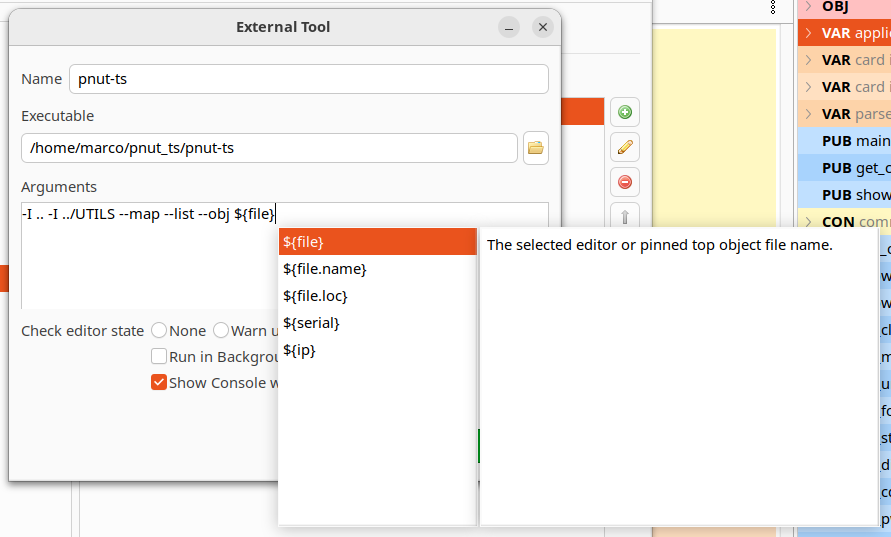
Also added run in background and show console when run options.
Run in background runs the program without capturing the output to the console.
Show console simply doesn't open the console view, the output is still captured and can be seen by toggling the console view.
Added option to search from top or cursor to the search dialog:
Some more fixes for the PST terminal emulation on both the command-line and IDE terminal.
The Linux and Windows launchers now also configure the console to work more like a terminal, disabling the line input mode and some other things. Running the terminal from the command-line compiler should now work much better.
Implemented the OFFSETOF function from the latest PNut release.
On open, the IDE now switches to the last selected editor tab instead of the first.
Thank you, Marco!
Does this mean we can do command line activities through the console?
I'm not sure to understant, let me explain better what was changed.
That change is related to the spinc command line compiler, when entering the terminal mode after upload (with the -T or -t parameter), the original Linux or Windows console mode was retained like the line input mode (you need to press the ENTER key to actually send something to the Propeller). Now the launcher executable configure the Linux or Windows console to disable the line input mode (and some other flags) so typed characters are sent immediately.
This only affects the command line compiler, the IDE still works as before.
@macca Can prop-tool.exe be called from the command line to program the P2? The log facility when debug is called is ideal for a project I am working on.
Nevermind. I just found spinc.exe
Thanks. I misunderstood.
I don't know if I ever asked for this, but I will now in case I haven't. I've seen in a couple editors (e.g., Thonny) the ability to select a bunch of lines and then comment them out, or remove the comment so they're back. This seems to work by looking at the first character of each line; if it's not a comment character it makes it a comment character (apostrophe in our case). If the first character is a comment character, it changes it to a space. Could we have something like that in Spin Tools?
@macca I almost have want I want with spinc.exe Is it possible to have spinc.exe (or an external program) log to a file the same way that the GUI does for debug?
Nevermind. I had Claud build a debugger for the P2 so it can directly receive debug data. I am having Claude Code program the P2 with spinc.exe with debug enabled. I will share with others in the "AI Tools and Techniques" very soon. Currently only works with Powershell, because it is a built in tool on Windows. I am sure a python version will be available if anyone else find this useful.
https://forums.parallax.com/discussion/178056/claudedebug-for-spin-tools
I see you found a solution, however I would like to give some suggestions for a more portable solution.
You end the debug log with debug("TEST_DONE"), sometime ago PNut introduced the DEBUG_END_SESSION flag to signal receivers that the debug has ended, if you use debug(DEBUG_END_SESSION), the spinc terminal mode will exit after receiving the code (it is translated to ESC CR LF).
spinc doesn't have a way to log to a file, however you can always redirect the output.
With the above change, you can compile, upload, switch to terminal mode, redirect to a file and exit when done automatically.
spinc -p /dev/ttyUSB0 -d -r -t 2000000 MyTest.spin2 >debug.logThen you need a script to generate the json data from the log (it includes all compiler output so you need some filtering).
On Linux you can also use tee to log to a file and see the output on the terminal, if that matters, don't know if Windows has something like that.
spinc -p /dev/ttyUSB0 -d -r -t 2000000 MyTest.spin2 | tee debug.logI may add some log file options to help automations, I see that these AI tools are becoming popular among Propeller users.
Would like to know more about the included C compiler for P2…. Is it complete? Work in progress? Compatible with some standard like C89? Maybe there is some documentation on this but didn’t find it yet…
It is a work in progress, though I haven't had much time to work on it lately, and it is far from complete.
There is only one example in the examples/P2 folder, i2c_scanner.c that gives an idea of how to use it with spin objects.
It is basically a spin compiler with C syntax, it produces standard spin bytecodes for both P1 and P2.
@macca Ok thanks. I thought maybe bytecode was an option because seeing two versions of stuff in Github, but think you are saying it is all bytecode. Thanks for the info.
I thought the -T would launch a terminal so I didn't try it. I haven't tested but it looks like it does exactly what I needed, redirect debug to STDOUT.
Well, at least I learned how to vibe code a debugger! I will give this a try. What you have here is really the ideal solution. Thank you!
Question.
I have looked all over the preferences and wherever I can to find out how to not have Spin Tools IDE open old files that were closed. Where is that preference button?
Thanks
@macca That worked fantastically. I have built a markdown file people can reference in their project folder that instructs Claude Code on how to do a build-upload-debug pipeline with spinc. I used part of your message above to tell Claude how to end a debug session and it has instruction on how to seek and destroy a spinc.exe that may have the port tied up.
Before I share it, is there a way for spinc.exe to automatically search and find the P2's com port?
Added a script that will search for the com port with a P2 attached. It is a part of the project now.
There isn't a button for that, I added the preference flag and forgot to add the button in the preferences dialog... will add in the next bugfix release.
@macca
Thanks.
I thought I was going nuts.

Released version 0.54.1
Bugfix release, including the missing option to restore the open editors (in Preferences -> Editor -> Restore editor state on startup).
PAsm instruction fixes
Added restore editor state on startup setting
Thank you, Marco.
@macca
An editor feature request...
To help with reformatting code, where there are leading TABS and/or leading spaces, could double-click selecting work more like other code editors (at least the ones I use as a MacOS guy )? Instead of selecting all of the leading tabs/spaces as well as the first word of text, could the selection take up single tabs or any sequential spaces and not the first word of text? I often copy code from examples off the internet and tabbing & spaces used for indentation are not formatted in a style that conforms to the style I use. It is difficult to select just the leading tabs & spaces with a double-click.
I've attached a zipped mp4 of how this editing action works in the MacOS TextEdit app which is a simple example of how every (on a Mac) editor app allows double-click selection of leading tab/spaces.
Current Spin Tools TAB select:
Thank for your consideration,
dgately
+1 from JonnyMac
FWIW, I tried two editors in Windows: EditPlus and Notepad. Double-clicking leading whitespace selected all of the whitespace (tabs, spaces, combination) at the head of a line.
In the Windows version of Spin Tools double-clicking the leading whitespace selects the whitspace plus some alphas. Triple-clicking selects the whole line (expected).
Exactly, the standard behaviour of the UI widget I'm using for text editing is to select a word with the double click (and it means all whitespaces before that), if you double-click, hold the button down and drag the mouse, it selects words instead of single characters. Altering this behaviour is complicated as it is handled internally by the widget.
I can disable the internal handling but this seems to have consequences that are even more complicated to handle, I mean, I can easily double-click to select a tab space (like in the Mac example) or a word, but that's all, if I double-click and hold the button I can't select the next word, the selection is handled by the widget with the standard character selection.
I think the only solution is to modify the widget itself which I would prefer to avoid since it is part of SWT and may have several internal dependencies.
It's too bad the SWT widget behaves in that manner when most editors I've encountered allow the selection of whitespace ahead of a line. The drag-to-increase-the-selection-size was something I didn't know about. Unfortunately, dragging to the left doesn't deselect the first word when one had double-clicked the whitespace.
My sentiments, exactly... Odd that the SWT works that way. Researching a bit, I found that the intention is to make up for the user mistakenly clicking away from the desired text. The widget thinks it knows better than the user
Oh well.
dgately
😖
I agree with Marco, though, that it's probably not a good idea to "fix" the SWT edit widget as that could lead to other complications.
I have the same opinion after researching how one might "fix" the issue...
dgately
@macca I think I may have found a bug where spin-tools is treating definitions differently than some of the other compilers. If I add the
#pragma exportdef SD_INCLUDE_DEFRAGin the top file or#define SD_INCLUDE_DEFRAGin the SD object file, something gets fouled up in the compile resulting in unexpected behavior. (SD card won't mount) This bug does not exist when using PNUT v53, however I must#define SD_INCLUDE_DEFRAGin the SD object file, because PNUT doesn't deal with#pragma exportdef SD_INCLUDE_DEFRAGproperly from what I can tell.If I remove the ifdefs around all of the code for SD_INCLUDE_DEFRAG, spin-tools compiles and operates correctly.
With Spin Tools, #define and #pragma exportdef are equivalent, you can use one or the other with the same effect, both are propagated to child objects.
The problem here is due to how Spin Tools handles the preprocessor as it is isn't really a pre-processor:
#ifdef SD_INCLUDE_DEFRAG if (cur_cmd >= CMD_NEWDIR and cur_cmd <= CMD_MOVEFILE) or (cur_cmd >= CMD_OPEN_READ and cur_cmd <= CMD_SET_VOL_LABEL) or (cur_cmd >= CMD_CREATE_CONTIGUOUS and cur_cmd <= CMD_FILE_FRAGMENTS) #else if (cur_cmd >= CMD_NEWDIR and cur_cmd <= CMD_MOVEFILE) or (cur_cmd >= CMD_OPEN_READ and cur_cmd <= CMD_SET_VOL_LABEL) #endif if driver_mode <> MODE_FILESYSTEMThe code above, for example, is not handled correctly and doesn't produce the desired effect.
I'm already working on a better parser but this will take some time.
For now, the only workaroud is what you have already found, remove the #ifdefs around the code for SD_INCLUDE_DEFRAG.
I'm not sure if the combination of other options may cause similar problems, as far as I can tell, they are around whole methods, that works without problems.
Thanks @macca ! I will do that as a workaround. I got Claude to whip up a standalone preprocessor in C#.NET and that worked out just fine.
I don't know much about Linux: I installed Spin Tools IDE 0.54.1 on Linux Mint, following the instructions on Macca's website:-
1. Can edit SPIN2 files in Spin Tools
2. 'Show Devices' identifies my P2 Eval board on /dev/ttyUSB0
3. I can interact with Taqoz in the Serial Terminal
4. A program with some debug statements, which ran under Windows Spin Tools, appears to load to the P2EVAL, but produces no debug results in the debug window. Other programs which opened graphical debug windows in Windows do not do so in Linux Mint. When compiling the blue lights flash on the P2 Eval briefly, as though the code is uploading.
I'd appreciate any advice on how to fix this, please. (Still using Win10, but have dual booted Linux Mint as a precaution)