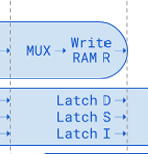
Ok, those diagrams on page 18/19 of this Hardware Manual are indeed confusing (or wrong?), because you can use a register, which has just been written back.
In my example about detecting birds, for example 5% false results are not a big problem. In my opinion such level of false information is not at all acceptable for a microcontroller document, because false information can easily cost hours or days for Parallax customers. So I am wondering, if AI can be forced to double check somehow.
There is never ever a fixed 2-cycle stall on anything. Hub/CORDIC stalls are variable length. (technically long instructions like MIXPIX could also be considered a pipe stall, but that's not really a good way to think of it).
Dumbass bot is regurgitating info related to old-style RISC processors, which do have register hazards like that (the good ones, anyways, the bad ones just let you read the stale register)
I remain validated in my assertion that this is all a really terrible idea.
second generation of the P2 Knowledge Base AI tools. Some of you tried the first generation — downloadable scripts that gave Claude access to P2 documentation. They worked, but were clunky to set up and performance-limited.
This new version, P2KB MCP, is a complete rewrite as a proper MCP server (Model Context Protocol). It's faster and easier to install, and it works with Claude, Cursor, and OpenAI Codex — not just Claude anymore.
What Does It Do?
Once installed, your AI assistant has direct access to the full Propeller 2 Knowledge Base and the OBEX. Just ask questions in plain English:
"Explain the MOV instruction — what flags does it affect?"
"How do I use PINSTART to configure a Smart Pin?"
"Find me an OBEX object for driving WS2812B LEDs."
"What's the difference between RDLONG and RDLUT?"
Your AI becomes an interactive reference manual for PASM2 instructions, Spin2 methods, P2 hardware architecture, and community code objects. Reduce your digging through PDFs — just ask.
Pair Programming with PNut-TS, PNut-Term-TS
If you also have PNut-TS and PNut-Term-TS installed, it goes much further. Your AI becomes a pair programmer that can write code, compile it, download to your P2, read the debug output, and iterate until it works — autonomously.
Real example workflow:
You hand your AI a datasheet for a new sensor
It researches the interface options and maps them against P2 capabilities
It produces an architecture plan showing which P2 features to use and what performance to expect
You wire up the hardware and tell the AI which pins you used
It writes the driver, compiles, downloads to the P2, and validates against real hardware
PNut-Term-TS even has a headless mode designed specifically for AI agents — the AI can run a compile-download-test-fix cycle without any GUI, reading debug output from a log file and iterating until everything passes.
What's New vs. the First Generation?
First Gen (Scripts)
Second Gen (MCP)
Setup
Download scripts, configure manually
Install binary, run one command
Performance
Scripts parsed on every query
Compiled server with local caching
AI Support
Claude only
Claude, Cursor, Codex
Platforms
macOS/Linux
Windows, macOS, Linux (all architectures)
OBEX
Available, you still had to unpack
Full OBEX search, browsing, selection, then download and unpack ready for reference
If you run into problems, please open an issue on GitHub. Include your platform (Windows/macOS/Linux), which AI tool you're using, and what happened.
I'm using these tools and the P2KB every day. If my agents are not understanding something, P2, I identify the lack of connection between concepts, missing discussion of concepts, or, much less frequently now, incorrect or conflicting information. As these are found, I immediately update the P2KB. With this new P2KB MCP, you always have access to the most recent updates or adjustments!
If you have ideas for what else should be in the Knowledge Base, I'd love to hear that too.
Give it a try and let me know how it works for you!
You hand your AI a datasheet for a new sensor
It researches the interface options and maps them against P2 capabilities
It produces an architecture plan showing which P2 features to use and what performance to expect
You wire up the hardware and tell the AI which pins you used
It writes the driver, compiles, downloads to the P2, and validates against real hardware"
I need a driver for P2 Flex which configures that camera for qvga, greyscale, automatic exposure. Then i want to have a function, which starts to capture a single picture into an array of bytes. Getpic(address)
Display it via debug in an example program. Pins on a private bus with 1bit interface starting from pinC= 16.
I need a driver that really works, not something, that only looks like it was fine.
@Wuerfel_21 said:
There is never ever a fixed 2-cycle stall on anything. Hub/CORDIC stalls are variable length. (technically long instructions like MIXPIX could also be considered a pipe stall, but that's not really a good way to think of it).
Dumbass bot is regurgitating info related to old-style RISC processors, which do have register hazards like that (the good ones, anyways, the bad ones just let you read the stale register)
I remain validated in my assertion that this is all a really terrible idea.
Us as well. We are having some extremely heavy meetings about the future of NAVCOM 2.0 right now.


Comments
Ok, those diagrams on page 18/19 of this Hardware Manual are indeed confusing (or wrong?), because you can use a register, which has just been written back.
In my example about detecting birds, for example 5% false results are not a big problem. In my opinion such level of false information is not at all acceptable for a microcontroller document, because false information can easily cost hours or days for Parallax customers. So I am wondering, if AI can be forced to double check somehow.
There is never ever a fixed 2-cycle stall on anything. Hub/CORDIC stalls are variable length. (technically long instructions like MIXPIX could also be considered a pipe stall, but that's not really a good way to think of it).
Dumbass bot is regurgitating info related to old-style RISC processors, which do have register hazards like that (the good ones, anyways, the bad ones just let you read the stale register)
I remain validated in my assertion that this is all a really terrible idea.
NEW
second generation of the P2 Knowledge Base AI tools. Some of you tried the first generation — downloadable scripts that gave Claude access to P2 documentation. They worked, but were clunky to set up and performance-limited.
This new version, P2KB MCP, is a complete rewrite as a proper MCP server (Model Context Protocol). It's faster and easier to install, and it works with Claude, Cursor, and OpenAI Codex — not just Claude anymore.
What Does It Do?
Once installed, your AI assistant has direct access to the full Propeller 2 Knowledge Base and the OBEX. Just ask questions in plain English:
Your AI becomes an interactive reference manual for PASM2 instructions, Spin2 methods, P2 hardware architecture, and community code objects. Reduce your digging through PDFs — just ask.
Pair Programming with PNut-TS, PNut-Term-TS
If you also have PNut-TS and PNut-Term-TS installed, it goes much further. Your AI becomes a pair programmer that can write code, compile it, download to your P2, read the debug output, and iterate until it works — autonomously.
Real example workflow:
PNut-Term-TS even has a headless mode designed specifically for AI agents — the AI can run a compile-download-test-fix cycle without any GUI, reading debug output from a log file and iterating until everything passes.
What's New vs. the First Generation?
Getting Started
Current version: v1.3.3
Each guide has platform-specific instructions — Windows, macOS, and Linux are all covered.
Links
Feedback Welcome
If you run into problems, please open an issue on GitHub. Include your platform (Windows/macOS/Linux), which AI tool you're using, and what happened.
I'm using these tools and the P2KB every day. If my agents are not understanding something, P2, I identify the lack of connection between concepts, missing discussion of concepts, or, much less frequently now, incorrect or conflicting information. As these are found, I immediately update the P2KB. With this new P2KB MCP, you always have access to the most recent updates or adjustments!
If you have ideas for what else should be in the Knowledge Base, I'd love to hear that too.
Give it a try and let me know how it works for you!
"Real example workflow:
You hand your AI a datasheet for a new sensor
It researches the interface options and maps them against P2 capabilities
It produces an architecture plan showing which P2 features to use and what performance to expect
You wire up the hardware and tell the AI which pins you used
It writes the driver, compiles, downloads to the P2, and validates against real hardware"
Well, if your tool can really do this, then convince me:
Here I asked about a little camera. https://forums.parallax.com/discussion/178007/camera-with-1bit-interface-for-p2#latest
I need a driver for P2 Flex which configures that camera for qvga, greyscale, automatic exposure. Then i want to have a function, which starts to capture a single picture into an array of bytes. Getpic(address)
Display it via debug in an example program. Pins on a private bus with 1bit interface starting from pinC= 16.
I need a driver that really works, not something, that only looks like it was fine.
Thank you!
Us as well. We are having some extremely heavy meetings about the future of NAVCOM 2.0 right now.