@Rayman said:
How does that work? Does the Wiznet ask the device for a preferred name?
And then, everybody can address each other by name?
The names have to be in the .local domain, but yes, if you have a nameresolver that supports MDNS, you can connect to other devices with the hostname. Windows will even go to just a short name. I don't know if other resolvers do that.
How it works in this instance:
I configure socket 4 on the W6100 to join the multicast group : 01:00:5E:00:00:FB
I configure the socket to have a destination IP of 224.0.0.251
I configure the destination port to be 5353
I open the socket. It joins the multicast group and listens for UDP traffic destined for 224.0.0.251 on port 5353.
In the webserver, when I am waiting for a connect, if none is detected, I execute a method to check if there is any data waiting on socket 4. If there is, I validate if it a MDNS query. If it isn't, I return. I then check to see of the queried hostname matches my own. If it doesn't, I return. If it does, I send an MDNS announcement via socket 4 with my IP address. The remote machine receives this query and then caches the IP address for the name in its resolver.
I currently do not do service announcements and I am not sure if there is value in doing that.
It's working! (of course...)
Just changed uSD pins to match this hardware, changed MAC to avoid having a duplicate with W6100 already on network, and also incremented IP address for same reason.
       'Configure Mac Address
  MACADDRESS[0] := $00 'wiznet don't change
  MACADDRESS[1] := $08 'wiznet don't change
  MACADDRESS[2] := $DC 'wiznet don't change
  MACADDRESS[3] := $00
  MACADDRESS[4] := $00
  MACADDRESS[5] := $02  'RJA changing

  ' Set IP Address. Set to 0.0.0.0 for DHCP
  IPADDRESS[0] := 192'0
  IPADDRESS[1] := 168
  IPADDRESS[2] := 1'0'137
  IPADDRESS[3] := 3'2'150  'RJA avoiding W6100 device

  ' Set Subnet Mask. Set to 0.0.0.0 for DHCP
  SUBNETMASK[0] := 255
  SUBNETMASK[1] := 255
  SUBNETMASK[2] := 255
  SUBNETMASK[3] := 0

' Set Gateway Address. Set to 0.0.0.0 for DHCP
  GATEWAY[0] := 192
  GATEWAY[1] := 168
  GATEWAY[2] := 1'0'137
  GATEWAY[3] := 1'10'1

' Set DNS Server Address. Set to 0.0.0.0 for DHCP
  DNS[0] := 192'8
  DNS[1] := 168'8
  DNS[2] := 1'8
  DNS[3] := 1'8
I have not folded the MDNS changes into the SpinnerEdge 2 / W6300 code yet, however, I have incorporated the new SD object by @"Stephen Moraco" and used Claude to implement the taskswitching and structure features that @cgracey added to spin2.
The combination of these features allows for robust performance of a webserver from a microcontroller.
The new SD object allows for multiple files to be open and makes reference to them via a handle. The taskswitching allows for individual pseudo threads to be created to handle multiple http requests and switch between those tasks when an appropriate objective inside the code is achieved. The usage of structures makes this simple as any buffers and bookkeeping that need to be segregated for an individual task are placed in structures and indexed by the taskid. In other words, Task 2 knows where it's own in-buffer, out-buffer, maximum segment size, packet size, filename requested, etc are by referencing the structure with it's own taskid.
This resulted in an almost 130% latency difference, where it would take about 600ms to load a webpage serially, that number dropped to 128ms when multiple requests could be serviced concurrently. This is expected behavior because during short requests via TCP, the 3way TCP handshake can be the most latent part of the exchange. Performing this simultaneously greatly reduces the latency. Additionally, up to three files can be downloaded at the same time whereas before, all other requests would have been blocking because only 1 TCP socket was assigned to service requests on port 80.
I will be backporting the MDNS to this code and all of these recent changes into the code for the original Spinner Edge based on the W6100. I hope to combine Top files for both the W6100 and W6300 into a single repo along with the W6300 and W6100 drivers.


Comments
The names have to be in the .local domain, but yes, if you have a nameresolver that supports MDNS, you can connect to other devices with the hostname. Windows will even go to just a short name. I don't know if other resolvers do that.
How it works in this instance:
I configure socket 4 on the W6100 to join the multicast group : 01:00:5E:00:00:FB
I configure the socket to have a destination IP of 224.0.0.251
I configure the destination port to be 5353
I open the socket. It joins the multicast group and listens for UDP traffic destined for 224.0.0.251 on port 5353.
In the webserver, when I am waiting for a connect, if none is detected, I execute a method to check if there is any data waiting on socket 4. If there is, I validate if it a MDNS query. If it isn't, I return. I then check to see of the queried hostname matches my own. If it doesn't, I return. If it does, I send an MDNS announcement via socket 4 with my IP address. The remote machine receives this query and then caches the IP address for the name in its resolver.
I currently do not do service announcements and I am not sure if there is value in doing that.
@ke4pjw does the new chip offer any advantages in 1-bit mode?
I’m a bit delayed in testing your board due to water leak and heating failure where it is, but will get on it soon.
It requires 3 less pins than quad mode. It's kind of nice that you can do 1, 2, or 4 pins modes with software.
Let me know how it works for you.
--Terry
@ke4pjw Testing it now...
First thing is that this only seems to work in Spin Tools IDE, is this right?
Also, if there's no uSD inserted, the code just appears to hang
Maybe good time to switch to the @"Stephen Moraco" uSD driver?
It's working! (of course...)
Just changed uSD pins to match this hardware, changed MAC to avoid having a duplicate with W6100 already on network, and also incremented IP address for same reason.
This was even easier than with W6100. There was something keeping the web server from working correctly there, but code seems all good now.
Thanks!
I have not folded the MDNS changes into the SpinnerEdge 2 / W6300 code yet, however, I have incorporated the new SD object by @"Stephen Moraco" and used Claude to implement the taskswitching and structure features that @cgracey added to spin2.
The combination of these features allows for robust performance of a webserver from a microcontroller.
The new SD object allows for multiple files to be open and makes reference to them via a handle. The taskswitching allows for individual pseudo threads to be created to handle multiple http requests and switch between those tasks when an appropriate objective inside the code is achieved. The usage of structures makes this simple as any buffers and bookkeeping that need to be segregated for an individual task are placed in structures and indexed by the taskid. In other words, Task 2 knows where it's own in-buffer, out-buffer, maximum segment size, packet size, filename requested, etc are by referencing the structure with it's own taskid.
This resulted in an almost 130% latency difference, where it would take about 600ms to load a webpage serially, that number dropped to 128ms when multiple requests could be serviced concurrently. This is expected behavior because during short requests via TCP, the 3way TCP handshake can be the most latent part of the exchange. Performing this simultaneously greatly reduces the latency. Additionally, up to three files can be downloaded at the same time whereas before, all other requests would have been blocking because only 1 TCP socket was assigned to service requests on port 80.
Single Task
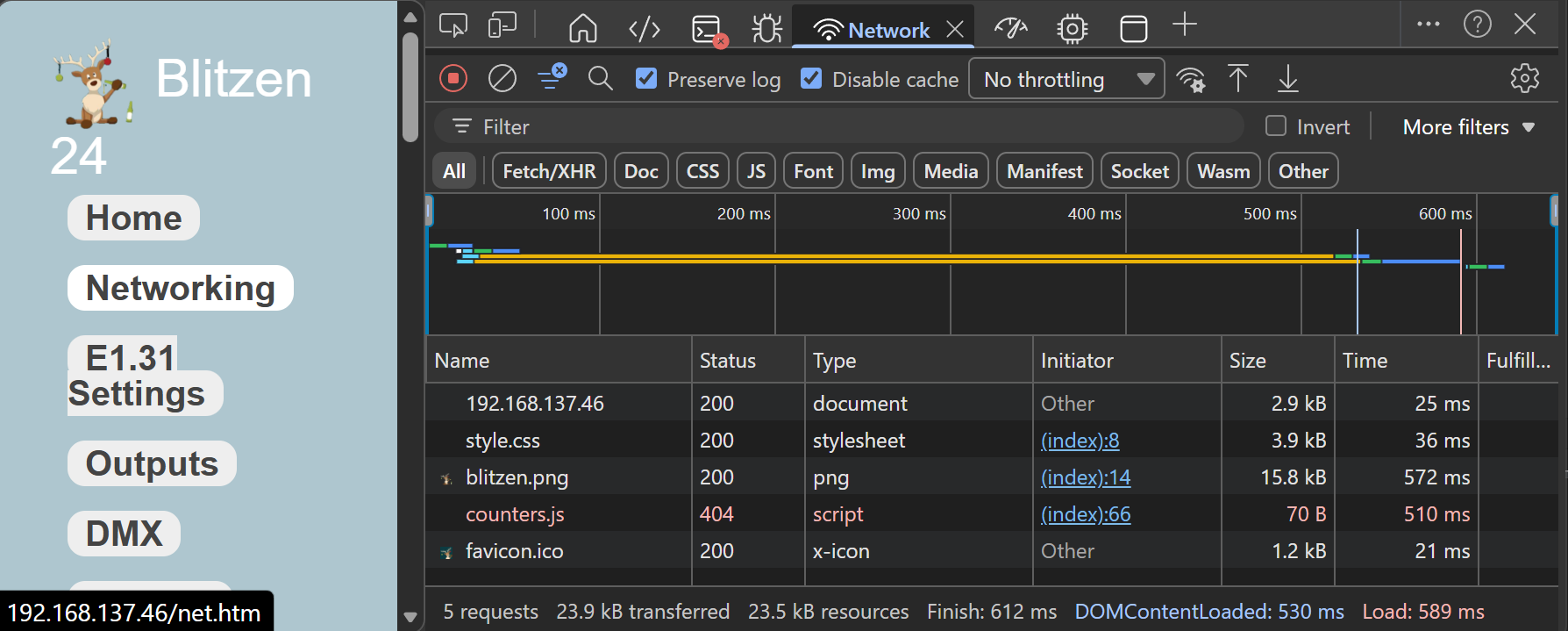
Multi Task
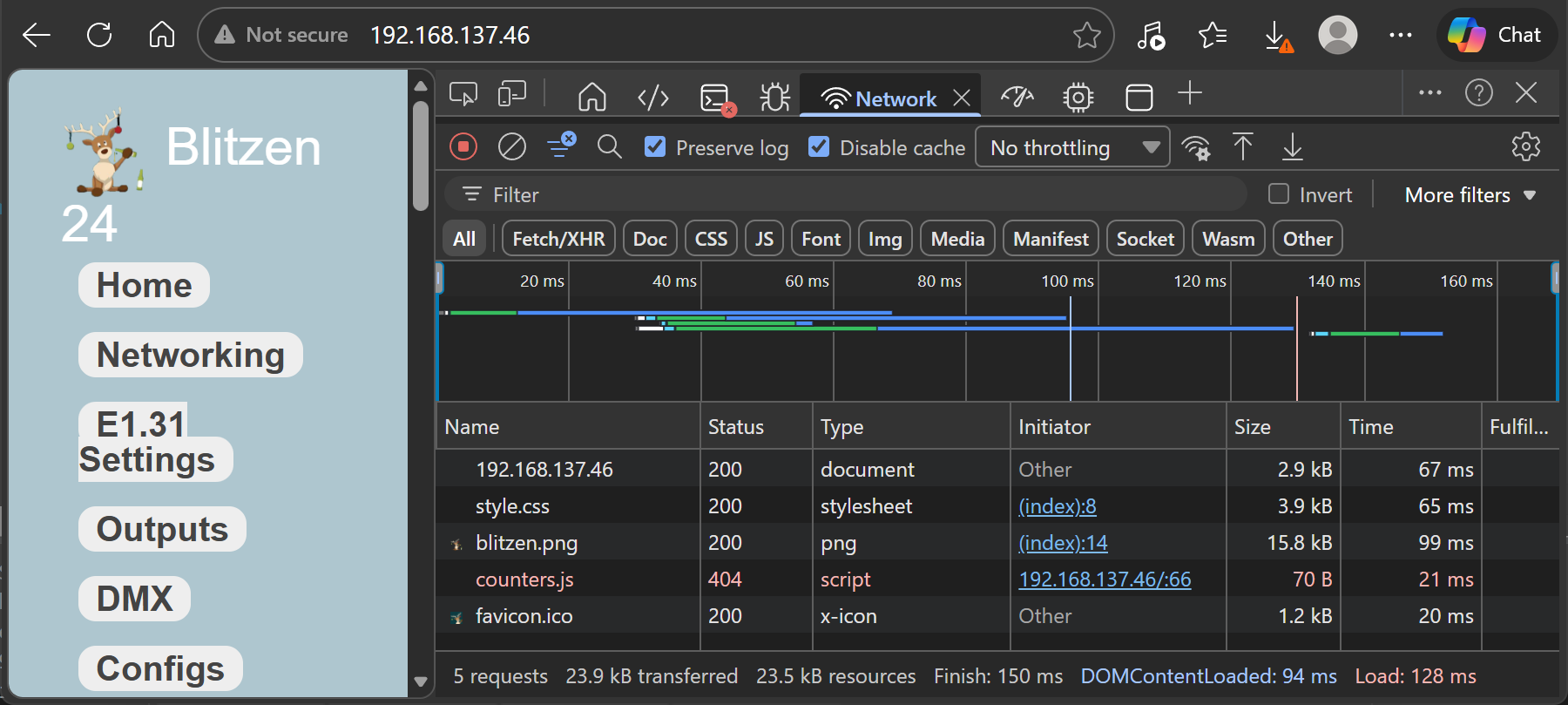
You can see the code differences here.
https://griswoldfx.visualstudio.com/_git/Spinner Edge II?path=/SpinnerEdge_Top.spin2&version=GBmain&_a=compare
And current code is located in the Spinner Edge II repo: https://griswoldfx.visualstudio.com/Spinner Edge II
I will be backporting the MDNS to this code and all of these recent changes into the code for the original Spinner Edge based on the W6100. I hope to combine Top files for both the W6100 and W6300 into a single repo along with the W6300 and W6100 drivers.