

Clearing ram and eeprom
 pilot0315
Posts: 990
pilot0315
Posts: 990
in Propeller 1
On the wx board or the earlier activity board. Any body have a problem with
clearing the ram and eeprom with Prop tool or spin tools IDE?
Thanks.
Martin
I have to unplug power and usb then restart from scratch.
Weird
Comments
Wait this is P1. Should be pretty solid …
Sometimes PST can capture the port though…
@Rayman
@jeromelab
I am using a PCA9685 to run mg995r servos that use 5 v signal which the p1 does
not provide. When I reset or turn off the p1 and turn the P1 back on no code loaded
the pca9685 continues to run.
This is weird. Do you have any experience with this board?
Thanks
I looked and did not see an eeprom on the pca. That is the only thing I could
think of.
Martin
But when I run parallax servos off of the P1 boards and reset or shut off every thing needs
to be reloaded as usual.
Did you download your program with F11? That would put it into the EEPROM which will auto-load next time the P1 resets.
I use this to wipe the P1 EEPROM. Yes, this is the entire program -- nothing else is needed.
pub main

  repeat
    waitcnt(0)
This needs to be downloaded with F11 for the EEPROM to be cleared. After that, running experiments with F10 will leave the EEPROM (and IO configuration) clear after subsequent resets.
Here's the F8 memory map that shows that other than the harmless repeat loop, the EE is clear.
@pilot0315 does sound like you are booting with eeprom, which is why things are still happening…
Almost seems like there should be a “clear eeprom” menu option …
Was hoping to add an custom tool to Spin Tools but spinc.exe doesn't work as a loader for pre-compiled code (I will verify with Marco). Maybe the loader from FlexProp could be used.
Do wonder if there is a slight difference between minimal program in eeprom and no program in eeprom…
Maybe the later will wait longer for serial or something?
Having an empty program works, too. I downloaded this to EEPROM and then tried to load another program to RAM. Everything was fine.
Spin Tools and Propeller Tool produce the same output for blank program. The nice thing about Spin Tools is the built-in list file display
The reason the empty program works has to do with those mysterious F9 and FF bytes past the end of the program. These are the initial stack frame for the main method. When it returns, it returns to $FFF9 in ROM, which contains the bytecodes for
cogstop(cogid)Think a really empty eeprom will read all $ff
A factory-fresh or erased EE is, yes (all $FF). Since the P1 loads the EE into RAM, it clears everything to $00 so that variables have no value when the program starts.
The attached program "erases" the EEPROM. Most P1 devices from Parallax user the 64K EE so that's the object I used. When I run (from RAM) I get.
This uses a PASM cog for I2C to make it as fast as possible. In this case, it erases the entire 64K EE on the FLiP in about 4 seconds (takes about 30 seconds with Spin I2C).
I pressed the reset button on the board, then tried to download a new program. As expected, no problem. In our laser tag devices we sometimes run an erase on the upper EE to force the next version of the program to rebuild the non-volatile data space (that isn't modified during a P1 download to EE) -- I'm going through that now with a game piece.
In another thread I asked Marco about adding a loader function for an existing binary to spinc.exe. He says he'll do that. It will simplify running EE/Flash erase programs from the Tools menu. I think this is the most flexible option versus adding it as a feature to Spin Tools. Doing it externally, we have control over what part of the P1 EEPROM or P2 Flash gets erased.
@Rayman
@Wuerfel_21
Here is all of the code. Came from the obex.
https://obex.parallax.com/obex/adafruit-16-channels-servo-driver-pca9685/
I made some changes by adding each of the channels.
One servo works then stops then another starts. channel 4 starts then stops then 3 then occaisionally 2 but my scope is on channel
1 and I am getting the appropriate signals.Still with channel 1 signal on scope then all the others stop.
Using external power at 5-6 volts.
When I test with regular parallax servos using parallax code, no issues with ram or eeprom.
Loaded blank program to each no issues.
Gonna solder up another adafruit board and test.
Thanks
@pilot0315 External power is very good. Servos are notorious power daemons that can cause all sorts of problems...
@Rayman
@Wuerfel_21
@macca
I hope marco maccaferri sees this.
There is something with the code to run the PCA 96685 that does not want to go away.
Again if I use any other code for example to run a servo directly off of the wx board or activity board no issues.
Ram and EEPROM are cleared.
Sent code to RAM, cleared RAM regular servo no issue. with the PCA board it reloads.
Also interesting shut the power on the wx or activity off and the regular servo continues to run. Have to unplug the usb port to either wx or activity to clear it. Brown out does not work either servo turns with power off, only unplugging usb clears everything. Then servos are using external power. Board is off, external power on parallax servo turns. Turn off external power, servo stops, turn external power back on servo turns board is off.
Spin tools ide
Still sounds like power problem…
Maybe WX power switch should be in the 1 position?
I have verified your code compiled with openspin, that is my reference, and it matches perfectly with the code generated by Spin Tools, except the strings with the degree symbol that have an extra character due to the conversion to UTF-8. So whatever happens is not due to the generated code, for what I can see. The loader is pretty standard, I don't see differences with what others are using.
That said, I did a quick look at the P1 ROM, the loader clears all longs after the program code so all variables (and all extra ram not used by the program) are initialized to 0, I'm not sure what happens when you run the empty code without the return, I think it is always good to place a repeat statement in that case.
I don't have experience with servos and driver interfaces, however, I see that the driver is programmed via I2C, while the parallax code drives the PWM on its own (if I'm not wrong), are you sure that the command doesn't survive a reset ?
I mean, the P1 is reset when you upload a program or press the reset button, so any PWM code is also reset, but what happens to the state of the driver ? Maybe it continue to execute the last command issued, I don't know.
Other than that, I don't know what to say, I'm here if you need futher help.
@macca
Thank you for the reply.
I will be continuing to figure this out. Never had this issue before.
Weird. I knew it was not spin tools nore do I think it was propeller tool.
Will let you know if I ever figure it out. Could just be a "Ghost in the machine, I, Robot, Asimov"
There is some explanation somewhere.
Again thank you for your help.
Martin
The nice thing about being able to run from RAM is the opportunity to write a little program that dumps out the contents of the EE. I needed this for a gaming device that stores configuration in the upper 32K of the 64K EE (I always use 64K in my designs).
Here's my little explorer program in the EE
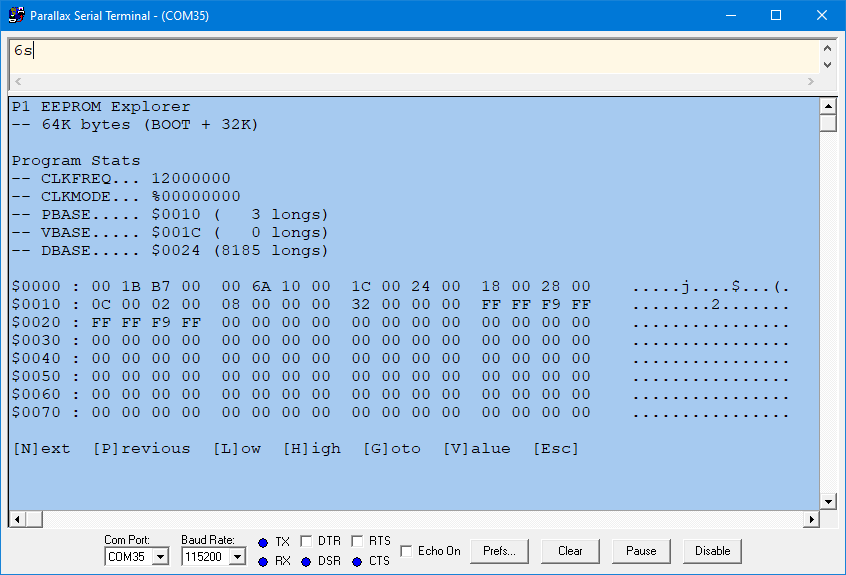
Moved code to this thread:
-- https://forums.parallax.com/discussion/178021/p1-eeprom-explorer/