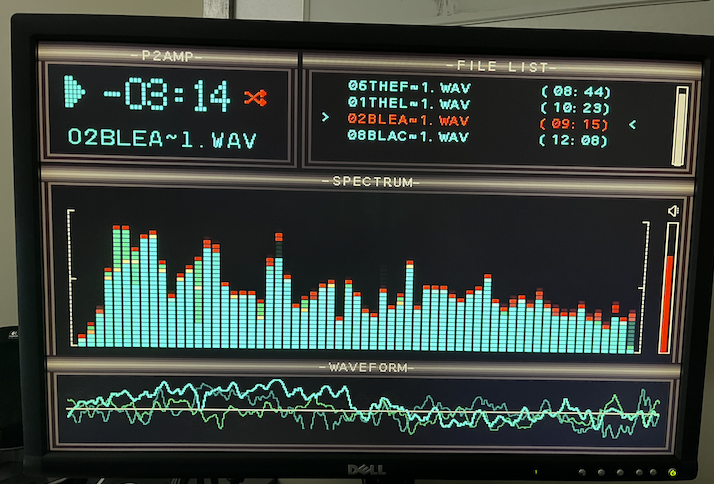
P2AMP - Wav Player with FFT Spectrum analyzer
 MXX
Posts: 25
MXX
Posts: 25
Dear All,
I would like to share with you a small project I worked on during Xmas holidays.
It's a simple wav player (Winamp Style) running on the P2 Thing + LCD 4.3" (480x272) display with a nice FFT real-time spectrum analyzer.
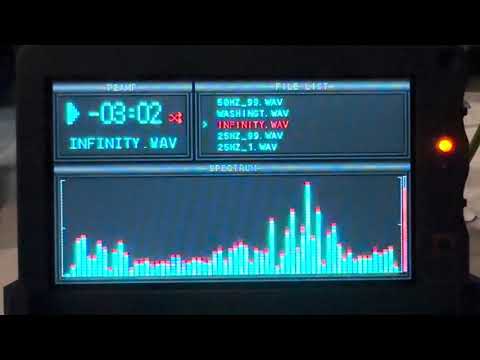
It includes:
- Paletted display driver to save hub memory (130 KB vs 390 KB with 256 colors 8 bit palette)
- Different Fonts directly loaded from simple bitmap images
- Wav player based on @Rayman code with some additions (like interactive volume control etc ..)
- FFT for spectrum analyzer including windowing (hanning, hammin, flat-top, rectangular etc ..) and all related calculations for graphical representation of the spectrum.
I implemented my own FFT working on 16 bit signed samples (to save some memory) on a 4096 samples window updated every 1024 samples (audio @ 44.1 kHz 16 bit stereo).
4096 samples window at 44.1 kHz allows a good resolution at lower frequencies (approx 11 Hz).
This works on 4 cogs: main program, FFT, wav player and LCD.
Credits @Rayman for the player and LCD driver.
I can share details if interested.
Comments
"interested"
are you kidding? that's brilliant.
Looking forward to seeing the code.
Dave
Nice!
Nice one!
(Also I think I forgot to thank you for the cookies - came on time this year)
Thanks Dave,
here is the whole source code, it compiles with FlexProp.
FFT object also woks with propeller tool / PNut.
Runs on our P2 board (The P2 Thing), can be adapted to run on other boards too by defining the correct pins.
Enjoy!
Very pretty. I wonder if the output screen could be easily ported to be run over a VGA or DVI output...? Pure doubling gives 960x544 which could fit within an XGA formatted output and look even better if resolution was correspondingly increased a bit vertically and horizontally to 512x384. Might need some changes to your driver or if it's just palettized it could use my video driver in palette mode. A 512x384 video mode only needs 192kB in 8 bit palette mode so it should all fit in the hub RAM.
Oh thanks so much for this.
Just looked at fft.spin and it written almost like a tutorial.
Always wanted to get my head around this and now I have something to chew on.
Thanks again
Dave
Thanks @rogloh, I always tried to figure out which VGA / HDMI / DVI would be better to use on P2 but I always feel a little lost.
Maybe yours is the way to go, could you provide your paletted VGA driver, please?
If I can draw lines and turn on pixels (fast enogh) I think I can quite easily port the code.
512x384 resolutions looks promising, we are actually updating the FFT drawing at about 40 fps.
Hi @MXX. The latest video driver can always be found here in the first post of this thread.
https://forums.parallax.com/discussion/170676/p2-dvi-vga-driver
I've made up a quick graphics demo for you in this attached zipfile using a 8 bit palette frame buffer and VGA output. You can make it output VGA or DVI and setup the pins you want in the CON section.
+1 for this one. Also, we have functional mp3 decoder available. Needs a cog but you have 4 of them still free.
Could this be expanded to play multiple wav files in sync, aka: multi-track player?
Thanks for the driver and sample code.
I'm trying to use your driver and noticed that would be great to have WSVGA 1024x600 resolution because is the best match to the current LCD resolution (480x272 doubled = 960x544) with small borders around.
If possible, I would need your help in adding WSVGA resolution / timings in the VGA driver.
Also I don't know how to enable the "doubling" in your driver.
Do you think is something that can be easily added?
Sure, although the aspect ratio would be off unless driving an LCD panel not a monitor.
Yes both things should already be doable and I believe I've even tested 1024x600 for some HDMI LCD I had in the past. But it's been quite a while since I've even messed around with my own p2videodrv and was trying to enable pixel doubling for you late last night but ran into some issues which I don't know if it was my own lack of remembering how exactly I had to set that up or some driver regression or problem I was encountering. Give me some time to look at it today....
BTW still no HDMI audio in big 26.
LOL, yeah. But at least I'm sort of working on P2 software again at the moment, so there's still hope . Last year was almost entirely HW focussed so I have to admit I got pretty rusty on P2 SW. Your HDMI compatible audio feature already works in my test build, needs that big final push to get that new updated release out which contains a bunch of other things as well - driver has been repartitioned into two.
Also just now I was able to figure out the problem with pixel doubling I had last night. My stupid mistake, I just needed to keep the line buffers sized to what is needed after pixel doubling happens, not before. This is some of the rustiness I mentioned above, when you leave things too long and start to forget the basics. I'll post the updated demo file for MXX here shortly once I figure out a 1024x600 resolution.
EDIT: attached update demo. Note: This shows how to create a custom resolution (in this case for stock 1024x768) with pixel doubling from 512x384. You'll need to update the values to get your display working with 1024x600 if you want that specifically. I don't have one to test right now. It should just be a matter to tweak the horizontal / vertical parameters for 600 lines such as hfp, hsync, hbp, vfp, vsync, vbp and lines to suit your display's timing requirements. If you don't know them then some experimentation might be required but a multisync VGA monitor is rather forgiving.
    ' create a custom video timing (eg. 1024x768)
    '                                 (  structaddr,pll,     freq,div,hpol,hfp,hsync,hbp,column,vpol,vfp,vsync,vbp,lines,brz,burst,cfreq)
    timing := video.createCustomTiming(@customTiming, 0, 260000000, 4,   0, 24,  136,160,1024/8,   0,  3,    6, 29,  768,  0,    0,    0)
EDIT2: I just found a potential Modeline online for running 512x300 over 1024x600:
Modeline: "1024x600_60.00" 50.00 1024 1072 1104 1344 600 603 607 635 -hsync -vsync
You may wish to try this timing out with the YSIZE set to 300 instead of 384. With this setting below I do set the display on my 24 inch Dell monitor but it's still slightly stretched due to not having an exact 16:10 ratio - and it's reporting incorrectly as 800x600 as well. I used a 51.2MHz pixel clock with the P2 running at 256MHz and a pixel clock divider of 5. Refresh rate is 60Hz.
CON YSIZE = 300 ... timing := video.createCustomTiming(@customTiming, 0, 256000000, 5, 0, 48, 32,240,1024/8, 0, 3, 4, 28, 600, 0, 0, 0)Thanks @rogloh, your demo did the job! I was able to port the player to VGA display @ 1024 x 600 and it looks pretty cool!
Also added the usb keyboard to control the player in case someone wants to try this on a different hardware.
Pin definitions for different hardware can be changed at the beginning of main.spin2 (VGA, USB, AUDIO, SD).
@Wuerfel_21 doesn't need to change them!
Arrows UP/DOWN select song, ENTER play, SPACE bar pause/resume, PageUP / PageDOWN volume.
Songs must be placed in the SD card root, WAV 44100 kHz 16 bit.
Enjoy your favourite songs !!
@tritonium glad you liked it. Yes FFT source code was written so that can be easily used.
@MXX very nice.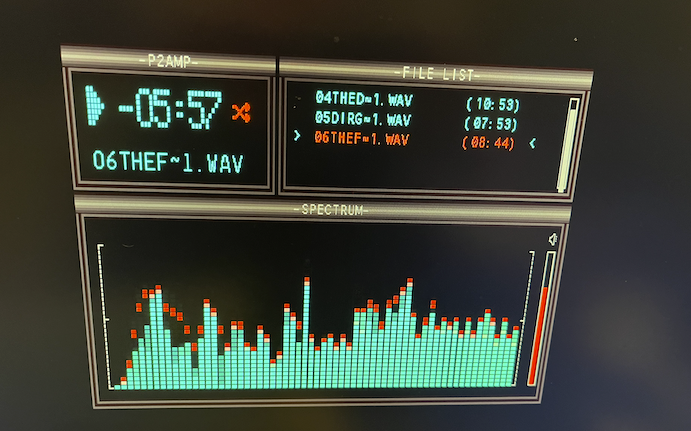
It didn't seem to work with flexspin 7.6.2 first time which I just updated. So looks like you used another toolchain.
I just got rid of the ABORT stuff in WavHeader.spin2 to use error return values instead and added the arguments to the C functions below in Folder.spin2, and ultimately got it working with flexspin with my own IO pin numbers. Fixes are in the attached zip. By the way the tabs and spaces mix generates a lot of warnings in Flexspin although it did seem to handle it.
        dir := c.OpenDir(path)
...
        c.CloseDir(dir)
Also if you want to draw it on a 1024x768 monitor with 512x300 pixel doubled framebuffer source and filling with 68 blank lines at the bottom to keep the aspect ratio clean and fonts less stretched on a VGA monitor, just use this in your VGA.spin2 file:
        timing := video.createCustomTiming(@customTiming, 0, 260000000, 4,   0, 24, 136,160,1024/8,   0,  3,    6, 29,  768,  0,    0,    0)
...
}                       video.initRegion( { setup a single text region as the display list
}                                      @region,        { region structure address in HUB RAM
}                                      video.LUT8,     { type of region is 8 bit palette graphics
}                                      600,              { size of region in scan lines (0=to end of screen)  <<<<---- change to 600 and it will blank remainder of the screen
}                                      flags,          { region specific flags (if enabled text flashes if BG colour > 7)
}                                      @palette,       { address of default palette to be used by region
}                                      0,              { address of default font to be used by this region
}                                      0,              { number of scan lines in font
}                                      ptrScreenBuffer,{ address of screen buffer in HUB RAM
}                                      0)              { link to next region, NULL = last region
If you didn't want the simultaneous LCD output you could possibly increase the file list window size to use this extra space. Also you could create a separate text region below the graphics for logging output if needed. You probably also want to set the same 260MHz clock in main.c for your player otherwise the music pitch could be a bit off.
UPDATE: Another possibility for the bottom 68 scan lines after doubling 300 pixels is to draw an oscilloscope waveform output of the signals - and using 64 pixel height for this is easy to quickly scale down to from the original 16 bit range without complex arithmetic. You could create another bitmap source for this region and flip between two framebuffer sources which you clear each time to get a rapidly updating waveform of 512 audio samples at a time (or 1kB for stereo). You could potentially even also make use of P2 LUMA modes and alpha blending with some fading phosphor effects too. Plus your FFT calculations may help you auto-scale/auto-range audio signals that are lower level to help fill the region range to make sure you see a waveform when things are quiet...
This is fantastic!!
@MXX I hacked up a quick proof of concept for an oscilloscope and added to your demo running 1024x768 output. It's probably better to dedicate a separate COG and get some other effects running. My simple dots are not as nice as real lines etc and there might be a nice way to setup triggering to try to align the waveforms more like a scope does rather than free run.
Note if you want to run this yourself some VGA IO pins are different and won't match yours. Also the remaining scan lines are actually 84 = (768-600)/2 when line doubled so you'd probably have space to name the subwindow like you do above it and still keep a 64 pixel vertical range.
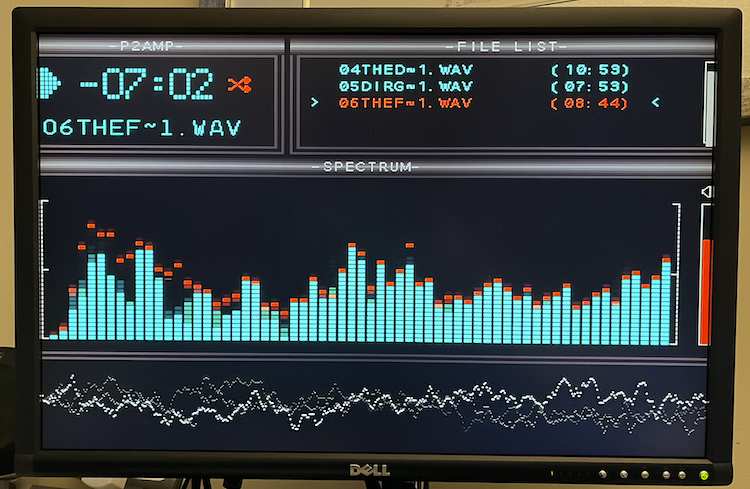
EDIT: Added waveform view at bottom of screen to demo.