

TM1637 Driver (Spin)
 JonnyMac
Posts: 9,787
JonnyMac
Posts: 9,787
Playing with the TM1638 caused me to try the '1637 as well. The attached demo code was tested on this display:
-- https://www.amazon.com/gp/product/B06WWN9Z6J
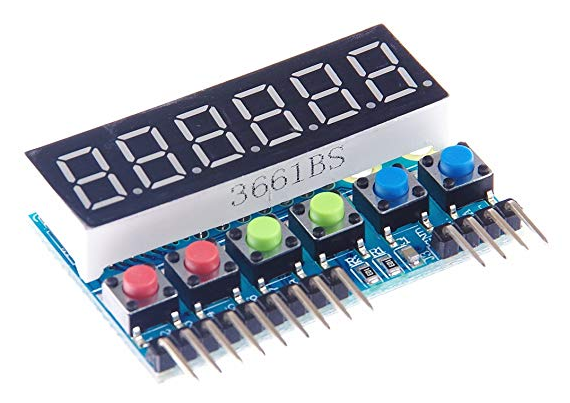
...but will work on 4-digit displays with decimal points. I don't know if it's a bad pcb design or I received a defective module, but the button input pins (9-pin header) do not work as expected; on one of the eight button inputs seems to be connected to the TM1637. In my button demo code I can see buttons 1-6 (onboard) and button 16; none of the others work. The TM1637 is designed to sense one-of-16 buttons.
07 DEC 2025 -- updated and str() method fixed
-- https://www.amazon.com/gp/product/B06WWN9Z6J
...but will work on 4-digit displays with decimal points. I don't know if it's a bad pcb design or I received a defective module, but the button input pins (9-pin header) do not work as expected; on one of the eight button inputs seems to be connected to the TM1637. In my button demo code I can see buttons 1-6 (onboard) and button 16; none of the others work. The TM1637 is designed to sense one-of-16 buttons.
07 DEC 2025 -- updated and str() method fixed
Comments
I also added a clock demo to the code for 4-digit displays that are configured 00:00.
That's a interesting display. I will order one in the New Year and try you code. Thanks for the code.
https://medium.com/@circuit4us/write-spin-code-for-tm1637-and-tm1638-part-i-f5568d2fe05b
Those modules do seem awfully expensive for a simple 6-digit LED display + buttons though.
BTW, you wouldn't want to see my Tachyon code for it, it's not complicated enough to be proper code
Agreed, but there are plenty of people who don't mind waiting a month for a cheap module from Ebay.
I wrote the objects for the TM163x chips as material for a book on Spin programming that I am writing.
the code must be so small, that I could not find it in your latest dropbox ...
or my search is not working correctly
@MJB I'm working outside of my Dropbox and I also don't have a display to check it on although it is easy to check the timing. This TM1637 is weird and you would think that it could have been a lot easier to communicate with in terms of "commands". One of the reasons that also contribute to the code being so small is because I don't try to have all these named methods, I just treat it as a character I/O device rather than have special methods just for strings and decimal point is set automatically within the previous character etc. Buttons come back as make and break characters too. So it just treats the TM1637 the same as if it were a physical serial character device which means there is no change to the application code. Even so the application only has to select the device with "TM" and PRINT" Hello World" anyway (in 7-seg "characters"). Printing "12.34" results in the decimal point being set for the previous "2".
Remember we did something like this for a 7-seg display you had once.
Here is the simple write function in Tachyon which could be made much simpler again but this version tries to bear some similarity to Jon's code simply as a comparison. I like to see where Tachyon can be improved, and these little exercises are good for that.
Tachyon code ( needs an active TMDLY to slow it down )
Original C Code (seems to leave last data bit bit not floating when clock is low in prep for ack)
uint8_t tm1637_write(uint8_t b) { uint8_t ackbit; for (uint8_t i = 0; i < 8; i++) { // write 8 bits if (b & 0x01 == 1) // get lsb, if 1 DIRA &= ~dmask; // float DIO else // else DIRA |= dmask; // DIO low (0) b >>= 1; DIRA &= ~cmask; tm1637_bit_delay(); DIRA |= cmask; tm1637_bit_delay(); } DIRA &= ~dmask; // DIO to input DIRA &= ~cmask; // CLK high tm1637_bit_delay(); if (INA & dmask) // get ACK bit ackbit = 1; else ackbit = 0; DIRA |= cmask; // CLK low tm1637_bit_delay(); return ackbit; }After being called out in another thread I've updated my TM1637 driver to work with newer displays -- I can't explain it, but new displays seem to require a slower clock (old displays worked fine with the code in the top of this thread). The updated demo has been tested with old and new displays. With the Spin interpreter the clock is about 3.9kHz. When compiled with FlexProp the clock rate is about 4.8kHz. I retested the code with 4-digit clock displays (using colon but no decimal points) and with the 6-digit display shown in the first post that has decimal points and button inputs.
Updated code moved to first post.
Just received and tested this 6-digit display
-- https://www.amazon.com/Display-Digital-Decimal-Segment-Module/dp/B0B2DJ62KD
DO NOT PURCHASE. This display is not mapped like others so anything my driver sends to it gets scrambled.
Other displays: [0][1][2][3][4][5]
This display: [2][1][0][5][4][3]
I should have paid attention to the first review for this module which says the TM1637TinyDisplay6 library must be used (for Arduino). Looking into that driver, it has the ability to remap the user data so that it works for this display. For most projects I will use the clock-type displays, so I'm not going to add remapping to my driver. I have one of the 6-digit displays shown in the first post and it is mapped properly.
Final post on this topic. Since I had to solder a header to the display to use it I cannot send it back, so I thought I should show those interested how to remap the output. The process is simple: turn what you want to display into a string and then use the .set_char() method to move a character from the string to a column in the display. The 3rd parameter enables bit 7 which is a decimal point or colon, depending on the display module.
pub timer_demo | t, h, m, s, d, tbuf[2]

'' Demo 6-digit real time counter HH.MM.SS

  longfill(@h, 0, 3)

  t := cnt
  repeat
    d := (h * 1_00_00) + (m * 1_00) + s                         ' time to decimal value
    bytemove(@tbuf, fmt.rjdec(d, 6, "0"), 6)                    ' hhmmss (as string)
    ' remap for odd display
    disp.set_char(2, tbuf.byte[0], false)
    disp.set_char(1, tbuf.byte[1], true)
    disp.set_char(0, tbuf.byte[2], false)
    disp.set_char(5, tbuf.byte[3], true)
    disp.set_char(4, tbuf.byte[4], false)
    disp.set_char(3, tbuf.byte[5], false)
    waitcnt(t += CLK_FREQ)                                      ' let second finish
    if (++s == 60)                                              ' update time
      s := 0
      if (++m == 60)
        m := 0
        if (++h == 100)
          h := 0
When displaying numbers (as in a clock or timer), another way to go is with .set_digit() -- this is a little cleaner for this particular demo.
pub timer_demo | t, h, m, s

'' Demo 6-digit real time counter HH.MM.SS

  longfill(@h, 0, 3)

  t := cnt
  repeat
    disp.set_digit(2, h  / 10, false)
    disp.set_digit(1, h // 10, true)
    disp.set_digit(0, m  / 10, false)
    disp.set_digit(5, m // 10, true)
    disp.set_digit(4, s  / 10, false)
    disp.set_digit(3, s // 10, false)
    waitcnt(t += CLK_FREQ)                                      ' let second finish
    if (++s == 60)                                              ' update time
      s := 0
      if (++m == 60)
        m := 0
        if (++h == 100)
          h := 0