

Tiny PropForth GUI snippit!
 Duane C. Johnson
Posts: 955
Duane C. Johnson
Posts: 955
OK, It works now!!!!!!!!!
Here is the snippet example:
I really did have a project in mind that would use the tiny GUI.
First load my utility words on top of PropForth 5.00. (I assume these will work with later revissions of "5.xx" PropForth:
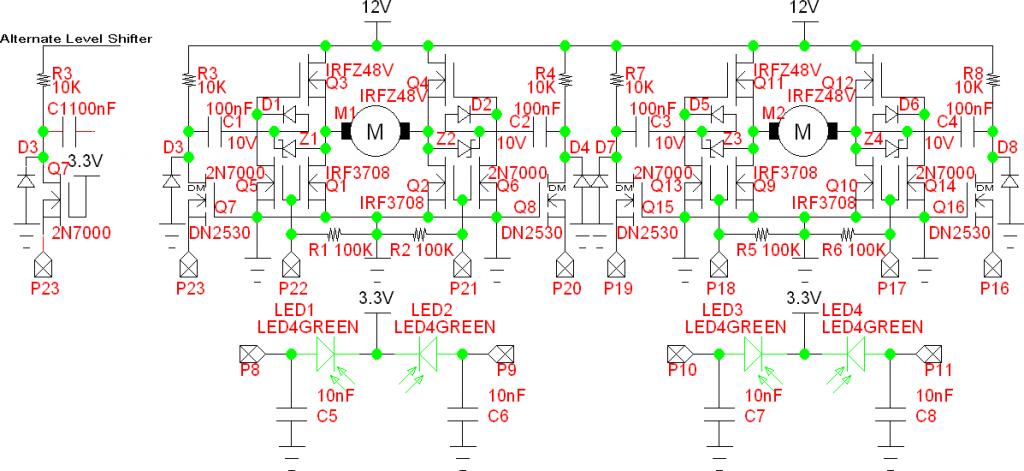
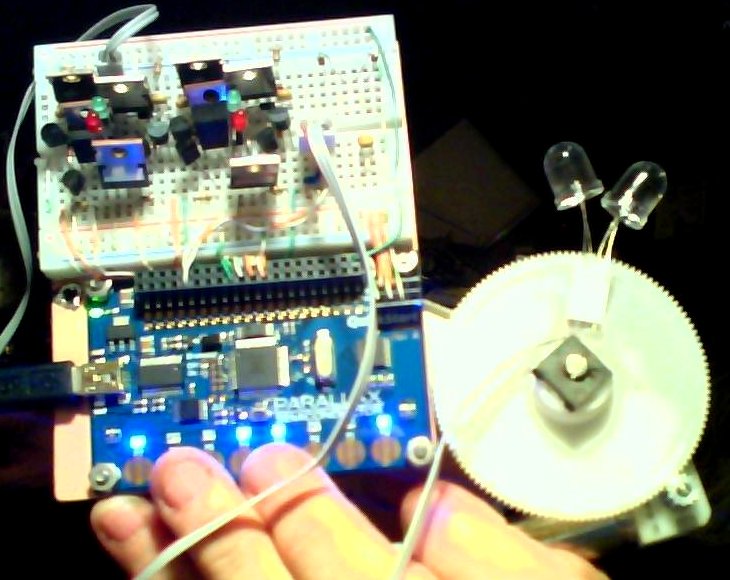
This driver starts out by setting up the NCOs to output 10KHz. Note this is a different method than what I posted earlier.
Anyway the GUI was needed to automate the operation of these H-Bridges.
The next step is to get the operation of the LED sensors incorporated in the GUI.
One more question. How can I get the GUI to "Auto Start" after a reset or power up?
Duane J
Here is the snippet example:
\ PropForth 5.00 with TeraTerm terminal on a QuickStart board.
fl
: do_something      c" do_something"      .cstr cr ;
: do_something_else c" do_something_else" .cstr cr ;
\ get_key ( -- c1 ) get a character
: get_key fkey? drop ; \ This works now.
\ test ( -- )  repeat forever until a clrl-C
: test begin
    get_key
    dup h41 - if else do_something      then \ "A"
    dup h61 - if else do_something      then \ "a"
    dup h42 - if else do_something_else then \ "B"
    dup h62 - if else do_something_else then \ "b"
    dup h03 - if else exit              then \ ctrl-C to drop out of the test word.
    drop 0 until ;
test
I'm trying to make a simple operating system or GUI.
I'm not sure how to ask the question?
What I want to do:
1. Run a continuous main loop that runs function words on each pass through the loop.
2. On each pass it checks to see if a key is pressed on the terminal input.
3. If a key is pressed the main loop diverts to process a function which then returns to the main loop.
I'm using ver.5.00 and TerraTerm on a QuickStart but should run on any flavor Prop that uses a terminal.
I apparently can't use key in the main loop because it hangs waiting for the key to be presses.
I suspect I'm supposed to using _fkey? or fkey? because these pass a t/f but I can't seem to make that work
I guess what I'm looking for are forth snippet examples of how to use these words.
fkey?
_fkey?
_wkeyto
clearkeys
and maybe others.
There are no examples in the docs for a novice programmer like me.
The GUI I envision will use ESC codes to display on the terminal.
When I get this going I'll post this in this message.
I really did have a project in mind that would use the tiny GUI.
First load my utility words on top of PropForth 5.00. (I assume these will work with later revissions of "5.xx" PropForth:
fl
decimal
\ --------------- words added to PropForth -----------------
\ fence ( -- )
: fence ;
0 wvariable baseold
\ binary ( -- ) switch to binary
: binary h2 base W! ;
\ .hex ( n -- ) emit a single hex digit
: .hex hF and d48 + dup d57 > if d7 + then emit ;
\ .x   ( n -- ) emit a single digit in the current base
: .x base W@ u/mod drop d48 + dup d57 > if d7 + then dup d93 > if d3 + then emit ;

\ Display formated number functions
\ .bn ( n1 n2 -- ) emit n1 as an n2 (1 to 32) place binary number
: .bn dup 0 do 2dup d32 swap - rev 1 i lshift and if ." 1" else ." 0" then loop 2drop ;
\ .dn ( n1 n2 -- ) emit n1 as an n2 place decimal number
: .dn dup >r 0 do   d10 u/mod loop drop r> 0 do .hex loop ;
\ .hn ( n1 n2 -- ) emit n1 as an n2 place hex number
: .hn dup >r 0 do   d16 u/mod loop drop r> 0 do .hex loop ;
\ .xn ( n1 n2 -- ) emit n1 as an n2 place number in the current base
: .xn dup >r 0 do base W@ u/mod loop drop r> 0 do .x loop ;

\ ------------------- ascii escape sequences ------------------
\ ascii escape sequences start with ESC
\ Clearly Plagerized from "prof_braino"
: esc     d27 emit ; \ ESCAPE
: csi esc d91 emit ; \ [
: capK       ." K" ; \ capital K
: smallm     ." m" ; \ small m
\ .digits ( n -- ." emit as decimal characters" ) for by the "at" command to convert 0-99 for emit
: .digits dup d9 > if d2 else 1 then .dn  ;
\ at ( column line -- ) put cursor at x y,  column line, from upper left corner
: at csi .digits ." ;" .digits ." f" ;
: home       csi ." 1;1f" ;
: clear      csi ." 2J"   ;
: preclear   csi ." 1J"   ;
: postclear  csi ." 0J"   ;
: cls home clear ;
: clear-eol  csi d0 .digits capK ;
: clear-bol  csi d1 .digits capK ;
: clear-line csi d2 .digits capK ;
\ attributes esc[d#;d#m  = csi d#;d#m
: atoff      csi d48 emit smallm ; \ 0 off
: bold       csi d49 emit smallm ; \ 1 bold
\ : faint    csi d50 emit smallm ; \ 2 faint ?
\ : italic   csi d51 emit smallm ; \ 3 italic ?
: underscore csi d52 emit smallm ; \ 4 underscore (mono) ?
\ : sblink   csi d53 emit smallm ; \ 5 slow blink PINK
\ : fblink   csi d54 emit smallm ; \ 6 fast blink
: reverse    csi d55 emit smallm ; \ 7 reverse
\ : conceal  csi d56 emit smallm ; \ 8 conceal ?
\ : crossout csi d57 emit smallm ; \ 9 crossed out ?
\ there are lots more...
\ ( n -- ) Curser movements
: cup        csi    .digits ." A" ; \ up
: cdown      csi    .digits ." B" ; \ down
: cforward   csi    .digits ." C" ; \ forward
: cback      csi    .digits ." D" ; \ backward
: csave      csi            ." s" ; \ save    position
: crestore   csi            ." u" ; \ restore position
\ ( -- ) graphics mode Color attributes Forground/Background
: black      csi d30 .digits smallm ;
: onblack    csi d40 .digits smallm ;
: red        csi d31 .digits smallm ;
: onred      csi d41 .digits smallm ;
: green      csi d32 .digits smallm ;
: ongreen    csi d42 .digits smallm ;
: yellow     csi d33 .digits smallm ;
: onyellow   csi d43 .digits smallm ;
: blue       csi d34 .digits smallm ;
: onblue     csi d44 .digits smallm ;
: magenta    csi d35 .digits smallm ;
: onmagenta  csi d45 .digits smallm ;
: cyan       csi d36 .digits smallm ;
: oncyan     csi d46 .digits smallm ;
: white      csi d37 .digits smallm ;
: onwhite    csi d47 .digits smallm ;
\ ----------------- end ascii escape sequences ----------------

\ .sx ( -- ) prints out the stack with a letter tag on the end Non-Destructivly
: .sx ." ST: " $C_stPtr COG@ 2+ dup $C_stTop < if $C_stTop swap - 0 do $C_stTop 2- i - COG@
  .long space loop else drop then ;            \ removed cr from end of the word st?
: .s0 .sx ." <0" cr ; : .s1 .sx ." <1" cr ; : .s2 .sx ." <2" cr ; : .s3 .sx ." <3" cr ;
: .s4 .sx ." <4" cr ; : .s5 .sx ." <5" cr ; : .s6 .sx ." <6" cr ; : .s7 .sx ." <7" cr ;
: .s8 .sx ." <8" cr ; : .s9 .sx ." <9" cr ; : .sA .sx ." <A" cr ; : .sB .sx ." <B" cr ;
: .sC .sx ." <C" cr ; : .sD .sx ." <D" cr ; : .sE .sx ." <E" cr ; : .sF .sx ." <F" cr ;
: .sG .sx ." <G" cr ; : .sH .sx ." <H" cr ; : .sI .sx ." <I" cr ; : .sJ .sx ." <J" cr ;
: .sK .sx ." <K" cr ; : .sL .sx ." <L" cr ; : .sM .sx ." <M" cr ; : .sN .sx ." <N" cr ;
: .sO .sx ." <O" cr ; : .sP .sx ." <P" cr ; : .sQ .sx ." <Q" cr ; : .sR .sx ." <R" cr ;
: .sS .sx ." <S" cr ; : .sT .sx ." <T" cr ; : .sU .sx ." <U" cr ; : .sV .sx ." <V" cr ;
: .sW .sx ." <W" cr ; : .sX .sx ." <X" cr ; : .sY .sx ." <Y" cr ; : .sZ .sx ." <Z" cr ;
\ -------------------------------------------------------------
\ .sd ( -- ) prints out the stack as 10 place decimal numbers Non-Destructivly
: .sd ." STD:" $C_stPtr COG@ 2+ dup $C_stTop < if $C_stTop
  swap - 0 do $C_stTop 2- i - COG@ d10 .dn space loop else drop then cr ;
\ .sh ( -- ) prints out the stack in hex Non-Destructivly
: .sh ." STH:" base W@ baseold W! hex .sx cr baseold W@ base W! ;

\ cb ( -- ) clear TeraTerm scroll buffer assuming TeraTerm is set to 512 lines
: cb d509 0 do cr loop bold blue 0 0 at clear ;

\ pins? ( -- ) samples the current status of all the io pins and prints them to the terminal
: pins?
  d32 0 do ."  "   i d2 .dn loop cr
  d32 0 do i px? if ."  HI" else ."  LO" then loop cr
  d32 0 do dira COG@ i rshift 1 and if ."  OT" else ."  IN" then loop cr ;
\ Alternate method
\ pins? ( -- ) samples the current status of all the io pins and prints them to the terminal
\ : pins?
\   d32 0 do ."  "   i d2 .dn loop cr
\   d32 0 do i px? if ."   ^" else ."   v" then loop cr
\   d32 0 do dira COG@ i rshift 1 and if ."   <" else ."   >" then loop cr ;

\ enablesteppers ( -- ) enable the stepper outputs and set to 0
: enablesteppers dira COG@ h000FF000 or dira COG!
  ina COG@ hFFF00FFF  and  h00000000 or outa COG! ;
\ stepaz  ( n -- ) n lowest 2 bits converted to 5 wire step code
: stepaz  b11 and 1 swap lshift h0001000 * ina COG@ hFFFF0FFF and or outa COG! ;
\ stepalt ( n -- ) n lowest 2 bits converted to 5 wire step code
: stepalt b11 and 1 swap lshift h0010000 * ina COG@ hFFF0FFFF and or outa COG! ;
\ fence ( -- )
: fence ;
\ -------------- end words added to PropForth -----------------
Then do this:
decimal
saveforth
Now load my Gui Demo for the H-Bridge:
fl
\ --- words added to PropForth for H-Bridge Driver And Solar Tracker ---
\ Reset sensor capacitor time for LED sensors
wvariable hbresettime
\ Motor Pulse Time
wvariable hbpulsetime
\ Tracker Flag
wvariable trackerflag
\ get_key ( -- c1 ) get a character from the serial port
: get_key fkey? drop ; \ This works now.
\ hbinit ( -- ) Initialize everything
: hbinit
    d17 pinlo d17 pinout d18 pinlo d18 pinout \ Setup the driver pins
    d16 pinlo d16 pinout d19 pinlo d19 pinout
    d21 pinlo d21 pinout d22 pinlo d22 pinout
    d20 pinlo d20 pinout d23 pinlo d23 pinout
    h1438_2610 h1F8 COG! h8_3126  h01FA COG!  \ Setup the NCO counters to output
    h1438_2E14 h1F9 COG! h8_3126  h01FB COG!  \  10KHz on Pins 16, 19, 20, 23
    d10 hbresettime W!
    d7  hbpulsetime W!
    d1  trackerflag W! \ 1 trackers On, 0 Trackers Off
    cb  \ clear TeraTerm Terminal Buffer
    cls \ clear TeraTerm Screen
    \ Setup the TeraTerm Terminal Display
    d1  d1 at red   c" Dual H-Bridge Driver & Solar Tracker, PropForth 5.00, TeraTerm Terminal" .cstr
    d1  d2 at blue  c" Q " .cstr green c" Left"        .cstr
    d15 d2 at blue  c" W " .cstr green c" Left Pulse"  .cstr
    d29 d2 at blue  c" E " .cstr green c" Break"       .cstr
    d43 d2 at blue  c" R " .cstr green c" Right Pulse" .cstr
    d57 d2 at blue  c" T " .cstr green c" Right"       .cstr
    d1  d3 at blue  c" A " .cstr green c" Up"          .cstr
    d15 d3 at blue  c" S " .cstr green c" Up Pulse"    .cstr
    d29 d3 at blue  c" D " .cstr green c" Break"       .cstr
    d43 d3 at blue  c" F " .cstr green c" Down Pulse"  .cstr
    d57 d3 at blue  c" G " .cstr green c" Down"        .cstr
    d1  d4 at blue  c" ctrl-C "   .cstr green c" Exit" .cstr
    d15 d4 at blue  c" X " .cstr green c" Tracker"     .cstr
    d1  d5 at green c" Last Command" .cstr
    d15 d5 at blue  c" Break L/R"    .cstr
    d29 d5 at blue  c" Break U/D"    .cstr
    d1  d6 at green c" Tracker"      .cstr
    d15 d6 at blue  trackerflag W@ if c" On " .cstr else  c" Off" .cstr then
    blue
    ;

\ ( -- ) All N-Channel MOSFET H-Bridge Driver Commands
: aoff   d16 pinin d19 pinin d17 pinlo  d18 pinlo  ; \ A Driver turn off all 4 MOSFETs
: aleft  d16 pinin d18 pinlo d17 pinhi  d19 pinout ; \ A Driver Move Left
: aright d19 pinin d17 pinlo d18 pinhi  d16 pinout ; \ A Driver Move Right
: abreak d17 pinlo d18 pinlo d16 pinout d19 pinout ; \ A Driver Break    Top 2 MOSFETs on
: boff   d20 pinin d23 pinin d21 pinlo  d22 pinlo  ; \ B Driver turn off all 4 MOSFETs
: bleft  d20 pinin d22 pinlo d21 pinhi  d23 pinout ; \ B Driver Move Up
: bright d23 pinin d21 pinlo d22 pinhi  d20 pinout ; \ B Driver Move Down
: bbreak d21 pinlo d22 pinlo d20 pinout d23 pinout ; \ B Driver Break    Top 2 MOSFETs on

\ tracker ( -- ) Toggle tracker flag
: tracker trackerflag W@ 1 xor trackerflag W!
    trackerflag W@ ;

\ hbreset ( -- ) Reset the LED Sensor Capacitors
: hbreset                d8 pinout d9 pinout d10 pinout d11 pinout
    hbresettime W@ delms d8 pinin  d9 pinin  d10 pinin  d11 pinin ;

\ hbaled ( -- n1 ) read A sensors on pins  8,  9
: hbaled d9  px? d2 and  d8 px? d1 and + ;

\ hbbled ( -- n1 ) read B sensors on pins 10, 11
: hbbled d11 px? d2 and d10 px? d1 and + ;

\ LED ( -- )
: LED trackerflag W@
    if
      hbreset
      1000 0 do
        hbaled
        dup d0 = if abreak then
        dup d1 = if aleft  then
        dup d2 = if aright then
            d3 = if abreak then
        hbbled
        dup d0 = if bbreak then
        dup d1 = if bleft  then
        dup d2 = if bright then
            d3 = if bbreak then
      loop
    then ;

\ repeat test loop forever ( unless interuped with a clrl-C )
: test
    hbinit \ initialize things
    begin
      LED
      get_key \ Get a key code and test see if it's in the table below.
      dup h51 - if else                                       \ "Q" Left  Continuous
                  aleft  d15 d5 at blue c" Left       " .cstr
                then
      dup h71 - if else                                       \ "q" Left  Continuous
                  aleft  d15 d5 at blue c" Left       " .cstr
                then
      dup h57 - if else                                       \ "W" Left  Pulse
                  aleft  hbpulsetime W@ delms
                  abreak d15 d5 at blue c" Left Pulse " .cstr
                then
      dup h77 - if else                                       \ "w" Left  Pulse
                  aleft  hbpulsetime W@ delms
                  abreak d15 d5 at blue c" Left Pulse " .cstr
                then
      dup h45 - if else                                       \ "E" Break Left Right
                  abreak d15 d5 at blue c" Break L/R  " .cstr
                then
      dup h65 - if else                                       \ "e" Break Left Right
                  abreak d15 d5 at blue c" Break L/R  " .cstr
                then
      dup h52 - if else                                       \ "R" Right Pulse
                  aright hbpulsetime W@ delms
                  abreak d15 d5 at blue c" Right Pulse" .cstr
                then
      dup h72 - if else                                       \ "r" Right Pulse
                  aright hbpulsetime W@ delms
                  abreak d15 d5 at blue c" Right Pulse" .cstr
                then
      dup h54 - if else                                       \ "T" Right Continuous
                  aright d15 d5 at blue c" Right      " .cstr
                then
      dup h74 - if else                                       \ "t" Right Continuous
                  aright d15 d5 at blue c" Right      " .cstr
                then
      dup h41 - if else                                       \ "A" Up    Continuous
                  bleft  d29 d5 at blue c" Up        "  .cstr
                then
      dup h61 - if else                                       \ "a" Up    Continuous
                  bleft  d29 d5 at blue c" Up        "  .cstr
                then
      dup h53 - if else                                       \ "S" Up    Pulse
                  bleft  hbpulsetime W@ delms
                  bbreak d29 d5 at blue c" Up Pulse  "  .cstr
                then
      dup h73 - if else                                       \ "s" Up    Pulse
                  bleft  hbpulsetime W@ delms
                  bbreak d29 d5 at blue c" Up Pulse  "  .cstr
                then
      dup h44 - if else                                       \ "D" Break Up Down
                  bbreak d29 d5 at blue c" Break U/D "  .cstr
                then
      dup h64 - if else                                       \ "d" Break Up Down
                  bbreak d29 d5 at blue c" Break U/D "  .cstr
                then
      dup h46 - if else                                       \ "F" Down  Pulse
                  bright hbpulsetime W@ delms
                  bbreak d29 d5 at blue c" Down Pulse"  .cstr
                then
      dup h66 - if else                                       \ "f" Down  Pulse
                  bright hbpulsetime W@ delms
                  bbreak d29 d5 at blue c" Down Pulse"  .cstr
                then
      dup h47 - if else                                       \ "G" Down  Continuous
                  bright d29 d5 at blue c" Down      "  .cstr
                then
      dup h67 - if else                                       \ "g" Down  Continuous
                  bright d29 d5 at blue c" Down      "  .cstr
                then
      dup h58 - if else                                       \ "X" Toggle Tracker
                  tracker d15 d6 at blue trackerflag W@
                  if     c" On " .cstr
                    else c" Off" .cstr
                  then
	        then
      dup h78 - if else                                       \ "x" Toggle Tracker
                  tracker d15 d6 at blue trackerflag W@
                  if     c" On " .cstr
                    else c" Off" .cstr
                  then
	        then
      dup h03 - if else  \ ctrl-C to exir
                blue d1 d12 at exit
	      then
      drop               \ drop the unused test character
    0 until ;            \ the 0 makes the loop go forever
                         \ ( unless interuped with a clrl-C )

\ ------ end words added to PropForth for H-Bridge Driver -----
And run it:
testThe H-Bridge schematic
This driver starts out by setting up the NCOs to output 10KHz. Note this is a different method than what I posted earlier.
Anyway the GUI was needed to automate the operation of these H-Bridges.
The next step is to get the operation of the LED sensors incorporated in the GUI.
One more question. How can I get the GUI to "Auto Start" after a reset or power up?
Duane J
Comments
Well I guess I've been told I don't know enough to help anybody yet, but this might be of interest to you
There is a PropForth word called term that has a feature that traps a CNTL-F to break out of a loop.
In order to monitor its input it simply uses key, not key? or otherwise fancy. The trick is that it duplicates key for one copy to be passed on and the other copy to be trapped for testing.
There are two version of this term word available.
The latest one is in the v5.03 Propforth tutorial 3.2. I suggest that is the better version though both use the dup key phrase in a loop to get throughput.
I think this could be adapted to do a lot of handy keyboard trapping. But it does put an extra cong in the line of communications. I suspect you are hanging up because you do not have dup involved... so you bottom out the stack.
However, this sounds like it needs to use key so it will hang until a terminal replay. That's not acceptable because the main loop processes will not be continuously serviced.
Duane J
I think you can do that, just write your new shell to do what you want and then if it doesn't get the special keys, it just goes to the main interpreter or loops forever. You're on the right track with the words you have called out. I don't have any snippets but we can figure them out.
Don't forget, you have those (up to) 6 other COGs sitting there waiting for work to do. Why not start the requested function in another COG and go back to your GUI loop looking for more work?
This sounds cool!
I ha some idle time coming up, I'll take a QuickStart with me and play!
As I see it, this could be done with a single forth word. Like this:
fl : do_something c" do_something" .cstr cr ; : do_something_else c" do_something_else" .cstr cr ; \ get_key ( -- c1 ) get a character although this hangs waiting for the key to be pressed. : get_key key ; \ I want it to return a 0 or nul character if no key was presse. \ repeat forever : test begin get_key dup h41 - if else do_something then \ "A" dup h61 - if else do_something then \ "a" dup h42 - if else do_something_else then \ "B" dup h62 - if else do_something_else then \ "b" drop 0 until ; testThat's a separate issue, I'd still need the key thing though.I would appreciate that.
Duane J
pfth has a program that works like FullDuplexSerial in Spin. It has an RXCHECK word that will return -1 if there is no received data, or it will return the next byte if one is available.
Or you could write your program in Spin.
\ PropForth 5.00 with TeraTerm terminal on a QuickStart board.
fl
: do_something      c" do_something"      .cstr cr ;
: do_something_else c" do_something_else" .cstr cr ;
\ get_key ( -- c1 ) get a character
: get_key fkey? drop ; \ This works now.
\ test ( -- )  repeat forever until a clrl-C
: test begin
    get_key
    dup h41 - if else do_something      then \ "A"
    dup h61 - if else do_something      then \ "a"
    dup h42 - if else do_something_else then \ "B"
    dup h62 - if else do_something_else then \ "b"
    dup h03 - if else exit              then \ ctrl-C to drop out of the test word.
    drop 0 until ;
test
The problem I had with fkey? before because what it was returning was confusing to me.Basically it returns 2 stack entries:
1, It pushes a character code onto the stack defaulted to d256 if no key is pushed.
2. It then pushes a true/false flag.
My solution was to drop the t/f flag and leave the character code which is tested in the main loop for things to do.
Thanks Dave for giving me the clue. I had tried fkey? before but I couldn't make it work.
Duane J
Good work!
I don't know if this will help or not but this is the only way I can code anything (I can't remember the words and stack effects half the time)
I copy all the .f files into one directory and then use this word index I created to look up words I need or am unsure about. The index has the stack effects correct in most cases (if they were documented consistently) and points to the places the word is defined if you need to go look it up and read some Forth.
Duane J
Another way to handle a bunch of options like you want is using an execution table. Look for execute in Pygmy forth for an example of the concept. We take the execution address of A-WORD with the TICK mark word
and save the address into and array.
Then we set up and enumeration evaluate for a bunch of actions, and jumpe to offset 0 for the first one, 1 for the next, etc (sorry no example, look in pygmy again)
The fkey? word it athe one you want I think, I does similar to key? but not the same, hence the different name. I use it to make an Abort on Escaope word in my test loops.
: onrest3 MyWord ;
Is how to define cog3 to start a word when it comes up.