

Corrections to my Zoom Meeting Comments on Spin Tools IDE (2026 JAN 14)
 JonnyMac
Posts: 9,852
JonnyMac
Posts: 9,852
During the Zoom meeting on the 14th I spoke about Spin Tools IDE. I will stand by the opinion that @macca has done a fantastic job with it, and I very much appreciate his willingness to listen to those of us who use it, and very frequently add features based on our suggestions. Thank you, Marco.
During my presentation I shared some struggles with the internal terminal. Of course, I had posted comments in the main Spin Tools IDE thread. Marco addressed those comments/questions within a day of me posting the problems, though it was after the Zoom call and my impromptu presentation.
The Spin Tools terminal has a PST mode, but does behave a bit differently (this turns our to be good). Let's start with the OG: Parallax Serial Terminal
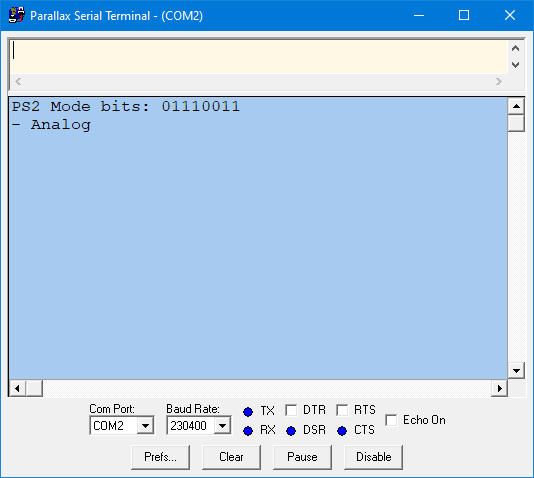
Note that at the top of the window, just under the title bar, there is an input field. In PST this is always present, and PST always takes a keypress and immediately sends it to the Propeller.
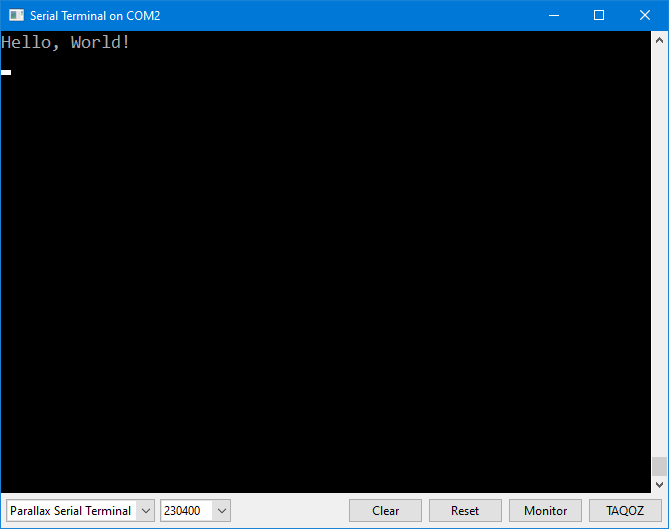
The terminal in Spin Tools has two modes: character input (like PST) and line input (the Schmarschmino terminal has this). Here is the Spin Tools terminal in CHARACTER mode.
And here it is in LINE mode.
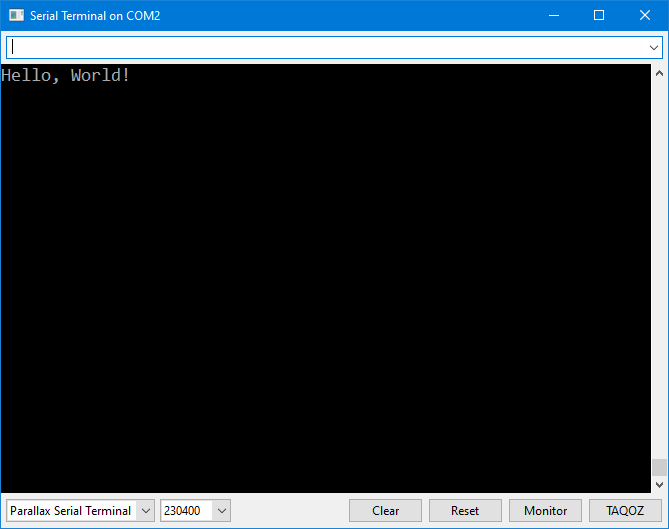
The differences are a little subtle, but there:
- Character input has a flashing cursor in the window, and no input field
- Line input has an input field (under the title) and the cursor is in the field, not on screen
When I told you about the situation I was facing I had been fooled by being in LINE mode because 20 years of using PST had conditioned me into thinking there should be an input box at the top of the terminal window. This was my mistake.
Another feature that exists -- but I didn't know about -- is that we can copy-and-paste text from the Spin Tools terminal window. When we drag-select text in the terminal nothing seems to happen. But, in fact, the terminal has copied that text into the clipboard and it can be pasted into another document. So, just select it -- Ctrl-C/Cmd-C is not needed.
I'm sorry for presenting a bit of erroneous information to the group yesterday, and am grateful for Marco setting me strait.
Please use the main Spin Tools IDE thread for any questions so that we can have a single place for information on this great tool. If you haven't tried Spin Tools, please do. It's very easy to setup on any OS, and it has all of the comforts -- plus a lot more -- that long-time Propeller Tool users came to enjoy. And; unlike Propeller Tool, Spin Tools is very actively updated so if you have a feature request and can articulate it clearly, you may just find that feature in a future update. That has certainly been true for me, and I appreciate Marco for it. Tools should help us be productive. Marco is a Propeller developer, too, so he understands when we ask for something that can help us and others.
Here's the Spin Tools thread:
-- https://forums.parallax.com/discussion/174436/spin-tools-ide#latest