

Pushing CRT Monitors from the '00's era
 potatohead
Posts: 10,267
potatohead
Posts: 10,267
A recent thread made me realize some of my recent activity might be of general interest here.
Basically, I have built up a modest PC with an older nVidia GPU for a general purpose dev station. I have some projects coming up that could take me back into P2 land, and anyone here who knows me knows I am as excited as all get out about that happening!!
People are paying large amounts of money for exotic CRT displays capable of higher resolutions at higher refresh rates. They are also paying for Trinitron display tubes too.
I wondered just what an ordinary to mid-scale display from the late 90's through late 00's is capable of. After some tinkering around, it turns out those displays can do a lot more than I expected!
I am typing this on a 1920x1442i @ 70Hz display forming the left side of my Windows Desktop, and another display running 1600x1442i @70Hz for the right side. Both could be running the 1920, it's just the display on the right doesn't have quite the fine detail needed to make 1920 great. The display will do it, but there is fatigue. That all comes down to a couple things: One is the phosphor pitch and the other is how well tuned the circuit inside the CRT is. I have found quite a few displays are not focused properly, and I found that out when I got one that was!! (The one I am typing this on BTW)
Why Interlaced video?
The most basic reason is an interlaced signal makes very high resolutions possible on displays that normally function at 1024x768 or maybe 1280x1024. The displays I have done this with basically top out at those resolutions. One can get higher ones to sync, but it's obvious the display is working hard to run near it's maximums too.
The interlaced signal centers the signal sweep rates much closer to the middle of the range and seem to display nicely without too much fiddling with the screen size and position controls.
After running one for a while, I find higher resolution interlace mostly gets out of the way and I don't see it, except for the occasional fine line or pattern hitting the signal grid exactly. That flicker is seen easily, and it's at half the overall refresh rate being supplied too. And while a 70Hz display = 35Hz flicker and that is a lot better than the usual 50/60Hz and 25/30Hz flicker, the fact is for some people the flicker is not OK. I, for the most part, am one of those people and am surprised at my overall low reaction to it happening at higher resolutions. I've not really experienced this before.
I was also inspired by reading this:
https://www.linuxdoc.org/HOWTO/XFree86-Video-Timings-HOWTO/inter.html
Driving higher resolutions to more fully utilize the CRT does require the very expensive circuits. Doing it as an interlaced display definitely does not. I got the favorable outcomes mentioned there.
So, how does it work?
For windows:
I find you need a program that can edit the EDID info Windows either collects from your CRT display, or it supplies some generic info. That body of information is where display resolutions, whether they are native or recommended, and refresh rates are all stored.
You can get such a program here: https://customresolutionutility.net/
And you need to access the display configuration tools:
On older hardware, you use the vendor supplied graphics configuration tools. nVidia Control Panel, ATI something or other, Intel Display something or other...
On newer hardware, you may just get the Windows tools. Settings, Display...
And that's it for dependencies.
Finally, you need to know your display timing limits and have some idea on how to arrive at reasonable timing.
What I did was use the existing resolutions as a guide. The basic idea is to convert one of those to be interlaced so the whole process is vetted. You know before you start tweaking that an interlaced display is possible.
The article above gives an X Window System mode line for 1024x768 display interlaced.
You may have luck with the vendor tools too: nVidia custom resolutions tools on older driver sets will create interlaced timings for you and you can test them with a few second fall back if it does not work out.
I also prefer to setup two displays so I have one working and can be testing the other one.
Now that I have the timings I want, it is pretty easy to load CRU onto a machine, hook the CRT up, and then paste those timings into the CRT display entry, restart graphics drivers and see whether it works.
For now, I'm attaching display timing data for a Princeton Ultra 72 display that runs this resolution amazingly well.
Later, this evening when I have some time, I will also post a how to with more detail for anyone intereted.
In the zip file attached, you will find a test card that has patterns that will show artifact colors and or flicker on some displays depending on their dot pitch and phosphor color pattern. That test card shows vivid artifact colors on my Plasma TV, for example. They don't line up nice and neat like 8 bit computer artifacts to, but they are still a thing apparently. You can use this, viewed at 100 percent in your favorite viewer to verify you have an actual interlaced display and not some goofy thing mapped to a lower resolution.
The rest of the zip files contain items you can import, or run to set the resolutions you want. And you can see the displays I tried.
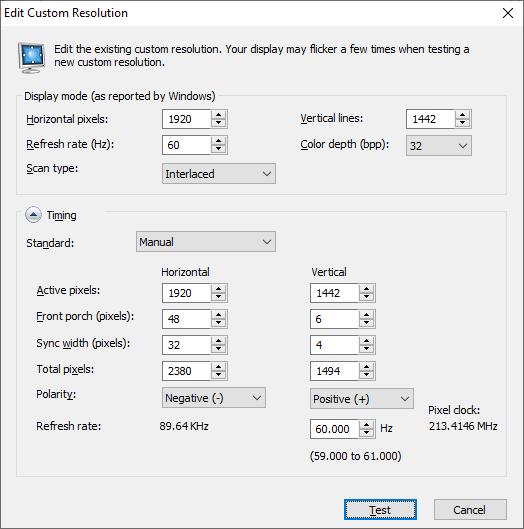
The picture below is from the nVidia custom resolution tool.
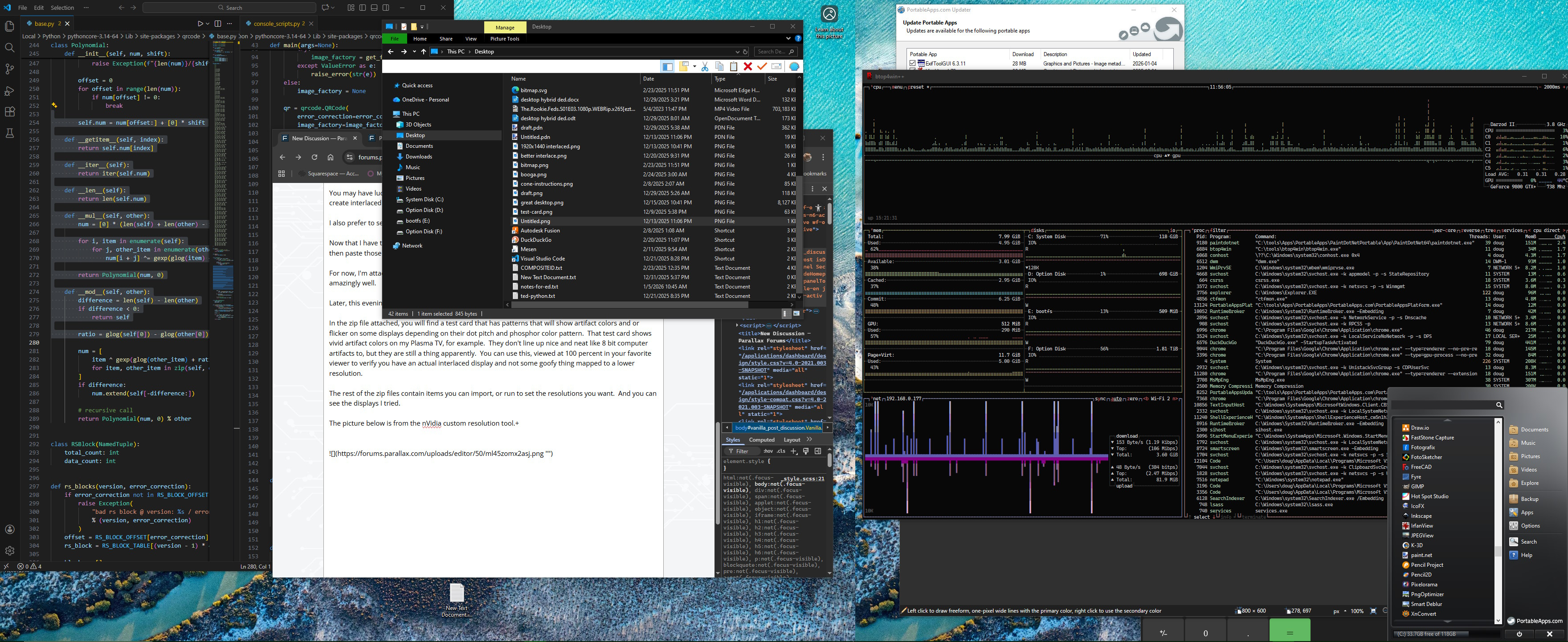
The other picture is the desktop from this machine running two CRT displays.

Comments
The other fun thing is pushing the VSync rate. I have a monitor that can run 960x720p120, 720x540p160 or 640x480p160, that's really smooth. High Vsync also raises the resolution needed to meet the min. HSync rate. So e.g. 320x240p120 is generally possible (and results in eye-searingly sharp scanlines)
Ooh! I have not taken things that direction. I have a flat panel here that runs at 144Hz. I am for sure going to drive a CRT at that or close to and compare.
I have been away for a time. Saw your P2 page and took a minute to catch up on your emulation antics. You have done a LOT OF GREAT WORK I am super excited to catch up on.
Welcome back!
So, yeah went a lot of places and did a lot of things.
Emulators have really been popular and have basically driven the whole platform forwards (3rd party boards being made, HDMI audio encoding, better USB driver)
The thing being currently vaguely worked on (that isn't listed in my forum signature) is a 3D rendering engine: https://forums.parallax.com/discussion/176083/3d-teapot-demo/p1
Good to know. I just looked on eBay and saw a Sony G520 (which I have) advertised for decent money and probably more than I paid for back in 2005 (second hand from a mate who'd only had it for a year). It's huge to keep around on the desk but I'm loathed to ever part with it.
They certainly can.
Still hard to beat a good CRT for PC gaming if the refresh rate is all dialled in with the video card's output and no tearing and other ugly video artefacts happens. I remember back in the day when I once finally had everything setup just right with a high speed machine and a great monitor and playing some game (maybe Q3Arena?) at really high FPS (100Hz+) with decent resolution and it was all awesome. Silky smooth motion and sharp images with really rapid screen updates in the game as you moved (screen felt directly locked to the input controls) and no noticeable lag or low frame rate induced nausea like I used to otherwise get sometimes after like 20mins of PC gaming. I still remember feeling at the time that it just was so awesome to be finally running on such a tuned setup but unfortunately this was quite a brief window in time of real game playability over my lifetime. After that the LCDs took over and it was never the same - though I've been out of the gaming scene for a while. Hopefully the higher speed OLEDs might have improved things somewhat since, but the analog CRTs are still great.
Don't forget it was Roger's G520 that you can thank for fixing the PLL wobbles in between P2 Rev A and Rev B silicon. Running at 2000x1500 you could spatially see what was going on,
Yup, I remember that well. Great timing of events. Had this been missed...
That was the combination I loved. Running 800x600 or 1024x768 @100Hz plus was flat out amazing! Those resolutions and rates still are. I did run Q3A on a huge SONY TV once. It was one of the big WEGA ones nobody moves once placed. That was an interlaced display, and I do not recall it being a problem. It was intense, lights out or dimmed, huge screen, rapid movement. Some onlookers got nausea watching game play in that environment.
I have a bit of poor news:
nVidia devices, perhaps not the very newest ones, all seem capable of a display like this. If they lack analog, the little HDMI to VGA devices seem to work. The cheap-o ones I have do.
I can get older ATI cards there too, but they nuked this capability some time back.
Intel is a mixed bag. Older onboard systems that had some sort of analog output might work, but newer systems don't.
So, this is classic gaming and computing only it seems. Shame, I was going to leave a nice CRT on my work desktop for a while, just because I enjoy the display. It compares favorably to a flat panel I have that will do 2560x1440 at something like 140Hz. The CRT at 70'ish actually is a lot less distracting than the panel is at that refresh rate. I did not expect that.
Given these constraints, I'm likely to keep one system around with one of the best displays and use it for watching movies, testing various driver / development related ideas / components and that's probably it.
I think we missed the boat in the 00's on this however. More than a few people could have been using a considerably more roomy desktop than they ended up using.