

Suggestions for a serial port reader
 cwyuzik
Posts: 17
cwyuzik
Posts: 17
in Propeller 1
I was hoping to utilize a utility that JonnyMac was kind enough to provide here, that reads the upper portions of a 512K bit eeprom he configured called the p1-eeprom-explorer. As it seems the PST itself won't display the memory location values but a different serial program will. Here is a repost of of a screen capture of it:
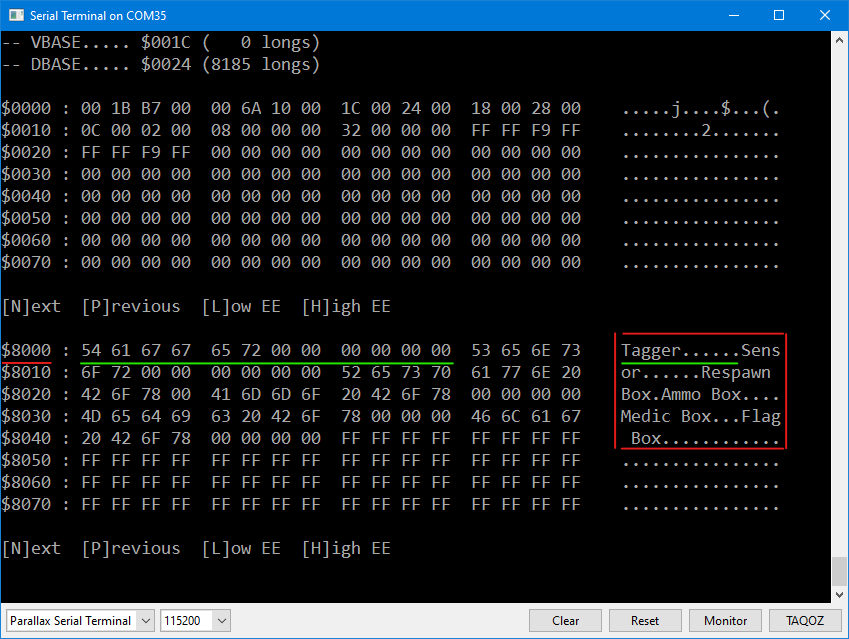
As you can see this is not the Parallax Serial Terminal but at the bottom it seems to be set to it. I'm using tool Version 2.9.3 on a win10 box.
Comments
That screencap is from the internal terminal of Spin Tools (by @macca). In fact, in the latest version (0.53.1) Marco fixed a little gotcha with the terminal that caused a problem with my menu display. I have updated the program as of today to let me modify portions of the EEPROM as required. Latest is here: https://forums.parallax.com/discussion/178021/p1-eeprom-explorer-updated-26-feb-2026#latest
PTS, and the internal terminals of Spin Tools and FlexProp are just that: terminals; they display what you tell them to display. In my little explorer program I use my EEPROM library to read the contents of the P1 EEPROM so that I can display it. Here's the latest version of my EE Explorer program using PST as a terminal:
As you can see, PST will display high EE memory, too. Press [H] to go to address $8000 (start of high memory). Of course, in the beginning you have to tell the program you have a 64K EEPROM.
Hey Jon, thanks for this. Being a noob at serial communications I thought I might be using the wrong terminal program but now since your post here I was able to track it down. I use the prop tool on a virtual machine running windows hosted on a linux box and found the host was restricting communications on the USB port.
You're welcome.
If you want a native Linux app for Propeller development have a look at Spin Tools (the first post in this thread is the terminal from Spin Tools); it runs on Linux, Mac, and Windows. During the development of my EEPROM Explorer I found a little gotcha in the Spin Tools terminal, but Marco fixed that right away. It's a nice tool that is actively developed (Propeller Tool development stopped many years ago) by a guy who is a Propeller user/developer, too.
Here's a link to the software:
-- https://maccasoft.com/en/spin-tools-ide/
Here's a link to the main forums thread for Spin Tools. If you read through it you'll see that Marco is really great about considering and implementing user suggestions. This is why Spin Tools is so nice.
-- https://forums.parallax.com/discussion/174436/spin-tools-ide#latest
Loadp2 is also effective running from a generic shell/console with scrollback. eg: Bash. You get a running history of operation, including compiles, then. Eric maintains it, along with Flexspin and Flexprop - https://github.com/totalspectrum